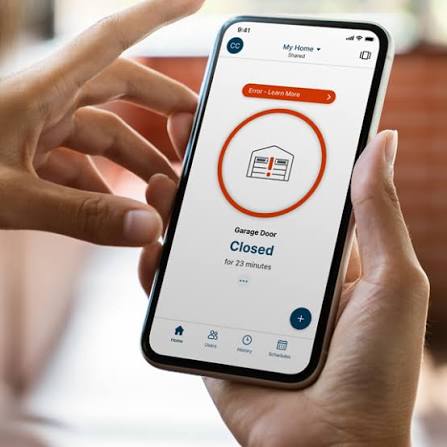
Have you ever pulled into your driveway only to realize you left your garage door wide open? Or perhaps you’re lying in bed, suddenly worried that you forgot to secure your home before leaving for work. These are common anxieties for homeowners, but technology has offered a sleek solution. If you are asking yourself, “can you open and close garage door with MyQ app,” the answer is a resounding yes. This smart technology allows you to monitor and control your garage from anywhere in the world, providing peace of mind and enhanced security for your household.
How the MyQ App Connects to Your Garage Door
To understand how this technology works, it helps to look at the underlying infrastructure. The MyQ system is developed by Chamberlain Group, a leading manufacturer of garage door openers. The system relies on a small hardware device called the MyQ Smart Garage Hub. This hub connects to your existing garage door opener via a simple wired connection and then links to your home’s Wi-Fi network.
Once the hub is online, it communicates with the MyQ app installed on your smartphone or tablet. When you tap “Close” in the app, a signal is sent through the internet to the hub, which then triggers the motor on your garage door opener. This entire process usually takes less than five seconds, depending on your internet connection speed.
The beauty of this system lies in its compatibility. It works with most major brands of garage door openers manufactured after 1993, including Chamberlain, LiftMaster, Craftsman, and even some older models from other manufacturers. For a deeper understanding of how wireless communication protocols function in smart home devices, you can refer to general technical resources such as Wikipedia’s page on Home Automation.
Step-by-Step Guide: Setting Up Remote Access
If you have purchased the hardware and are ready to start using the app, follow these concrete steps to ensure a smooth installation. Proper setup is crucial for answering the question of can you open and close garage door with MyQ app effectively.
- Install the MyQ Hub: Locate your garage door opener motor unit. Plug the MyQ Hub into a power outlet nearby. Use the provided wires to connect the hub to the “Smart Terminal” or the push-button terminals on your opener. Ensure the wires are securely attached to avoid signal loss.
- Download the App: Go to the Apple App Store or Google Play Store and download the official MyQ app. Create an account using your email address and a strong password.
- Connect to Wi-Fi: Open the app and follow the on-screen instructions to add a new device. The app will search for the MyQ Hub. Once found, you will need to enter your home Wi-Fi credentials. Note: Ensure your garage has a strong Wi-Fi signal. If the signal is weak, consider using a Wi-Fi extender.
- Name Your Device: Give your garage door a recognizable name, such as “Main Garage” or “Side Entry.” This is helpful if you have multiple doors.
- Test the Connection: Stand near the garage door and use the app to open and close it. Listen for the motor to engage and watch the door move smoothly.
Troubleshooting Common Connectivity Issues
Even with the best technology, users occasionally face hiccups. If you find that the app says “Offline” or the door doesn’t respond, don’t panic. Here are the most common issues and how to fix them.
Weak Wi-Fi Signal
Garages are often located at the edge of a home’s Wi-Fi range. Walls, metal insulation, and large appliances can block signals.
- Solution: Check the signal strength in the MyQ app settings. If it is low, install a Wi-Fi range extender closer to the garage.
Power Outages
If your home loses power, the MyQ Hub will go offline unless it has a backup battery.
- Solution: Consider purchasing a MyQ Backup Battery Unit. This ensures you can still operate your door during short power outages.
App Glitches
Sometimes the issue isn’t the hardware but the software.
- Solution: Force close the app and reopen it. If that fails, check for updates in your app store. Restarting your phone can also clear temporary cache issues.
MyQ App Features: Beyond Basic Open/Close
While the primary function is opening and closing the door, the MyQ ecosystem offers several features that enhance user experience and security. Understanding these can help you get the most out of your investment.
| Feature | Description | Benefit |
|---|---|---|
| Real-Time Alerts | Sends notifications when the door opens or closes. | Know immediately if someone enters or leaves. |
| Scheduling | Set specific times for the door to close automatically. | Prevents forgetting to close the door at night. |
| Guest Access | Share access with family members or service providers. | No need to share physical remotes or codes. |
| Voice Control | Integrates with Amazon Alexa and Google Assistant. | Hands-free operation while carrying groceries. |
The Importance of Scheduling
One of the most underutilized features is the scheduling tool. You can set your garage door to close automatically at 10:00 PM every night. This eliminates the mental load of remembering to check the door before bed. For families with teenagers, this feature ensures that the garage is secure even if they forget to close it after coming home from school.
Security Considerations for Smart Garages
When adopting any smart home technology, security is a paramount concern. Users often ask, “Is it safe to let an app control my garage?” The MyQ system uses bank-level encryption to protect your data. However, there are best practices you should follow to maintain high security standards.
- Use Two-Factor Authentication (2FA): Enable 2FA in the MyQ app settings. This adds an extra layer of protection by requiring a code sent to your phone whenever you log in from a new device.
- Update Regularly: Keep both the MyQ app and your router’s firmware up to date. Manufacturers frequently release patches to fix potential vulnerabilities.
- Monitor Activity Logs: The app keeps a history of who opened and closed the door and when. Review this log periodically to spot any unusual activity.
It is also worth noting that while the app provides convenience, it should not replace physical security measures. Always ensure your garage door locks are functioning correctly and consider adding a secondary lock for added peace of mind.
Frequently Asked Questions (FAQ)
1. Does the MyQ app work without Wi-Fi?
No, the MyQ app requires an active internet connection to communicate with the hub. If your Wi-Fi goes down, you cannot use the app to control the door. However, you can still use your physical remote control or wall button, as these operate on radio frequencies independent of the internet.
2. Can I use MyQ with any garage door opener?
The MyQ Hub is compatible with most garage door openers manufactured after 1993. It works with Chamberlain, LiftMaster, Craftsman, and many other brands. However, it is always recommended to check the compatibility list on the Chamberlain website before purchasing to ensure your specific model is supported.
3. Is there a monthly fee for using the MyQ app?
Basic features, such as opening and closing the door and receiving alerts, are free. However, Chamberlain offers a premium subscription called “MyQ Premium” which includes advanced features like video verification (if you have a MyQ Camera) and extended activity history. For most users, the free version is sufficient.
4. What happens if my phone dies?
If your phone battery dies, you will not be able to use the app. This is why it is essential to keep your physical remote control in your car or on your keychain as a backup. The MyQ app is a convenience tool, not a replacement for traditional access methods.
5. Can multiple people use the same MyQ account?
Yes, you can invite family members to join your MyQ household. Each person downloads the app and creates their own login, but they are granted access to your garage door. This allows you to track who is entering and exiting the garage individually.
Conclusion
So, can you open and close garage door with MyQ app? Absolutely. It is a reliable, secure, and convenient way to manage your home’s entry point. From preventing accidental open doors to granting temporary access to dog walkers, the benefits extend far beyond simple convenience.
By following the setup steps and adhering to security best practices, you can enjoy seamless control over your garage. Whether you are a tech-savvy enthusiast or a beginner looking to simplify your daily routine, the MyQ app offers a robust solution.
If you found this guide helpful, please share it with your friends and family on social media. Helping others discover the ease of smart home technology can make their lives safer and more efficient too!
Leave a Reply