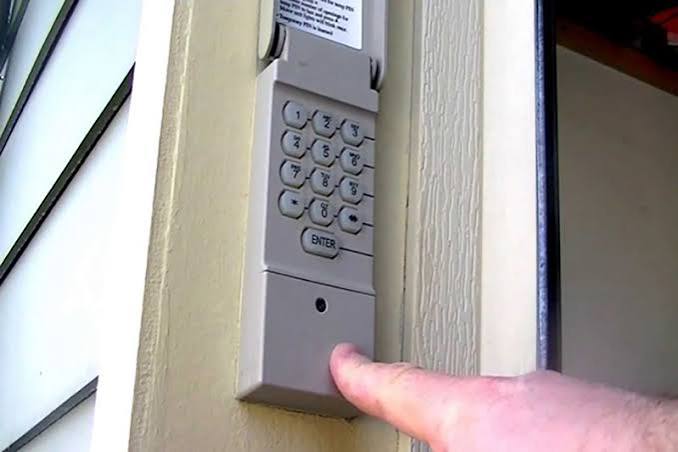
Have you ever fumbled for your remote in the rain or locked yourself out of the garage? You’re not alone. Many homeowners ask, “Can you add a keypad to any garage door opener?” The short answer is: most modern openers support keypads, but compatibility depends on your system’s age, brand, and technology. In this guide, we’ll break down everything you need to know—from checking compatibility to installing your new keypad like a pro.
Understanding Garage Door Opener Compatibility
Before rushing to buy a keypad, it’s crucial to determine whether your garage door opener can support one. Not all systems are created equal, and understanding the technical requirements will save you time and money.
How Do I Know If My Garage Door Opener Supports a Keypad?
Most garage door openers manufactured after 2005 come with built-in support for wireless keypads. Here’s how to check:
- Look for a “Learn” or “Smart” button on your opener motor unit (usually located on the back or side). This button allows you to program additional accessories like keypads.
- Check your owner’s manual for a section on “accessories” or “wireless controls.”
- Identify your opener’s brand and model number, then visit the manufacturer’s website for compatibility lists.
If your opener is older than 20 years, it may use outdated radio frequencies (like 315 MHz or 390 MHz) that aren’t compatible with modern keypads operating at 433 MHz or higher. In such cases, you might need to upgrade your entire opener system.
Are All Keypads Universal?
No, keypads are not universally compatible. While some third-party universal keypads claim to work with multiple brands, they often have limitations. Major brands like Chamberlain, LiftMaster, Genie, and Craftsman typically require brand-specific keypads for optimal performance.
| Brand | Recommended Keypad Type | Compatibility Notes |
|---|---|---|
| Chamberlain/LiftMaster | Model 877LM or 878LM | Works with most models post-2005 |
| Genie | Model GKRWC or GKRWI | Compatible with Intellicode systems |
| Craftsman | Model 139.53636SRT | Requires Sears-compatible units |
| Older/Open-Source | Universal 433 MHz keypads | May require additional receiver |
According to Wikipedia’s entry on garage door openers, modern systems use rolling code technology for enhanced security, which means older fixed-code keypads won’t work with newer openers.
Step-by-Step Guide: How to Add a Keypad to Your Garage Door Opener
Installing a keypad is generally straightforward, but following the correct steps ensures proper functionality and security.
What Tools Do I Need?
- Screwdriver (Phillips head)
- Ladder (if mounting high)
- Drill and bits (for masonry or wood surfaces)
- Batteries (usually AA or 9V, depending on model)
- Wireless keypad kit
Installation Steps
- Choose a Mounting Location: Pick a spot near your garage entrance, ideally 4–5 feet off the ground for easy access. Ensure it’s within 20–30 feet of the opener motor for reliable signal strength.
- Insert Batteries: Open the keypad compartment and insert fresh batteries. Most keypads use 2 AA batteries or a single 9V battery.
- Program the Keypad:
- Press the “Learn” button on your garage door opener motor unit. The LED light will blink or turn solid.
- Within 30 seconds, enter your desired 4–6 digit PIN on the keypad and press “Enter” or “Send.”
- The opener’s light should flash or beep, confirming successful programming.
- Test the Keypad: Enter your PIN and press “Enter.” The garage door should activate. Test it multiple times to ensure consistency.
- Secure the Keypad: Use screws or adhesive mounts to attach the keypad to your chosen location. Make sure it’s weatherproof if installed outdoors.
Pro Tip: If your keypad doesn’t respond, double-check the battery orientation and ensure you’re within range. Some openers require you to hold the “Learn” button longer—consult your manual for specifics.
Benefits of Adding a Keypad to Your Garage Door
Why bother with a keypad when you already have a remote? Here are compelling reasons:
- Convenience: No more searching for remotes or worrying about dead batteries in your car.
- Security: You can share temporary codes with guests, delivery personnel, or service providers without giving them full access.
- Backup Access: If your remote breaks or gets lost, the keypad serves as a reliable alternative.
- Smart Home Integration: Many modern keypads connect to Wi-Fi-enabled openers, allowing you to monitor access via smartphone apps.
A study by the National Association of Home Builders found that homes with smart garage access features sell 10% faster than those without, highlighting the growing demand for convenient entry solutions.
Common Issues and Troubleshooting Tips
Even with proper installation, you might encounter occasional hiccups. Here’s how to address them:
Keypad Not Responding?
- Replace the batteries: Weak batteries are the most common culprit.
- Reprogram the keypad: Clear existing codes and re-enter your PIN.
- Check signal interference: Metal objects, thick walls, or other electronic devices can block signals.
Forgotten Your PIN?
Most keypads allow you to reset the PIN by holding down specific buttons (e.g., “*” and “#”) for 5–10 seconds. Refer to your manual for exact instructions.
Weather Damage?
Ensure your keypad has an IP65 rating or higher for outdoor use. If water gets inside, dry it thoroughly and replace batteries before retesting.
FAQ Section
Can I add a keypad to an old garage door opener?
It depends. If your opener is pre-2005 and uses fixed-code technology, it may not support modern rolling-code keypads. In such cases, consider upgrading to a newer opener or using a universal receiver kit.
Do I need professional help to install a keypad?
No, most keypads are designed for DIY installation. However, if you’re uncomfortable working with electrical components or climbing ladders, hiring a professional is a safe option.
How many users can share one keypad?
Most keypads allow 1–4 unique PINs, making them ideal for families or small households. Some advanced models support up to 10 codes.
Are wireless keypads secure?
Yes, modern keypads use rolling code encryption, which changes the signal with each use, preventing hackers from intercepting and replaying codes. Avoid sharing your PIN publicly.
Can I connect a keypad to a smart garage door opener?
Absolutely! Many smart openers from brands like Chamberlain MyQ and Genie Aladdin Connect offer keypad compatibility along with app-based control, voice assistant integration, and real-time notifications.
How long do keypad batteries last?
Typically 1–2 years, depending on usage frequency. Opt for lithium batteries for longer life and better performance in extreme temperatures.
Conclusion
So, can you add a keypad to any garage door opener? For most modern systems, the answer is a resounding yes. By checking compatibility, choosing the right keypad, and following simple installation steps, you can enjoy added convenience, security, and peace of mind. Whether you’re tired of losing remotes or want to grant temporary access to visitors, a keypad is a smart upgrade worth considering.
Ready to take the plunge? Share this guide with friends who might benefit from a smarter garage setup, and don’t forget to comment below with your own installation experiences!
Leave a Reply