Introduction
We have all been there: you pull into your driveway during a heavy rainstorm, only to realize you left your handheld garage remote inside the house. It is a frustrating inconvenience that disrupts the comfort and security of your home entry. Knowing how to set your garage door opener in your car eliminates this hassle, turning your vehicle into a seamless key to your home. In this guide, we will walk you through the process clearly and safely, ensuring you get back to enjoying the convenience of modern automotive technology.
Why Program Your Garage Door Opener to Your Car?
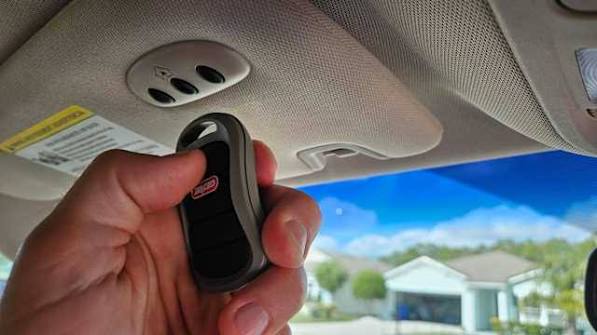
Before diving into the technical steps, it is worth understanding why this feature is a game-changer for many drivers. Integrated garage door openers, such as HomeLink or Car2U, are built directly into your vehicle’s rearview mirror or overhead console.
The Benefits of Integration
- Convenience: No more digging through bags or sun visors for a separate remote.
- Security: Fewer loose remotes mean fewer chances of losing them or having them stolen.
- Aesthetics: Keeps your car interior clutter-free.
- Compatibility: Most modern systems work with 90% of garage door openers manufactured after 1995.
According to industry data, over 60 million vehicles on the road today are equipped with some form of integrated garage door opener system. Yet, a significant portion of owners never activate it due to perceived complexity. Let’s debunk that myth.
Identifying Your System: HomeLink vs. Car2U vs. Aftermarket
The first step in learning how to set your garage door opener in your car is identifying which system your vehicle uses. The two most common factory-installed systems are HomeLink and Car2U. There are also aftermarket solutions if your car did not come with one pre-installed.
| Feature | HomeLink | Car2U | Aftermarket (e.g., GTO) |
|---|---|---|---|
| Prevalence | Very Common (Ford, Toyota, Honda, etc.) | Common (GM, Chrysler, Jeep) | Universal Fit |
| Buttons | Usually 3 buttons | Usually 3-4 buttons | Varies |
| Complexity | Low to Medium | Medium | High |
| Rolling Code? | Yes (Modern versions) | Yes | Depends on model |
Note: If you are unsure, check your owner’s manual. It will specify whether you have HomeLink, Car2U, or another proprietary system like Mercedes’ Homelink or BMW’s Universal Remote.
Step-by-Step: How to Set Your Garage Door Opener in Your Car
While every car manufacturer has slight variations, the core logic remains similar. Below is the universal method that works for most HomeLink and Car2U systems.
Step 1: Clear Previous Codes (If Necessary)
If you are reprogramming a button or bought a used car, you must clear the memory first.
- Press and hold the two outer buttons on your car’s overhead console.
- Hold them for about 10–20 seconds until the indicator light begins to flash rapidly.
- Release the buttons. The memory is now cleared.
Step 2: Position Your Vehicle
Park your car outside the garage, facing the door. Ensure you are within range (usually 10–20 feet). Keep the engine running or the ignition in the “On” position to prevent battery drain during programming.
Step 3: Initiate Learning Mode on the Car
- Choose the button you want to program (e.g., Button 1).
- Press and hold this button.
- Simultaneously, press and hold the button on your original handheld garage remote.
- Keep both held down until the car’s indicator light changes from a slow blink to a rapid flash. This usually takes 10–30 seconds.
- Release both buttons.
Step 4: Program the Garage Door Motor Unit
This is the critical step where the car communicates with the garage door opener motor. Most modern openers use rolling codes for security, which requires an extra step at the motor unit itself.
- Locate the “Learn” or “Smart” button on your garage door opener motor (hanging from the ceiling). It is often colored yellow, purple, or red.
- Press and release the “Learn” button. You typically have 30 seconds to complete the next step.
- Return to your car and press the programmed button (Button 1) three times.
- Watch the garage door. If it moves, the programming is successful.
Expert Tip: If the door does not move, repeat Step 4. Sometimes, the signal strength needs a second attempt to sync the rolling code encryption.
Troubleshooting Common Issues
Even with careful following, things can go wrong. Here are solutions to the most frequent problems users face when trying to figure out how to set your garage door opener in your car.
Issue 1: The Light Flashes but the Door Doesn’t Move
This usually indicates a compatibility issue with older “fixed code” openers or a weak signal.
- Solution: Try moving closer to the garage door. If that fails, you may need a compatibility bridge or repeater kit, which acts as a translator between your car and older garage motors.
Issue 2: The “Learn” Button Times Out
Garage door openers have a short window (often 30 seconds) to accept a new remote.
- Solution: Have a helper stand by the motor unit to press the “Learn” button while you stay in the car. Coordination is key.
Issue 3: Interference from LED Bulbs
Surprisingly, certain LED light bulbs in garage door openers can emit radio frequency interference that blocks signals from HomeLink or Car2U systems.
- Solution: Temporarily replace the LED bulb with an incandescent bulb during programming. If it works, switch to a “garage door compatible” LED bulb later. For more technical details on radio frequency interference, you can refer to general standards on Wikipedia.
Security Considerations: Rolling Codes Explained
When you learn how to set your garage door opener in your car, you are dealing with security protocols. Older openers used “fixed codes,” which were easy for thieves to intercept and replicate.
Modern systems use rolling codes (also known as hopping codes). Each time you press the button, the code changes. The car and the garage motor share an algorithm that predicts the next valid code. This is why the synchronization step at the motor unit (Step 4 above) is mandatory for most post-1995 openers. Never skip this step, or your car will send a code the garage doesn’t recognize.
FAQ: Common Questions About Car Garage Openers
1. Can I program multiple garage doors to one car?
Yes. Most systems like HomeLink have three distinct buttons. You can program one for your home garage, one for a vacation home, and one for a gate or secondary entrance. Each button is programmed independently using the steps above.
2. What if I don’t have my original handheld remote?
This makes programming difficult but not impossible. Some garage door openers allow you to put the motor unit into “learning mode” and then press the car button repeatedly until it syncs. However, for rolling code systems, having the original remote is highly recommended to initiate the handshake protocol. Check your garage opener’s manual for “remote-less programming” options.
3. Does programming my car void my garage door warranty?
No. Programming an integrated transmitter is a standard feature supported by major garage door manufacturers (like LiftMaster, Chamberlain, and Genie). It does not alter the mechanical or electrical integrity of the opener.
4. Why does my car button work intermittently?
Intermittent issues are often caused by dead batteries in the handheld remote used during programming, or interference from nearby radio towers. Try reprogramming the button. If the issue persists, check if your garage door opener’s antenna is hanging down freely and not tucked behind metal housing.
5. Is it safe to leave my garage door opener programmed in my car?
Generally, yes. Because of rolling code technology, a thief cannot simply record the signal and replay it later. However, always practice good security hygiene: do not leave your car unlocked in public places, and consider disabling the HomeLink buttons if you are handing your car over to a valet or mechanic for an extended period.
6. Can I program a smart garage hub (like MyQ) to my car?
Yes, but the process is different. Smart hubs connect via Wi-Fi. You would typically use the companion app on your phone to link the hub to your HomeLink system, rather than using the physical “Learn” button on the motor. Consult your smart hub’s specific integration guide.
Conclusion
Learning how to set your garage door opener in your car is a small investment of time that yields daily dividends in convenience and security. By identifying your system, clearing old codes, and carefully syncing with your garage motor’s rolling code protocol, you can master this feature in under 15 minutes.
Don’t let the rain soak you while you fumble for keys again. Take control of your entryway today. If you found this guide helpful, please share it with friends and family who might still be struggling with their handheld remotes. Safe driving and happy garaging!
Leave a Reply