Introduction
We have all been there: you are rushing out the door, coffee in hand, only to realize you left the garage door wide open. Or perhaps you are halfway to work when that nagging doubt creeps in—did I actually close it? In today’s connected world, the answer to can I use my smartphone as a garage door opener is a resounding yes. Not only can you control your door from anywhere, but you can also monitor its status in real-time, adding a layer of convenience and peace of mind that traditional remotes simply cannot match.
This guide will walk you through everything you need to know about transforming your phone into a powerful garage controller. Whether you have an older mechanical door or a modern smart system, we will explore the hardware, apps, and security measures required to make this transition seamless and safe.
How Does Smartphone Garage Control Actually Work?
Before diving into the installation, it is crucial to understand the technology behind the magic. Your smartphone does not communicate directly with the garage door motor. Instead, it uses a bridge device known as a smart garage controller.
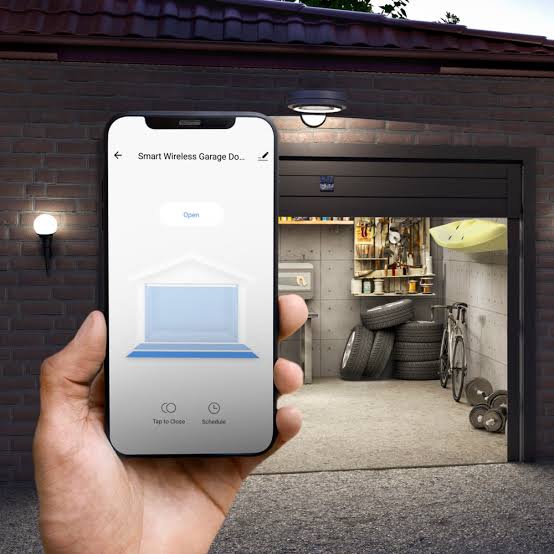
This small hardware unit connects to your home’s Wi-Fi network and links physically to your existing garage door opener. When you tap “Open” or “Close” on your phone, the signal travels from your device to the cloud, down to your home router, and finally to the controller, which triggers the door mechanism.
Key Components Required
- A Compatible Garage Door Opener: Most units manufactured after 1993 are compatible.
- A Smart Controller: Devices like MyQ, Ratgdo, or Meross act as the bridge.
- Stable Wi-Fi Connection: Your garage needs a strong signal for instant response times.
- A Smartphone App: The interface where you manage access and settings.
According to Wikipedia’s entry on Home Automation, the integration of IoT (Internet of Things) devices has revolutionized residential security, allowing users to manage physical assets remotely with unprecedented ease.
Is It Safe to Open My Garage Door With My Phone?
Security is the primary concern for most homeowners. After all, your garage often contains valuable tools, vehicles, and serves as an entry point to your home. The short answer is: Yes, it is safe, provided you choose reputable brands.
Modern smart garage controllers use advanced encryption protocols, typically AES-128 or higher, to protect data transmission. This means that even if a hacker intercepts the signal between your phone and the cloud, they cannot decode it to open your door.
Safety Features to Look For
- Two-Factor Authentication (2FA): Adds an extra layer of login security.
- Activity Logs: Shows you exactly who opened the door and when.
- Auto-Close Timers: Automatically shuts the door after a set period if forgotten.
- Geofencing: Uses your phone’s location to trigger actions only when you are near home.
However, avoid using generic, unbranded controllers found on obscure marketplaces. Stick to established names like Chamberlain (MyQ), LiftMaster, or well-reviewed third-party options like Shelly or Ratgdo for DIY enthusiasts.
Step-by-Step Guide: Setting Up Your Smart Garage
Turning your smartphone into a garage door opener is a straightforward process. Here is a detailed tutorial to get you up and running in under 30 minutes.
Step 1: Check Compatibility
First, identify the brand and model of your current garage door opener. Look for a label on the motor unit hanging from your ceiling. Most major brands (Chamberlain, Craftsman, LiftMaster, Genie) are compatible with universal smart controllers.
Step 2: Purchase a Smart Controller
Buy a dedicated smart garage hub. For this guide, we will assume a standard Wi-Fi enabled controller. Ensure your garage has a working electrical outlet nearby.
Step 3: Install the Hardware
- Power Down: Unplug your garage door opener to prevent accidental activation during installation.
- Mount the Controller: Place the smart hub within 3–5 feet of the motor unit. Use the included adhesive or screws.
- Connect Wires: Locate the terminal posts on your motor labeled “Push Button” or “Wall Console.” Connect the two wires from the smart controller to these terminals. Note: Polarity usually does not matter for these low-voltage connections.
- Plug In: Restore power to the garage door opener and plug in the smart controller.
Step 4: Configure the App
- Download the manufacturer’s app (e.g., MyQ, eWeLink, or Tuya).
- Create an account and enable Two-Factor Authentication immediately.
- Follow the in-app instructions to connect the device to your 2.4GHz Wi-Fi network. Note: Most smart home devices do not support 5GHz bands.
- Name your device (e.g., “Main Garage”) and test the open/close function.
Step 5: Test and Calibrate
Stand inside the garage and use your phone to operate the door. Ensure it opens and closes smoothly. Set up any desired automation rules, such as closing the door at 10 PM every night.
Top Apps and Devices for iPhone and Android
Not all solutions are created equal. Here is a comparison of the most popular options available in the US market.
| Feature | MyQ (Chamberlain) | Ratgdo (DIY/Open Source) | Meross Smart Hub |
|---|---|---|---|
| Ease of Setup | Very Easy | Moderate/Technical | Easy |
| Cost | $30–$100+ | ~$30 (Hardware) | $25–$40 |
| Subscription | Some features paid | None | None |
| Compatibility | Proprietary + Universal | Universal | Universal |
| Best For | Beginners | Tech Enthusiasts | Budget-Conscious |
MyQ is the industry leader, offering seamless integration with Apple HomeKit, Google Assistant, and Amazon Alexa. However, some advanced features require a subscription. Ratgdo is a favorite among privacy-focused users because it keeps data local and doesn’t rely on cloud servers, though it requires more technical know-how to install.
Troubleshooting Common Connectivity Issues
Even the best systems encounter glitches. If your smartphone fails to open the garage door, check these common culprits:
- Weak Wi-Fi Signal: Garages are often far from routers. Consider installing a Wi-Fi extender or a Mesh node in the garage.
- App Permissions: Ensure the app has permission to use your location and background data.
- Outdated Firmware: Check the manufacturer’s website for updates to your controller’s firmware.
- Interference: Large metal objects or other wireless devices can interfere with the signal between the controller and the motor.
If the problem persists, perform a hard reset on the smart controller by unplugging it for 30 seconds and reconnecting it.
FAQ Section
1. Can I use my smartphone as a garage door opener without buying new hardware?
Generally, no. Unless your existing garage door opener was built with native Wi-Fi capabilities (which is rare in older models), you need a smart controller to bridge the gap between your phone and the motor. Some very new openers come with built-in smart tech, but most homes require an add-on device.
2. Does it work if my internet goes down?
Most smart garage controllers rely on the cloud. If your internet is down, you likely cannot open the door via your smartphone. However, many systems offer Bluetooth connectivity as a backup, allowing you to control the door when you are within close range (e.g., in the driveway) even without Wi-Fi. Always keep a physical remote as a fail-safe.
3. Can I give access to family members or guests?
Yes. One of the biggest advantages of smart garage systems is user management. You can invite family members via email to download the app and gain access. You can also generate temporary virtual keys for dog walkers or delivery personnel, which expire after a set time.
4. Will using my phone drain my battery faster?
No. The energy consumption of sending a simple command to open a garage door is negligible. The app runs in the background efficiently, and modern smartphones are designed to handle IoT communications without significant battery impact.
5. Is it compatible with Apple HomeKit and Google Home?
Most major brands, including MyQ and Meross, offer integration with Apple HomeKit, Google Home, and Amazon Alexa. This allows you to use voice commands like “Hey Siri, open the garage” or create automations, such as turning on garage lights when the door opens.
Conclusion
So, can I use my smartphone as a garage door opener? Absolutely. It is one of the most impactful upgrades you can make to your home’s convenience and security profile. By investing in a reliable smart controller, you gain the ability to monitor your home from anywhere, share access securely, and never worry about an open door again.
The technology is mature, affordable, and user-friendly. Whether you choose a plug-and-play solution like MyQ or a DIY project like Ratgdo, the benefits far outweigh the initial setup effort.
Ready to upgrade your home? Share this guide with friends who are still fumbling for physical remotes, and let us know in the comments which smart garage system you plan to install!
Leave a Reply