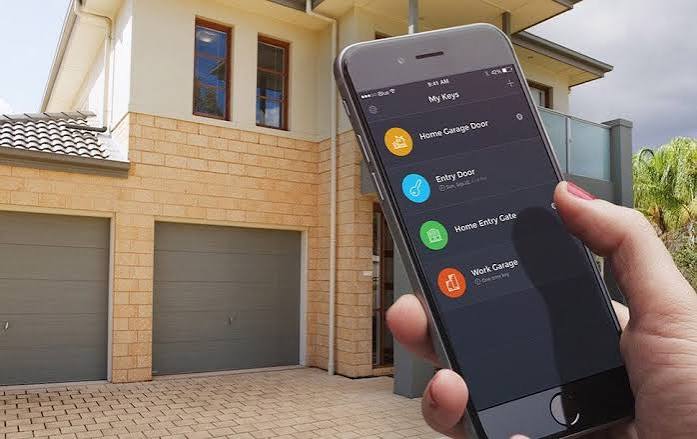
Have you ever pulled into your driveway only to realize your garage door remote is missing or out of batteries? It is a frustrating scenario that many homeowners face daily. If you are asking yourself, “Can I use my phone to open my garage door,” the answer is a resounding yes. Modern technology has made it easier than ever to turn your smartphone into a universal remote, offering convenience, security, and peace of mind.
In this guide, we will explore exactly how you can achieve this, whether you have a brand-new smart opener or an older model that needs a simple upgrade.
Why Control Your Garage Door With Your Phone?
Before diving into the technical steps, it is important to understand why this upgrade is worth your time. Using your smartphone to manage your garage door is not just a novelty; it is a practical solution to common household problems.
- Remote Access: Did you forget to close the garage door after leaving for work? With phone control, you can check the status and close it from your office.
- Keyless Entry: No more digging through your purse or pockets for a small plastic remote. Your phone is always with you.
- Activity Logs: Most smart apps provide a history of when the door was opened and closed, adding a layer of security monitoring.
- Guest Access: You can grant temporary access to dog walkers, cleaners, or family members without giving them a physical key or code.
Method 1: Using a Built-in Smart Garage Door Opener
If you recently purchased a new home or installed a new garage door system, you might already have a smart-compatible opener. Major brands like Chamberlain (MyQ), LiftMaster, and Genie now include Wi-Fi connectivity in their mid-to-high-end models.
How to Check If Your Opener Is Smart-Ready
Look at the motor unit hanging from your garage ceiling. If it has a Wi-Fi symbol or mentions “MyQ,” “Aladdin Connect,” or “Wi-Fi Enabled” on the label, you are in luck.
Step-by-Step Setup for Native Smart Openers
- Download the Manufacturer’s App: Go to the Apple App Store or Google Play Store and download the specific app for your brand (e.g., MyQ, Genie Aladdin Connect).
- Create an Account: Register with your email address and create a secure password.
- Connect to Wi-Fi: Follow the in-app instructions to connect your garage door opener to your home’s 2.4GHz Wi-Fi network. Note: Most smart home devices do not support 5GHz networks.
- Pair the Device: The app will search for your opener. You may need to press a “Learn” button on the motor unit to finalize the pairing.
- Test the Connection: Stand outside your garage and use the app to open and close the door. Ensure there is no significant lag.
Method 2: Adding a Smart Hub to an Old Garage Door Opener
What if your garage door opener is ten years old and has no Wi-Fi capabilities? Do not worry. You do not need to replace the entire motor unit. You can add a smart garage door controller that acts as a bridge between your old opener and your smartphone.
These devices are affordable, usually costing between $30 and $100, and are easy to install. Popular options include the MyQ Smart Garage Hub, Meross Smart Garage Door Opener, and Tailwind.
Installation Guide for Smart Hubs
Installing a smart hub is a DIY-friendly project that typically takes less than 30 minutes.
- Mount the Hub: Place the smart hub device on the ceiling near your garage door opener motor. It needs to be within range of both the opener and your Wi-Fi router.
- Connect the Wires: Locate the two terminals on your garage door opener where the wall button wires are connected. Disconnect the wall button wires and connect them to the smart hub’s terminals. Then, run new wires from the hub back to the wall button if you wish to keep it functional. Always ensure the power to the opener is turned off before handling wires.
- Power the Hub: Plug the smart hub into a nearby electrical outlet.
- Configure the App: Download the corresponding app for your smart hub device. Follow the on-screen prompts to connect the hub to your Wi-Fi.
- Calibrate Sensors: Most hubs come with a door position sensor. Stick this sensor on the garage door track and the door itself to tell the app whether the door is open or closed.
For more detailed technical specifications on garage door safety standards, you can refer to Wikipedia’s entry on Garage Door Openers, which outlines the evolution of safety mechanisms and remote technologies.
Method 3: Using Home Automation Ecosystems
If you are already invested in a smart home ecosystem like Amazon Alexa, Google Home, or Apple HomeKit, you can integrate your garage door for voice control and automation.
| Ecosystem | Compatibility | Key Feature |
|---|---|---|
| Amazon Alexa | Works with MyQ, Ring, and others | Voice commands like “Alexa, close the garage door.” |
| Google Home | Works with Nest, MyQ, and others | Integration with Google Assistant routines. |
| Apple HomeKit | Requires HomeKit-certified hubs | High-security encryption and Siri control. |
To set this up, simply link your garage door app account within the Alexa, Google Home, or Apple Home app. Once linked, you can create routines, such as having the garage door close automatically when your phone leaves a certain geographic radius (geofencing).
Security Considerations: Is It Safe?
A common concern among homeowners is security. “If my phone can open my garage, can hackers do it too?”
While no digital system is 100% immune to threats, modern smart garage systems use advanced encryption protocols (such as AES 128-bit or 256-bit encryption) that make unauthorized access extremely difficult. To maximize your security:
- Use Strong Passwords: Never reuse passwords from other sites.
- Enable Two-Factor Authentication (2FA): This adds an extra layer of protection by requiring a code sent to your phone or email when logging in.
- Keep Firmware Updated: Manufacturers regularly release updates to patch security vulnerabilities. Enable automatic updates in your app settings.
- Monitor Activity Logs: Regularly check the app’s history feature to ensure no unknown devices have accessed your door.
Troubleshooting Common Issues
Even with the best setup, you might encounter occasional glitches. Here are quick fixes for common problems:
- App Not Connecting: Ensure your phone is connected to the internet. If the issue persists, restart your Wi-Fi router and the garage door hub.
- Door Status Incorrect: If the app says the door is open when it is closed, recalibrate the door position sensor. Make sure it is aligned correctly on the track.
- Slow Response Time: This is often due to weak Wi-Fi signal in the garage. Consider installing a Wi-Fi extender or a mesh network node closer to the garage.
FAQ Section
1. Can I use my phone to open my garage door without Wi-Fi?
Generally, no. Most smartphone-based solutions rely on an internet connection to communicate with the garage door opener via the cloud. However, some systems use Bluetooth for local control, which works without Wi-Fi but requires you to be within close proximity (usually 30–50 feet) of the garage.
2. Does using my phone to open the garage door drain my battery?
The impact on your phone’s battery is negligible. The app runs in the background and only uses significant power when actively communicating with the server. It is comparable to using any other standard social media or messaging app.
3. What happens if my internet goes down?
If your internet goes down, you will not be able to control the garage door remotely via your phone. However, your physical remote controls and wall-mounted buttons will still work perfectly, as they use radio frequencies independent of your Wi-Fi network.
4. Can multiple family members use the same app?
Yes. Most smart garage door apps allow you to invite multiple users to your account. You can assign different levels of access, such as full control for family members and limited access for guests or service providers.
5. Is it expensive to convert my old garage door to a smart one?
No, it is quite affordable. A smart garage door hub typically costs between $30 and $100. This is significantly cheaper than replacing the entire garage door opener system, which can cost upwards of $300–$500 plus installation fees.
6. Will a smart garage door opener work with my existing security system?
Many smart garage controllers are compatible with major security systems like ADT, Ring Alarm, and SimpliSafe. Check the compatibility list on your security provider’s website before purchasing a hub.
Conclusion
So, can you use your phone to open your garage door? Absolutely. Whether you have a modern smart opener or an older model, there is a solution available to fit your needs and budget. By upgrading to phone-controlled access, you gain unparalleled convenience, enhanced security monitoring, and the ability to manage your home from anywhere in the world.
Don’t let outdated technology hold you back. Take the first step today by checking your current opener’s compatibility or investing in a simple smart hub. Your future self will thank you the next time you wonder if you left the garage open.
Found this guide helpful? Share it with your friends and family on social media to help them unlock the convenience of smart home technology!
Leave a Reply