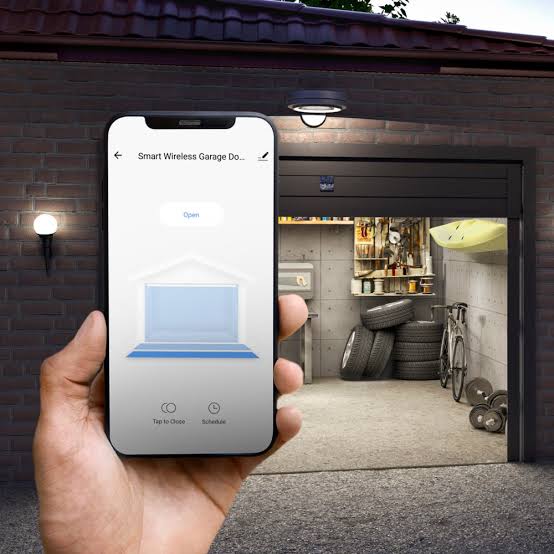
Have you ever pulled into your driveway, rain pouring down, only to realize you left your physical garage remote on the kitchen counter? It is a frustrating scenario that many homeowners face daily. The good news is that technology has evolved, and you no longer need to rely solely on those small, easily lost plastic remotes. If you are asking, “Can I use my phone as a garage door opener,” the answer is a resounding yes. With the right setup, your smartphone can become the most powerful and convenient tool for managing your home’s entry points.
How Does Phone-Based Garage Control Work?
Before diving into the installation, it is helpful to understand the mechanics behind this convenience. Traditional garage openers use radio frequencies (RF) to communicate between the handheld remote and the motor unit in your garage. Your smartphone, however, does not typically broadcast these specific RF signals natively.
To bridge this gap, you need an intermediary device known as a smart garage controller. This small hardware component connects to your existing garage door opener motor and links to your home’s Wi-Fi network. Once connected, it acts as a translator. When you tap a button on your phone’s app, the signal travels via the internet to the controller, which then triggers the mechanical opener to lift or lower the door.
This integration allows for features that traditional remotes cannot offer, such as:
- Real-time status updates (is the door open or closed?)
- Remote access from anywhere in the world
- Integration with other smart home ecosystems like Amazon Alexa or Google Home
What Do You Need to Turn Your Phone into a Remote?
You do not need to replace your entire garage door system to gain smart capabilities. In most cases, you only need three things:
- A Compatible Garage Door Opener: Most openers manufactured after 1993 have standard security+ rolling code technology that works with smart controllers. If your opener is extremely old (pre-1990s), you might need a professional assessment.
- A Smart Garage Controller: This is the hardware hub. Popular brands include MyQ, RatGDO, and Meross. These devices usually cost between $30 and $100.
- A Smartphone with an App: You will need iOS or Android device with the manufacturer’s specific app installed.
Comparison of Popular Smart Controllers
| Feature | MyQ Smart Garage Hub | RatGDO (DIY Friendly) | Meross Smart Garage Hub |
|---|---|---|---|
| Price Range | $$ | $ | $$ |
| Ease of Install | Moderate | Hard (Requires wiring) | Easy |
| App Quality | High | Community-driven | Good |
| Smart Home Integration | Alexa, Google, Key by Amazon | Home Assistant, MQTT | Alexa, Google, SmartThings |
| Subscription Required? | No (Basic features) | No | No |
Step-by-Step Guide to Setup
Setting up your phone as a garage door opener is generally a straightforward process that takes about 30–45 minutes. Follow these detailed steps to ensure a secure and functional connection.
Step 1: Check Compatibility
Visit the website of the smart controller you intend to buy. Look for a “Compatibility Checker” tool. You will need to know the brand and model number of your current garage door motor, which is usually printed on a label on the back or side of the unit hanging from your ceiling.
Step 2: Install the Hardware
Turn off the power to your garage door opener for safety. Mount the smart controller near the motor unit. You will typically need to connect two wires from the controller to the “trigger” terminals on your garage opener board. These terminals are often labeled as “Common” and “Trigger.” Refer to your specific device’s manual for exact wiring diagrams.
Step 3: Connect to Wi-Fi
Restore power to the garage opener. Download the corresponding app (e.g., MyQ, Meross) on your smartphone. Create an account and follow the in-app instructions to pair the controller with your home’s 2.4GHz Wi-Fi network. Note: Most smart home devices do not support 5GHz networks during setup.
Step 4: Test the Connection
Stand clear of the garage door. Use the app to press the “Close” or “Open” button. Watch the door to ensure it responds correctly. If it does not move, double-check your wiring connections.
Step 5: Enable Security Features
Once operational, enable two-factor authentication (2FA) in the app settings. This adds an extra layer of security, ensuring that even if someone guesses your password, they cannot access your garage without your phone.
Is It Safe to Use Your Phone as a Garage Opener?
Security is a valid concern when connecting physical entry points to the internet. Critics often point out that any internet-connected device is potentially vulnerable to hacking. However, modern smart garage controllers use encryption protocols similar to those used in online banking.
According to cybersecurity experts, the risk is minimal if you follow best practices. The National Institute of Standards and Technology emphasizes the importance of keeping firmware updated and using strong, unique passwords. By using a reputable brand and enabling 2FA, you significantly reduce the risk of unauthorized access.
Furthermore, using your phone can actually be safer than traditional remotes. Physical remotes can be stolen from cars or copied using cheap signal-grabbing devices available online. A smartphone requires biometric authentication (FaceID or fingerprint) to access the app, making it much harder for a thief to operate your garage even if they steal your phone.
What Are the Benefits Over Traditional Remotes?
Switching to phone-based control offers several distinct advantages that enhance daily life:
- Never Get Locked Out: If you leave home without your remote, you are not stranded. You can open the garage from your office or a friend’s house.
- Package Delivery Security: Many services, such as Amazon Key, allow delivery drivers to place packages inside your garage if you grant them temporary access via the app. This prevents porch piracy.
- Activity Logs: You can see exactly when the door was opened and closed. This is useful for monitoring when children arrive home from school or if service providers accessed the garage.
- Voice Control: Integrate with smart speakers to say, “Alexa, close the garage door,” which is incredibly helpful when your hands are full of groceries.
Common Troubleshooting Issues
Even with the best setup, you might encounter minor issues. Here is how to handle them:
- Wi-Fi Disconnection: If your garage is far from your router, the signal may drop. Consider installing a Wi-Fi extender in the garage to maintain a stable connection.
- App Lag: If there is a delay between pressing the button and the door moving, check your internet speed. A slow upload speed can cause latency.
- Sensor Errors: Ensure the safety sensors at the bottom of your garage door tracks are clean and aligned. If they are blocked, the door will not close, regardless of the app command.
Frequently Asked Questions
1. Can I use my phone as a garage door opener without Wi-Fi?
Generally, no. Most smart controllers require an active internet connection to communicate with your phone. However, some advanced systems offer Bluetooth connectivity for local control when you are within range of the garage, even if the internet is down.
2. Will this work if my power goes out?
If the power goes out, the garage door opener motor will not function, so the door cannot be opened electronically. However, all garage doors have a manual release cord (usually a red rope) that allows you to disengage the motor and lift the door by hand. Your phone will not help in this scenario, but the manual mechanism remains your backup.
3. Can multiple family members use the same app?
Yes. Most smart garage apps allow you to create “family” accounts or share access with other users. You can grant full access to spouses and limited or guest access to neighbors or dog walkers.
4. Does using my phone drain the battery faster?
Using the garage door app occasionally has a negligible impact on your battery life. However, if you keep the app running in the background with constant location tracking enabled, it may consume more power. It is recommended to disable background refresh for the app if battery conservation is a priority.
5. Is there a monthly fee for using these apps?
Most major brands, including MyQ and Meross, offer their basic open/close functionality for free. Some premium features, such as video verification or extended history logs, may require a subscription, but core functionality is typically free.
6. What if my garage door opener is very old?
If your opener lacks the standard trigger terminals or uses outdated security codes, you may need to install a new motor unit. Alternatively, some universal smart controllers come with external relay modules that can interface with older systems, but professional installation is recommended in these cases.
Conclusion
So, can I use my phone as a garage door opener? Absolutely. Not only is it possible, but it is also one of the most impactful upgrades you can make to your smart home. It combines convenience, security, and peace of mind into a device you already carry in your pocket every day.
By investing in a simple smart controller, you eliminate the hassle of lost remotes and gain the ability to monitor your home from anywhere. Whether you are letting in a delivery driver or simply checking if you forgot to close the door before bed, your phone is now the ultimate key to your home.
If you found this guide helpful, please share it with your friends and family on social media. Help them discover how easy it is to upgrade their garage security today!
Leave a Reply