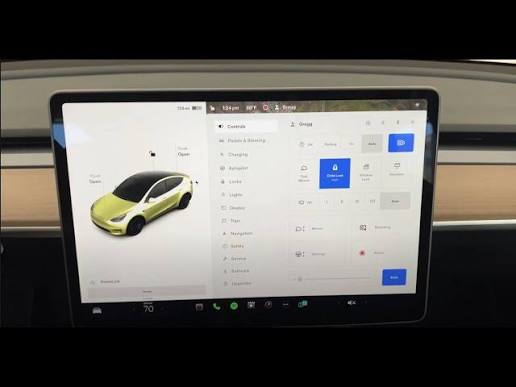
Have you ever pulled into your driveway in the rain, only to realize you left your garage remote inside the house? It is a frustrating scenario that many drivers face daily. If you are wondering, “Can I program my Tesla to open my garage door,” the answer is a resounding yes for most modern setups. By integrating your vehicle with your home’s automation system, you can enjoy seamless entry without fumbling for keys or remotes.
Understanding Tesla’s HomeLink Technology
To answer the core question of whether your Tesla can open your garage, we must first look at HomeLink. This is Tesla’s built-in universal garage door opener system. Unlike older cars that required bulky aftermarket visor clips, Tesla integrates this technology directly into the infotainment screen.
However, not every garage door opener is compatible out of the box. The system works by mimicking the radio frequency signal of your existing remote. According to general automotive standards, most openers manufactured after 1990 use rolling code technology, which HomeLink supports. For a deeper technical understanding of radio frequency protocols in consumer electronics, you can refer to Wikipedia’s entry on Rolling Codes.
Compatibility Check: Is Your Opener Supported?
Before attempting any programming, verify your hardware. Tesla vehicles generally support three types of connections:
- Standard RF Remotes: Most common residential openers (Chamberlain, LiftMaster, Genie).
- HomeLink-Compatible Units: Openers that have a dedicated “Learn” button for universal remotes.
- Smart Hubs: Devices like MyQ or Ratgdo that bridge non-compatible openers to Wi-Fi.
| Opener Type | Compatibility Level | Additional Hardware Needed? |
|---|---|---|
| Modern RF (Post-2010) | High | No |
| Older RF (Pre-2010) | Medium | Maybe (Repeater) |
| Proprietary Digital | Low | Yes (Smart Hub) |
Step-by-Step Guide: How to Program Your Tesla
If you have confirmed compatibility, you can proceed with the setup. The process is straightforward but requires precision. Follow these steps carefully to ensure a successful connection.
Step 1: Position Your Vehicle Correctly
Park your Tesla approximately 6 to 10 feet away from the garage door opener motor unit. Ensure you are within direct line-of-sight if possible. Obstructions like metal beams or thick walls can interfere with the signal transmission during the pairing process.
Step 2: Access the HomeLink Menu
- Tap the Car Icon at the bottom left of your touchscreen.
- Select Security & Locks (or simply “Locks” depending on your software version).
- Scroll down to find the HomeLink section.
- Tap Add New Device.
Step 3: Enter Programming Mode
Your Tesla will now enter discovery mode. You need to teach the car the specific frequency of your garage opener.
- Locate the “Learn” or “Program” button on your actual garage door motor unit hanging from your ceiling. It is usually colored yellow, purple, or orange.
- Press and hold this button until the indicator light on the motor unit blinks or changes color. This typically takes 5 to 10 seconds.
- Immediately return to your Tesla screen and tap Continue.
Step 4: Test the Connection
Once the screen confirms “Device Added,” test the functionality.
- Tap the newly created HomeLink icon on your Tesla screen.
- Observe if the garage door activates.
- If it does not move, repeat Step 3, ensuring you press the motor unit button within the time window.
Pro Tip: If your garage door has safety sensors, ensure nothing is blocking the beam while testing. The door will not close if the sensor path is obstructed.
Troubleshooting Common Issues
Even with careful following of instructions, users often encounter hurdles. Here are the most frequent problems and their solutions.
Signal Interference
If the door responds intermittently, you may be experiencing signal interference. LED light bulbs in the garage opener unit are notorious for causing radio frequency noise. Try turning off the garage lights before programming. If the issue persists, consider installing an external antenna repeater, which amplifies the signal from your Tesla to the motor unit.
“Rolling Code” Errors
Some high-security openers require a double-press sequence. If the standard single-press method fails, consult your garage door manual. You may need to press the “Learn” button twice rapidly to accept a new universal remote.
Software Glitches
Tesla frequently updates its firmware. If HomeLink disappears or fails to save, check for a software update. Navigate to Software > Check for Updates. A reboot of the infotainment system (holding both scroll wheels on the steering wheel for 10 seconds) can also clear temporary cache errors.
Advanced Integration: Beyond Basic Opening
Modern homeowners often ask if they can do more than just open the door. The answer lies in smart home ecosystems.
Using Geofencing for Automation
While Tesla’s native app does not currently offer automatic opening based on location due to security risks, you can use third-party platforms like IFTTT (If This Then That) or Home Assistant.
- Setup: Connect your Tesla account and your smart garage hub (e.g., MyQ) to IFTTT.
- Trigger: Create an applet that says, “When Tesla arrives at Home GPS coordinates, send open command to Garage.”
- Safety Note: Always add a confirmation step or restrict this to Wi-Fi-only triggers to prevent accidental openings when you are merely driving past your house.
Voice Control Integration
By linking your garage hub to Amazon Alexa or Google Home, you can indirectly control your door via voice commands once you are inside the house. While this doesn’t happen from the car, it creates a cohesive smart home experience.
Security Considerations
When automating your garage, security must be a priority. A garage door is a primary entry point to your home.
- Disable Auto-Open: Avoid setting your door to open automatically every time you approach. This leaves your home vulnerable if your phone or car is stolen.
- Monitor Activity: Use a smart camera inside the garage to receive alerts whenever the door opens.
- Update Firmware: Keep both your Tesla software and your garage opener’s firmware up to date to patch any known vulnerabilities.
FAQ Section
1. Does every Tesla model support HomeLink?
Most Tesla models produced after 2017 come with built-in HomeLink hardware. However, some early Model 3 vehicles required a retrofit kit. Check your vehicle’s specifications under “Security & Locks” to see if the option exists. If it is missing, you may need to purchase the HomeLink module from Tesla Service.
2. Can I program multiple garage doors?
Yes. The Tesla interface allows you to store up to three different HomeLink devices. This is ideal if you have a home garage, a vacation home, or a shared family garage. You can rename each device for easy identification (e.g., “Home,” “Office,” “Beach House”).
3. Why won’t my Tesla connect to my Chamberlain opener?
Chamberlain and LiftMaster openers often use strong encryption. Ensure you are pressing the “Learn” button on the motor unit correctly. If it still fails, you may need a MyQ Smart Garage Hub. This device connects your opener to Wi-Fi, allowing you to control it via the Tesla app indirectly or through integrations, bypassing the RF limitation.
4. Is it safe to leave my garage door controlled by my car?
Generally, yes. The signal used is encrypted and unique to your vehicle. However, no system is 100% hack-proof. For maximum security, disable HomeLink when traveling or lending your car to others. You can do this quickly via the touchscreen menu.
5. What if my garage door opener is very old?
If your opener predates 1990, it likely uses fixed codes rather than rolling codes. These are less secure and harder to pair. In this case, it is highly recommended to replace the motor unit with a modern, smart-compatible opener. This improves both convenience and home security.
6. Can I use HomeLink to open gates or lights?
Absolutely. HomeLink is not limited to garage doors. It can be programmed to operate gate operators, exterior lights, or even home alarm systems that accept RF signals. The programming process remains identical: put the receiver in learning mode and transmit the signal from your Tesla.
Conclusion
So, can I program my Tesla to open my garage door? The answer is a definitive yes, provided you have a compatible opener and follow the correct setup procedure. By utilizing Tesla’s HomeLink feature, you transform your vehicle into a keyless entry device for your home, adding a layer of convenience that modern drivers deserve.
Remember to prioritize security by avoiding fully automatic geofencing unless you have robust safeguards in place. With the right setup, you will never have to search for a remote in the dark again.
Did you find this guide helpful? Share it with your fellow Tesla owners on social media to help them streamline their daily commute!
Leave a Reply