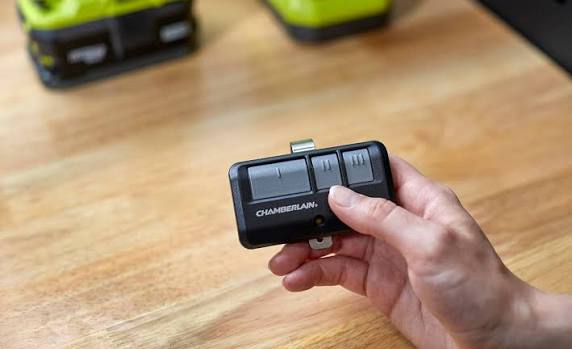
Introduction
Losing your garage door remote or upgrading your home’s security can feel overwhelming. You might be holding a new device and asking yourself, “Can I program any garage door opener to my garage?” The short answer is no, not every opener will work, but many universal and smart options are highly compatible with modern systems. Let’s break down exactly what works, how to check your system, and how to program it safely and easily.
Can I Program Any Garage Door Opener To My Garage? Compatibility Explained
The straightforward truth is that you cannot program just any garage door opener to your existing garage door system. Compatibility depends heavily on the technology your current motor unit uses.
Since the early 1990s, the garage door industry has shifted from simple “fixed code” systems to advanced “rolling code” technology to prevent theft and unauthorized access. According to industry security standards, modern openers change their access code every time the remote is used, generating billions of possible combinations.
To understand this better, here is a quick comparison:
| Feature | Fixed Code (Pre-1993) | Rolling Code (1993–Present) |
|---|---|---|
| Security Level | Low (Easy to intercept) | High (Encrypted, changes per use) |
| Compatibility | Limited to exact brand matches | Broad (Works with most universal remotes) |
| Programming | Manual dip-switch matching | Wireless “Learn” button synchronization |
| Risk of Hacking | High | Extremely Low |
For a deeper understanding of how this encryption protects your home, you can read more about rolling code technology on Wikipedia.
How to Check If Your Garage Door Opener Is Compatible
Before purchasing a new remote or smart hub, you must verify compatibility. Follow these three concrete steps:
- Locate the Model Number: Climb a sturdy ladder and look at the back or side of the motor unit hanging from your garage ceiling. Write down the brand (e.g., Chamberlain, LiftMaster, Genie) and the exact model number.
- Identify the “Learn” Button Color: Open the light cover on the motor unit. The color of the “Learn” or “Smart” button dictates compatibility:
- Yellow, Purple, Red, or Orange: Compatible with most modern universal remotes (Security+ 2.0).
- Green: Older rolling code (may require specific universal remotes).
- No Learn Button: Pre-1993 fixed-code system (requires dip-switch matching).
- Check the Manufacturing Year: If your opener was made after 1993, it almost certainly uses rolling code technology, making it highly compatible with today’s universal remotes.
Step-by-Step Guide: How to Program a Universal Garage Door Opener
If your system is compatible, programming is a straightforward process. Follow these exact steps to ensure success.
What You Need:
- A compatible universal garage door remote
- A sturdy step ladder
- A fresh set of batteries (e.g., CR2032 or AAA, depending on the remote)
Programming Steps:
- Clear Old Codes (Optional but Recommended): Press and hold the “Learn” button on the motor unit for exactly 6 seconds until the indicator light turns off. This resets the memory.
- Activate Learning Mode: Press and release the “Learn” button on the motor unit. The adjacent LED light will illuminate or blink, indicating it is ready to pair. You have exactly 30 seconds to complete the next step.
- Sync the Remote: Within that 30-second window, point your new remote at the motor unit from a distance of 3 to 5 feet. Press and hold the desired button on the remote for 2 to 3 seconds, then release.
- Repeat for Confirmation: Press the same button on the remote two more times, holding for 2 seconds each time. This sends the rolling code sequence to the motor unit.
- Test the Connection: Press the button once more. The garage door should activate. If it does, programming is successful!
Pro Tip: If the door does not respond, replace the remote’s batteries and ensure you are standing within 10 feet of the motor unit during programming.
Universal Remotes vs. Smart Garage Door Hubs: Which Should You Choose?
If you are upgrading, you might wonder whether to buy a simple universal remote or a smart garage door hub. Here is a breakdown to help you decide:
| Feature | Universal Remote | Smart Garage Door Hub |
|---|---|---|
| Average Cost | $15 – $30 | $30 – $100 |
| Compatibility | High (Matches most rolling codes) | Moderate (Requires Wi-Fi & specific brands) |
| Key Features | Basic open/close functionality | App control, voice assistant integration, alerts |
| Ease of Setup | Very Easy (Under 5 minutes) | Moderate (Requires Wi-Fi network setup) |
| Best For | Replacing a lost remote quickly | Tech-savvy homeowners wanting automation |
Industry data suggests that over 65% of homeowners who upgrade their garage systems in the US opt for smart hubs due to the added convenience of monitoring their garage from a smartphone. However, a universal remote remains the most reliable, fail-safe backup.
Common Programming Mistakes to Avoid
Even with simple instructions, things can go wrong. Avoid these common pitfalls:
- Standing Too Far Away: Always program the remote within 5 feet of the motor unit to ensure a strong signal reception.
- Ignoring the Time Limit: The 30-second window after pressing the “Learn” button is strict. If you wait 35 seconds, you must start over.
- Using Depleted Batteries: A weak battery cannot transmit the rolling code signal effectively. Always use fresh batteries.
- Forgetting to Clear Old Remotes: If you lost a remote, always clear the opener’s memory first to prevent unauthorized access.
Frequently Asked Questions (FAQ)
Q1: Are all garage door remotes universal?
No, not all remotes are universal. While many aftermarket remotes are designed to work with multiple brands (like Chamberlain, LiftMaster, Genie, and Craftsman), they must match the frequency (usually 315 MHz or 390 MHz) and security protocol (rolling code) of your specific opener.
Q2: Can I program a new remote to a 20-year-old garage door opener?
Yes, in most cases. If your 20-year-old opener has a “Learn” button, it uses rolling code technology and will likely work with a modern universal remote. If it uses manual dip-switches, you will need a universal remote specifically designed with adjustable dip-switches.
Q3: What does the color of the “Learn” button mean?
The color indicates the security generation of your opener. For example, LiftMaster and Chamberlain use yellow, purple, red, or orange buttons for modern Security+ 2.0 systems. Genie often uses purple, red, or green buttons. The color helps you buy the correct compatible universal remote.
Q4: Why won’t my new garage door opener program to my door?
The most common reasons are: the remote is incompatible with your opener’s frequency, the batteries are dead, you exceeded the 30-second programming window, or the motor unit’s memory is full and needs to be cleared.
Q5: Is it safe to use a universal garage door opener?
Absolutely. As long as the universal remote supports rolling code technology (which most do today), it is just as secure as the original manufacturer’s remote. The encrypted signal changes with every use, preventing code-grabbing theft.
Conclusion
While the answer to “Can I program any garage door opener to my garage?” is no, the reality is highly encouraging. Most modern garage door systems are designed to work seamlessly with a wide range of universal remotes and smart hubs. By checking your model number, identifying your “Learn” button, and following a precise programming routine, you can restore or upgrade your garage access in under ten minutes.
Don’t let a lost remote compromise your convenience or security. Found this guide helpful? Share it with your friends, family, or neighbors on Facebook, X (Twitter), or WhatsApp who might be struggling with their own garage door setup!
Disclaimer: Always prioritize safety. Ensure the garage door area is clear of people and obstacles before testing your newly programmed opener.
Leave a Reply