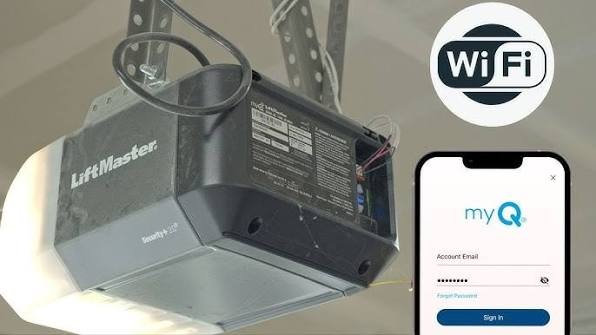
Have you ever pulled into your driveway only to realize you left your garage door remote inside the house? Or perhaps you’re halfway to work and suddenly wonder if you closed the garage door behind you? It is a common stress point for many homeowners. If you are asking, “Can I open my Liftmaster garage door with my phone?” the answer is a resounding yes. Modern technology has made it easier than ever to control your home’s entry points directly from your smartphone, offering both convenience and peace of mind.
In this guide, we will walk you through everything you need to know about connecting your Liftmaster opener to your mobile device. Whether you have a newer model or an older unit, we will cover the solutions that work best for your specific setup.
How Does Smartphone Control Work for Liftmaster Openers?
Before diving into the setup, it helps to understand the technology behind the feature. Liftmaster uses a proprietary system called MyQ. This technology allows your garage door opener to connect to your home’s Wi-Fi network. Once connected, the opener communicates with Liftmaster’s secure cloud servers, which then send signals to the app on your phone.
This means you can operate your door from anywhere in the world, as long as you have an internet connection. The system is designed with security in mind, using encryption to ensure that only authorized users can open or close the door. According to Wikipedia, modern garage door openers have evolved significantly from simple radio frequency remotes to integrated smart home devices, enhancing both security and user convenience.
What Do You Need to Connect Your Liftmaster to Your Phone?
Not every Liftmaster opener is smart-ready out of the box. To answer the question, “Can I open my Liftmaster garage door with my phone?” you first need to check your hardware compatibility. Here is what you typically need:
- A Compatible Liftmaster Opener: Most units manufactured after 2012 with a learn button are compatible. Look for a yellow, orange, purple, or red learn button on the motor unit.
- MyQ Smart Garage Hub: If your opener is older or lacks built-in Wi-Fi, you will need this external device. It acts as a bridge between your opener and your Wi-Fi network.
- Stable Wi-Fi Connection: Your garage needs to be within range of your home’s Wi-Fi signal. A 2.4 GHz band is usually recommended for better range through walls.
- Smartphone: An iOS (iPhone) or Android device with the latest operating system updates.
Compatibility Check Table
| Opener Feature | Built-in Wi-Fi? | Action Required |
|---|---|---|
| Yellow Learn Button | No | Requires MyQ Hub |
| Orange Learn Button | No | Requires MyQ Hub |
| Purple Learn Button | No | Requires MyQ Hub |
| Red Learn Button | No | Requires MyQ Hub |
| Built-in MyQ Logo | Yes | Direct App Connection |
If you are unsure about your model, check the label on the side of your motor unit. It will list the model number, which you can cross-reference on the Liftmaster website.
Step-by-Step Guide: Setting Up the MyQ App
Setting up your phone to control your garage door is a straightforward process. Follow these detailed steps to get started.
Step 1: Download the MyQ App
Go to the Apple App Store or Google Play Store and search for “MyQ”. Download the official app developed by Chamberlain Group. Ensure you are downloading the correct app, as there are several third-party apps with similar names.
Step 2: Create Your Account
Open the app and sign up for a new account. You will need to provide:
- A valid email address.
- A strong password (use a mix of letters, numbers, and symbols).
- Your name and location details.
Verify your email address by clicking the link sent to your inbox. This step is crucial for account recovery and security alerts.
Step 3: Add Your Device
Once logged in, tap the “Add Device” button. The app will ask you to select the type of device you are adding. Choose “Garage Door Opener.”
Step 4: Connect to Wi-Fi
Follow the on-screen instructions to connect your opener or MyQ Hub to your home Wi-Fi network.
- If you have a MyQ Hub, press the button on the hub to put it in pairing mode.
- Enter your Wi-Fi password when prompted. Note that most smart home devices do not support 5 GHz networks, so ensure you are selecting the 2.4 GHz network if your router broadcasts both.
Step 5: Name Your Door
Give your garage door a recognizable name, such as “Main Garage” or “Side Entry.” This is helpful if you plan to add multiple doors later.
Step 6: Test the Connection
Stand near your garage door and use the app to open and close it. Listen for the motor to engage. If it works, you are all set! If not, proceed to the troubleshooting section below.
Troubleshooting Common Connection Issues
Even with the best technology, things can go wrong. If you are struggling to connect, here are some common fixes.
1. Weak Wi-Fi Signal Garages are often located at the edge of a home’s Wi-Fi coverage. If your signal is weak, consider installing a Wi-Fi extender or a mesh network node closer to the garage. A signal strength of at least -70 dBm is recommended for stable connectivity.
2. Incorrect Learn Button Color As mentioned earlier, the color of the learn button matters. If you have a green learn button, your opener may be too old to support MyQ technology without significant hardware upgrades. In this case, replacing the opener might be more cost-effective.
3. App Glitches Sometimes, the issue is with the app itself. Try force-closing the app and reopening it. If that doesn’t work, uninstall and reinstall the MyQ app. Ensure your phone’s operating system is up to date.
4. Router Settings Some routers have security settings that block new devices. Check your router’s firewall settings and ensure that MAC address filtering is not preventing the MyQ Hub from connecting.
Benefits of Using Your Phone as a Garage Remote
Why go through the trouble of setting this up? The benefits extend beyond just novelty.
- Remote Access: Let in delivery drivers, family members, or service providers without needing to be home. You can grant temporary access via the app.
- Peace of Mind: Did you close the garage door? Check the app. If you forgot, you can close it with a single tap, even if you are miles away.
- Activity Alerts: Receive notifications whenever your garage door opens or closes. This is excellent for monitoring when children arrive home from school.
- Integration with Smart Home Systems: MyQ integrates with Amazon Alexa, Google Assistant, and Apple HomeKit. You can use voice commands like, “Alexa, close the garage door,” making your life even more convenient.
Frequently Asked Questions (FAQ)
1. Is it safe to open my Liftmaster garage door with my phone?
Yes, it is generally safe. The MyQ system uses bank-level encryption to protect your data. However, always use a strong, unique password for your MyQ account and enable two-factor authentication if available. Avoid using public Wi-Fi networks when controlling your garage door.
2. Can I use my phone if the power goes out?
No. Both your garage door opener and your Wi-Fi router require electricity to function. If the power goes out, you will not be able to use the app. However, most Liftmaster openers have a manual release cord that allows you to open the door physically during a power outage.
3. Does the MyQ app work with all Liftmaster models?
Most Liftmaster openers manufactured after 2012 are compatible. Older models may require the purchase of a MyQ Smart Garage Hub. If your opener has a green learn button, it is likely incompatible with the current MyQ technology.
4. Can multiple people use the same app to control the door?
Yes. You can invite family members to join your MyQ account. Each person can download the app and log in with their own credentials. You can manage permissions and see who opened or closed the door and when.
5. Why is there a delay when opening the door with my phone?
A slight delay of 2–5 seconds is normal due to the time it takes for the signal to travel from your phone to the cloud and then to your garage. If the delay is longer, check your Wi-Fi signal strength in the garage.
6. Do I need a subscription for MyQ?
Basic features like opening and closing the door and receiving alerts are free. However, some advanced features, such as video integration with certain cameras or extended history logs, may require a paid subscription. Check the current pricing in the app for the most up-to-date information.
Conclusion
So, can I open my Liftmaster garage door with my phone? Absolutely. By leveraging the MyQ technology, you transform a standard garage opener into a smart, secure, and convenient entry point for your home. Whether you are letting in a guest or simply ensuring you locked up before leaving for vacation, smartphone control puts the power in your hands.
Take the first step today by checking your opener’s compatibility and downloading the MyQ app. Once set up, you will wonder how you ever managed without it. If you found this guide helpful, please share it with friends and family on social media who might also be looking to upgrade their home security and convenience.
Leave a Reply