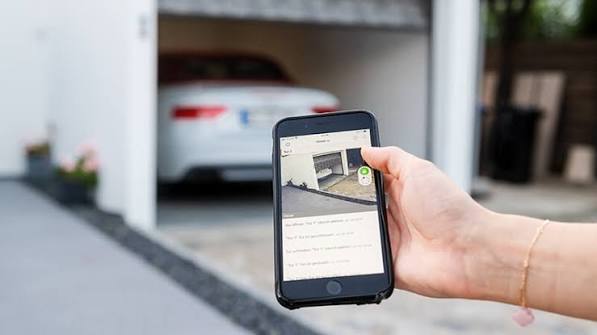
Have you ever pulled into your driveway only to realize you left your garage door remote inside the house? Or perhaps you’re halfway to work and suddenly panic, wondering if you actually closed the garage door behind you. These are common stressors for homeowners, but technology has offered a sleek solution. If you have been asking yourself, “Can I open my garage door with my cell phone?” the answer is a resounding yes.
Modern smart home technology has transformed the way we interact with our homes, turning our smartphones into universal keys. Whether you want to let in a delivery driver, check on your home while on vacation, or simply enjoy the convenience of keyless entry, controlling your garage via mobile is not only possible but increasingly standard. In this guide, we will explore exactly how to achieve this, the equipment you need, and how to keep your home secure while doing it.
How Does Smart Garage Door Control Work?
Before diving into the setup, it helps to understand the mechanics behind the magic. Traditional garage door openers use radio frequencies (RF) to communicate between a handheld remote and the motor unit. To enable smartphone control, we bridge the gap between these radio signals and your home’s Wi-Fi network.
This is typically achieved through a smart garage hub or a Wi-Fi-enabled opener. The device connects to your existing garage door motor’s terminal wires. Once connected to your home Wi-Fi, it communicates with a cloud server. Your smartphone app then sends commands to this server, which relays the instruction to your garage door hub, triggering the door to open or close.
According to Wikipedia, the evolution of garage door openers has moved from simple chain drives to sophisticated belt-drive systems integrated with IoT (Internet of Things) protocols, allowing for seamless remote access and monitoring.
Methods to Open Your Garage Door With Your Phone
Not all garage doors are created equal, and neither are the solutions to connect them. Depending on your current setup and budget, you can choose one of the following three methods.
1. Install a Smart Garage Hub (Retrofit Kit)
This is the most popular option for homeowners who already have a functioning garage door opener but lack smart features. A smart hub is a small device that attaches to your existing motor.
- Pros: Cost-effective, works with most major brands (Chamberlain, LiftMaster, Genie), easy DIY installation.
- Cons: Requires a stable Wi-Fi signal in the garage; adds another device to manage.
2. Replace with a Wi-Fi-Enabled Opener
If your current garage door motor is old, noisy, or broken, replacing it with a new smart opener is the best long-term investment. Newer models come with built-in Wi-Fi and battery backups.
- Pros: Integrated design, often quieter, includes latest security encryption, no extra hubs needed.
- Cons: Higher upfront cost, professional installation may be required.
3. Use a Smart Plug with Limitations (Not Recommended)
Some users attempt to use a standard smart plug on older openers. However, this is generally discouraged because it cuts power rather than sending a “open/close” signal. This can leave the door in an unknown state and bypass safety sensors.
| Feature | Smart Hub (Retrofit) | New Smart Opener |
|---|---|---|
| Cost | $30 – $100 | $300 – $600+ |
| Installation Difficulty | Easy (DIY) | Moderate to Hard |
| Compatibility | High (Most brands) | N/A (New Unit) |
| Features | Basic Open/Close + Monitor | Advanced + Battery Backup |
Step-by-Step Guide: Setting Up a Smart Garage Hub
For most readers, installing a retrofit smart hub is the quickest path to answering “can I open my garage door with my cell phone.” Here is a general step-by-step process. Note that specific steps may vary by brand (e.g., MyQ, Tailwind, RatGDO).
- Check Compatibility: Verify that your garage door opener model is compatible with the smart hub you purchased. Most hubs support openers manufactured after 1993.
- Power Down: Unplug your garage door opener from the electrical outlet to ensure safety during wiring.
- Locate Terminals: Find the terminal block on the motor unit. Look for the two terminals labeled for the wall button (usually marked as “1” and “2” or “Common” and “Input”).
- Connect Wires: Strip the ends of the smart hub’s wires. Connect them to the same terminals where your existing wall button wires are attached. It does not matter which wire goes to which terminal for most basic setups.
- Mount the Hub: Use the included adhesive or screws to mount the hub near the motor. Ensure it is within range of your Wi-Fi router. If your Wi-Fi is weak in the garage, consider installing a Wi-Fi extender.
- Power Up and Pair: Plug the opener back in. Download the manufacturer’s app on your smartphone. Follow the in-app instructions to connect the hub to your Wi-Fi network (usually involves holding a pairing button on the hub until an LED blinks).
- Test the System: Use the app to open and close the door. Ensure the physical safety sensors still work by placing an object in the door’s path while closing.
Security Concerns: Is It Safe?
A common hesitation among homeowners is security. If my phone can open the door, can a hacker do it too?
Modern smart garage devices use AES-128 or AES-256 bit encryption, which is the same standard used by banks. This makes it extremely difficult for unauthorized users to intercept or mimic your signal. However, security also depends on user behavior.
To maximize security:
- Enable Two-Factor Authentication (2FA): Always require a second verification step when logging into your garage app.
- Update Firmware: Keep your smart hub’s software up to date to patch any vulnerabilities.
- Secure Your Wi-Fi: Ensure your home Wi-Fi network uses a strong password and WPA3 encryption if available.
- Monitor Activity Logs: Most apps provide a history of who opened the door and when. Check this regularly for unusual activity.
Benefits Beyond Convenience
While the primary question is “can I open my garage door with my cell phone,” the benefits extend far beyond just opening the door.
- Package Delivery Management: You can grant temporary access to delivery drivers, allowing them to place packages securely inside your garage, protecting them from porch pirates and weather.
- Remote Monitoring: Receive instant notifications if the door is left open. This is invaluable for parents who want to know when their teens arrive home from school.
- Integration with Smart Home Ecosystems: Connect your garage to Alexa, Google Assistant, or Apple HomeKit. You can create routines like “Goodnight,” which locks the front door, turns off lights, and closes the garage door simultaneously.
- Guest Access: Create virtual keys for dog walkers, cleaners, or family members without needing to hand over physical remotes or share codes.
FAQ Section
1. Do I need Wi-Fi in my garage to use a smart opener?
Yes, most smart garage hubs require a stable Wi-Fi connection to communicate with your phone. If your router is far from the garage, you may need a Wi-Fi extender or a mesh network system to ensure a strong signal.
2. Can I open my garage door if the power goes out?
If you have a smart hub, it likely won’t work during a power outage unless your garage door opener has a battery backup. Newer smart openers often come with built-in battery backups that allow for limited operations during outages.
3. Will using a smart garage hub void my warranty?
Generally, no. Most reputable smart hubs are designed to connect to the existing terminal wires without altering the motor’s internal circuitry. However, it is always wise to check your opener’s warranty terms before installation.
4. Can multiple family members control the garage door?
Yes. Most apps allow you to invite multiple users. You can assign different levels of access, such as full control for family members and temporary access for guests.
5. What happens if my internet goes down?
If your internet is down, you cannot control the door via your phone remotely. However, you can still use the physical wall button inside the garage or your traditional remote control, as these operate on local radio frequencies independent of the internet.
6. Is it difficult to install a smart garage hub myself?
For most people, no. If you can use a screwdriver and follow simple wiring instructions (connecting two wires), you can install it yourself. The process usually takes less than 30 minutes. If you are uncomfortable working with electrical components, hiring a professional is recommended.
Conclusion
So, can I open my garage door with my cell phone? Absolutely. Not only is it possible, but it is also one of the most impactful upgrades you can make for home convenience and security. Whether you choose to retrofit your existing opener with a smart hub or invest in a brand-new Wi-Fi-enabled system, the ability to monitor and control your garage from anywhere provides peace of mind.
By following the steps outlined above and prioritizing security measures like 2FA, you can enjoy the modern luxury of keyless entry without compromising safety. Don’t let an open garage door keep you awake at night or force you to rush home from work. Take control of your home today.
Found this guide helpful? Share it with your friends and family on social media to help them upgrade their smart homes too!
Leave a Reply