Introduction
There is nothing quite like the panic of pulling into your driveway, rain pouring down, and realizing you left your physical garage remote on the kitchen counter. It is a modern-day nightmare that many homeowners face. But here is the good news: Can I open my Chamberlain garage door with my phone? The answer is a resounding yes, provided you have the right setup.
For years, Chamberlain has been a leader in garage door technology, and their integration with smartphone technology has transformed how we interact with our homes. Whether you are looking to let in a delivery driver while you are at work or simply want the peace of mind of checking if you closed the door after leaving for vacation, using your phone as a remote is not just possible—it is incredibly convenient. In this guide, we will walk you through exactly how to make it happen, troubleshoot common issues, and ensure your system is secure.
Understanding the myQ Ecosystem
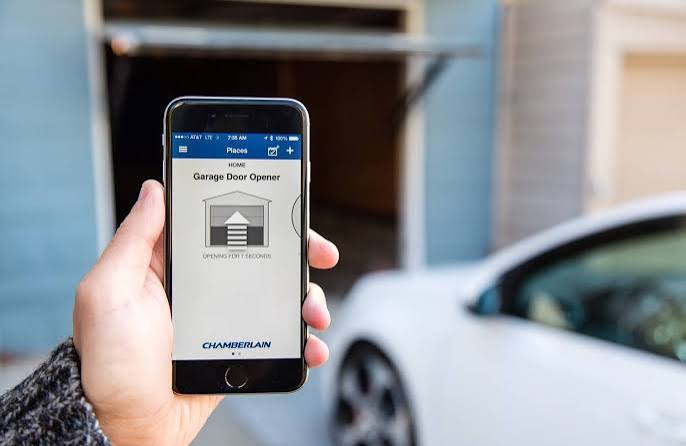
Before diving into the “how-to,” it is essential to understand the technology behind the feature. Most modern Chamberlain garage door openers come equipped with myQ technology. This is a built-in Wi-Fi capability that allows your opener to communicate with Chamberlain’s servers, which then talk to your smartphone via the myQ app.
If your opener is older (pre-2012), it might not have built-in Wi-Fi. However, do not despair. You can still achieve phone control by purchasing a myQ Smart Garage Hub. This small device bridges the gap between your old opener and your smartphone, adding smart functionality to legacy hardware.
Key Components Required
- A Compatible Chamberlain Opener: Look for the myQ logo on your motor unit.
- Stable Wi-Fi Connection: Your garage needs to reach your home’s Wi-Fi network.
- The myQ App: Available for free on iOS and Android.
- A Smartphone: Any modern smartphone with an internet connection.
Step-by-Step: How to Connect Your Chamberlain Opener to Your Phone
Setting up your garage door for phone control is straightforward if you follow these steps precisely. Many users fail because they skip the Wi-Fi pairing process. Here is the exact procedure:
Step 1: Download and Create an Account
First, download the myQ app from the Apple App Store or Google Play Store. Open the app and create a new account. You will need a valid email address and a strong password. Security Tip: Use a unique password for this account, as it controls access to your home.
Step 2: Put Your Opener in Pairing Mode
Locate the learn button on your garage door opener motor unit. It is usually colored yellow, purple, or red. Press and hold this button until the LED light begins to blink. This indicates the unit is searching for a Wi-Fi network.
Step 3: Connect to Wi-Fi via the App
Open the myQ app and select “Add Device.” Follow the on-screen prompts. The app will ask you to select your Wi-Fi network. Note: Ensure your garage is within range of your router. If the signal is weak, consider installing a Wi-Fi extender. Enter your Wi-Fi password when prompted.
Step 4: Name Your Device
Once connected, name your garage door (e.g., “Main Garage” or “Side Entry”). This helps if you have multiple doors. Test the connection by pressing the virtual button in the app. The door should open or close within seconds.
Troubleshooting: Why Won’t My Phone Open the Garage?
Even with a perfect setup, glitches can happen. If you are asking, “Can I open my Chamberlain garage door with my phone?” but it isn’t working, check these common culprits.
| Issue | Possible Cause | Solution |
|---|---|---|
| App Says “Offline” | Wi-Fi signal loss in garage | Move router closer or install a Wi-Fi extender. |
| Button Grayed Out | Door sensor misalignment | Check safety eyes; ensure nothing blocks the beam. |
| Delayed Response | Server latency or poor data | Switch from Wi-Fi to cellular data on your phone. |
| Login Failed | Incorrect credentials | Reset password via the “Forgot Password” link. |
According to Wikipedia’s entry on Internet of Things, connectivity issues are the most common barrier to smart home adoption. Ensuring a robust network infrastructure in your garage is critical for consistent performance.
Security Concerns: Is It Safe to Use My Phone?
One of the biggest hesitations homeowners have is security. After all, giving digital access to your garage is akin to giving someone a key to your house. However, Chamberlain has implemented several layers of security to protect users.
Encryption and Authentication
The myQ app uses bank-level encryption (AES-128) to transmit data. This means that even if a hacker intercepts the signal, they cannot decode it. Furthermore, the app requires two-factor authentication (2FA) for added protection. Always enable 2FA in your account settings.
Access Control
You can grant temporary access to family members, dog walkers, or contractors without sharing your main password. The app allows you to set schedules, so the door only opens during specific hours. This feature is invaluable for managing household logistics securely.
Benefits of Using Your Phone as a Remote
Why go through the trouble of setting this up? The benefits extend beyond mere convenience.
- Peace of Mind: Did you close the garage? Check the app from anywhere in the world. No more driving back home to verify.
- Delivery Management: Allow couriers to place packages inside the garage, protecting them from porch pirates and weather damage.
- Integration with Smart Home Systems: myQ integrates with Amazon Alexa, Google Assistant, and Apple HomeKit. You can say, “Alexa, close the garage door,” and it will happen instantly.
- Activity Logs: The app keeps a history of every time the door was opened or closed, including who did it. This is useful for monitoring teenagers or service providers.
Advanced Tips for Optimal Performance
To ensure your system runs smoothly for years, consider these expert tips:
- Update Firmware Regularly: Chamberlain releases updates to fix bugs and improve security. Enable automatic updates in the app settings.
- Check Battery Backup: If your opener has a battery backup, test it annually. Power outages should not disable your ability to open the door via phone if the Wi-Fi is still active (via a mobile hotspot).
- Optimize Wi-Fi Placement: Garages are often far from routers. Use a mesh Wi-Fi system to ensure strong coverage in the garage area.
- Clean Safety Sensors: Dust and spider webs can obstruct the safety eyes, causing the door to refuse to close. Wipe them monthly with a soft cloth.
FAQ Section
Q1: Do I need a subscription to use the myQ app?
A: Basic features, such as opening and closing the door and receiving alerts, are free. However, premium features like video storage (if you have a myQ camera) and advanced integrations may require a subscription.
Q2: Can I use my phone if the power goes out?
A: If the power is out, the garage door opener motor will not work unless it has a battery backup. However, if you have a battery backup and your Wi-Fi router is also on a backup power source, you can still use the app. Otherwise, you will need to use the manual release cord.
Q3: Is the myQ app compatible with both iPhone and Android?
A: Yes, the myQ app is fully compatible with both iOS and Android devices. The interface is nearly identical on both platforms, ensuring a seamless user experience regardless of your phone type.
Q4: What if my garage door opener is very old?
A: If your opener does not have built-in myQ technology, you can purchase a myQ Smart Garage Hub. This device attaches to your existing opener and adds Wi-Fi connectivity, allowing you to control it via your phone. It is a cost-effective alternative to buying a new opener.
Q5: Can multiple people use the same app to control the door?
A: Yes, you can invite family members to join your myQ account. Each person downloads the app and logs in with their own credentials. You can manage their access levels, granting them full control or limited access as needed.
Q6: How far away can I be and still open the garage?
A: Since the app uses the internet, distance is not a factor. You can open your garage door from across town, across the country, or even from another continent, as long as your phone has an internet connection and the garage opener is online.
Conclusion
So, can I open my Chamberlain garage door with my phone? Absolutely. It is a reliable, secure, and highly convenient feature that transforms your garage into a smart entry point for your home. By following the setup steps outlined above, you can enjoy the freedom of controlling your garage from anywhere in the world.
Whether you are letting in a neighbor to water plants or simply ensuring you didn’t leave the door open, the myQ app puts control at your fingertips. Remember to keep your Wi-Fi strong, your firmware updated, and your security settings tight.
If you found this guide helpful, please share it with your friends and family on social media. Help them discover the convenience of smart garage control too!
Leave a Reply