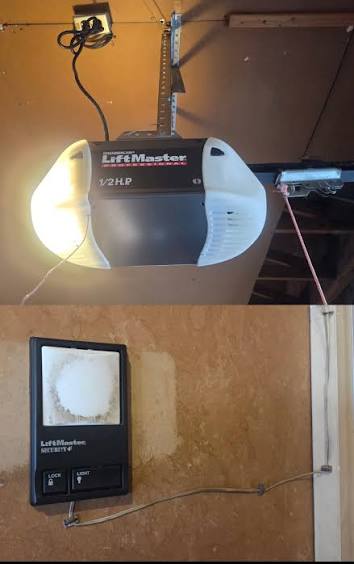
Can I Add a Remote to My Garage Door Opener? Your Complete Guide
Have you ever pulled into your driveway only to realize your garage door remote is missing, broken, or simply not working? It’s one of those small frustrations that can throw off your entire day. The good news is, the answer to “Can I add a remote to my garage door opener?” is almost always yes — and it’s easier than most homeowners think. Whether you need an extra remote for a family member, a replacement for a lost one, or a universal remote to consolidate multiple devices, this guide will walk you through everything you need to know.
Why Would You Need to Add a New Remote?
Before diving into the how-to, let’s talk about why so many people search for this solution every month. According to industry data from the Door & Access Systems Manufacturers Association (DASMA), over 70% of American homes have at least one automatic garage door opener. With that kind of adoption rate, the demand for additional or replacement remotes is enormous.
Here are the most common reasons homeowners look to add a remote:
- Lost or stolen remote — It happens more often than you’d think.
- Adding access for a new family member — Teenagers getting their first car, for example.
- Upgrading to a newer remote — Older remotes may lack modern security features like rolling code technology.
- Consolidating multiple openers — If you have two garage doors, a universal remote can simplify your life.
- Backup remote — Keeping a spare in your glove compartment or inside the house.
Understanding your reason will help you choose the right type of remote and programming method.
What Types of Garage Door Remotes Are Available?
Not all remotes are created equal. Choosing the right one depends on your opener’s brand, age, and frequency. Here’s a quick comparison:
| Remote Type | Best For | Pros | Cons |
|---|---|---|---|
| OEM (Original Equipment Manufacturer) | Exact match with your opener brand | Guaranteed compatibility, reliable | Often more expensive |
| Universal Remote | Multiple brands and models | Affordable, versatile | May require more setup steps |
| Smart/Wi-Fi Remote | Tech-savvy users who want app control | Control from anywhere, voice assistant integration | Requires Wi-Fi and smartphone |
| Keychain Mini Remote | Convenience and portability | Small, easy to carry | Limited range compared to full-size remotes |
Pro Tip: Check the label on your garage door opener motor unit (usually mounted on the ceiling) to find the brand name, model number, and frequency (e.g., 315 MHz or 390 MHz). This information is critical for compatibility.
How to Program a New Remote to Your Garage Door Opener (Step-by-Step)
This is the heart of the matter. Most modern garage door openers use a “Learn Button” system that makes adding a new remote straightforward. Here’s exactly what to do:
Step 1: Locate the Learn Button on Your Opener
Climb a sturdy step ladder and find the motor unit of your garage door opener. Look for a button labeled “Learn,” “Program,” or “Smart” — it’s typically located on the back or side panel. The button color varies by brand:
- LiftMaster / Chamberlain / Craftsman: Yellow, red/orange, purple, or green
- Genie: Square button near the antenna wire
- Overhead Door: Usually behind the light lens
Step 2: Clear Old Codes (Optional but Recommended)
If you’re replacing a lost remote and want to ensure no unauthorized person can access your garage, press and hold the Learn button for 6–10 seconds until the indicator light turns off. This erases all previously programmed remotes and keypads.
⚠️ Warning: Only do this if you have all your existing remotes available to reprogram afterward.
Step 3: Press the Learn Button
Press and release the Learn button. An LED light will turn on or begin blinking, indicating the opener is in programming mode. You typically have 30 seconds to complete the next step.
Step 4: Program Your New Remote
Within the 30-second window, press and hold the button on your new remote that you want to assign to the garage door. Hold it until the opener’s lights flash or you hear a click — this confirms successful pairing.
Step 5: Test the Remote
Step outside the garage and press the newly programmed button. Your door should open or close smoothly. Test it from various distances (up to 100 feet is typical range) to ensure a strong signal.
Compatibility: Will Any Remote Work With My Opener?
This is where many homeowners get stuck. The short answer: not every remote works with every opener. Compatibility depends on three main factors:
- Frequency — Your remote and opener must operate on the same radio frequency (commonly 315 MHz, 390 MHz, or dual-frequency).
- Rolling Code vs. Fixed Code — Openers manufactured after 1996 use rolling code (also called Security+), which changes the access code each time the remote is used. Older models use fixed DIP switches. Your remote must match your opener’s coding system.
- Brand Protocol — Some brands use proprietary communication protocols. For instance, LiftMaster’s Security+ 2.0 requires compatible remotes specifically designed for that system.
For a deeper understanding of how radio frequency identification and wireless communication work in consumer devices, you can explore the technical background on Wikipedia’s Radio Frequency page.
Troubleshooting: What If My Remote Won’t Program?
Even when you follow the steps correctly, things don’t always go smoothly. Here are the most common issues and their fixes:
- LED doesn’t blink when pressing Learn button: Check if the opener is plugged in and receiving power. Reset the circuit breaker if needed.
- Remote programs but doesn’t work from a distance: Replace the remote’s battery (most use a CR2032 coin cell). Also, check for interference from LED bulbs — some inexpensive LED garage lights emit radio frequency noise that disrupts signals.
- Remote works intermittently: Reprogram the remote. If the issue persists, the remote’s internal antenna may be damaged.
- Opener clicks but door doesn’t move: This is likely a mechanical issue unrelated to the remote. Check the safety sensors and track alignment.
Security Considerations When Adding a Remote
Adding a remote isn’t just about convenience — it’s also about home security. Keep these best practices in mind:
- Use rolling code remotes whenever possible. They generate a new code with every use, making it virtually impossible for thieves to intercept and replay the signal.
- Never leave a remote visible in your car. If someone breaks into your vehicle, they gain direct access to your home.
- Reprogram your opener if you lose a remote or move into a new home. Previous owners or finders could still have working access.
- Consider smart openers with real-time alerts. Brands like Chamberlain’s myQ system notify your phone every time the door opens or closes.
FAQ Section
Q1: Can I add a remote to any garage door opener?
Most garage door openers manufactured after the mid-1990s support additional remotes. However, very old models with DIP switch systems may have limited capacity (often up to 8 remotes). Always check your owner’s manual for the maximum number of supported devices.
Q2: How many remotes can I program to one garage door opener?
Most modern openers can store between 8 and 40 remote codes, depending on the brand and model. LiftMaster and Chamberlain units typically support up to 40, while Genie models usually handle around 20.
Q3: Do I need a professional to program a new remote?
In most cases, no. Programming a remote takes less than five minutes and requires no special tools. However, if your opener uses a proprietary system or you’re installing a smart hub, consulting a certified technician may save time and frustration.
Q4: Can I use a universal remote with my garage door opener?
Yes, as long as the universal remote supports your opener’s brand and frequency. Popular universal remotes like the Chamberlain Clicker (KLIK1U) and Genie Universal Remote are compatible with most major brands manufactured after 1993.
Q5: Why did my remote stop working suddenly?
The most common culprits are a dead battery, signal interference from nearby electronics, or a misaligned safety sensor. Start by replacing the battery, then reprogram the remote. If the problem continues, inspect the opener’s antenna wire to make sure it’s hanging straight down and not coiled or damaged.
Q6: Is it safe to buy a used garage door remote?
It can be, but exercise caution. Ensure the remote is factory reset before use, and verify compatibility with your opener model. Buying from reputable sellers or choosing refurbished OEM remotes is generally safer than purchasing from unknown sources.
Conclusion
So, can I add a remote to my garage door opener? Absolutely. With the right remote, a few minutes of your time, and the simple steps outlined above, you can restore convenience and security to your daily routine. Whether you’re replacing a lost remote, adding access for a loved one, or upgrading to smarter technology, the process is well within the reach of any homeowner.
Don’t let a missing or malfunctioning remote disrupt your day any longer. Grab the right remote, follow the programming steps, and enjoy seamless garage access once again.
Found this guide helpful? Share it with friends and family on Facebook, Twitter, or Pinterest — someone you know is probably dealing with a stubborn garage door remote right now! 🏠🔑
Leave a Reply