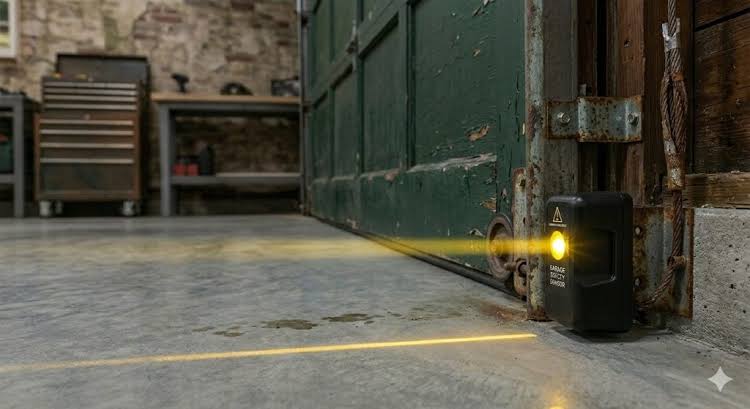
It is incredibly frustrating when your garage door refuses to close, especially when you are in a rush or the weather is turning bad. If you are currently staring at the blinking lights and asking, “Why is one of my garage door sensor yellow?”, do not worry—you are not alone, and the fix is usually quite simple. Let us walk through the exact reasons behind that stubborn yellow light and how to get your door moving smoothly again.
Why Is One Of My Garage Door Sensor Yellow? The Short Answer
To understand the problem, we first need to look at how modern garage door openers work. Your system uses a pair of photoelectric sensors placed near the floor on both sides of the door.
One sensor emits an invisible infrared beam, while the other receives it. If the beam is broken, the door will immediately reverse to prevent accidents.
The amber or yellow light typically indicates the sending sensor. This sensor is responsible for broadcasting the infrared beam to its partner. When this light is blinking or acting up, it means the beam is not successfully reaching the receiving sensor.
According to the U.S. Consumer Product Safety Commission, these automated reverse mechanisms have prevented thousands of severe entrapment incidents since they became mandatory in 1993. For more technical background on how these optical devices function, you can refer to the Photoelectric sensor entry on Wikipedia.
Top 4 Reasons Your Garage Door Sensor is Showing Yellow
When you are troubleshooting, identifying the root cause is half the battle. Here are the most common culprits behind a yellow sensor light.
1. Misalignment of the Sensor Eyes
This is the number one cause of sensor issues. Even a slight bump from a lawnmower, a bicycle, or a stray basketball can knock the sensors out of alignment. If the sending sensor (yellow light) is not pointing directly at the receiving sensor, the beam breaks.
2. Dirty or Obstructed Sensor Lenses
Garages are dusty environments. Over time, dirt, spider webs, or condensation can build up on the small plastic lenses. This physical barrier scatters the infrared beam, preventing it from reaching the other side.
3. Sunlight Interference
Believe it or not, the sun can blind your garage door sensors. Direct sunlight contains high amounts of infrared light. If the morning or afternoon sun shines directly into the receiving sensor, it can overpower the sender’s beam, causing the yellow light to flicker.
4. Wiring Issues or Loose Connections
The sensors connect to the main motor head via thin wires. If these wires are pinched, frayed, or loosely connected at the back of the sensor, the electrical current drops. This will cause the yellow LED to blink erratically or stay off entirely.
Step-by-Step Tutorial: How to Fix the Yellow Light
Ready to fix the issue? Grab a stepping stool and follow these concrete steps.
Step 1: Clean the Lenses Thoroughly Take a clean, dry microfiber cloth and gently wipe the small plastic lenses on both sensors. Do not use harsh chemical glass cleaners, as they can leave a residue that attracts more dust.
Step 2: Check and Adjust the Alignment Look closely at the sensors. Are they pointing at each other at the exact same height?
- Loosen the wing nut on the bracket just enough to move it.
- Adjust the sensor horizontally or vertically by about a 1/4-inch shift.
- Watch the lights. Once the yellow light stays steady and the receiving light turns solid green (or red), retighten the wing nut carefully.
Step 3: Block Out Direct Sunlight If the issue only happens at a specific time of day, sunlight is likely the culprit. Cut a small piece of cardboard or use a toilet paper tube. Slide it over the receiving sensor to create a physical shade. This blocks ambient sunlight without blocking the infrared beam.
Step 4: Inspect the Wiring Connections Trace the thin wires from the sensors back to the motor. Ensure the quick-connect pins at the back of the sensor are pushed in firmly. If you hear a distinct “click,” the connection is secure. If the wires are visibly damaged, they will need to be spliced or replaced.
Sensor LED Color Guide: Quick Reference
Understanding what the lights mean makes future troubleshooting much easier. Here is a quick comparison table to help you identify normal versus abnormal behavior.
| Sensor Type | LED Color | Primary Function | Normal Status | Abnormal Status |
|---|---|---|---|---|
| Sending Sensor | Amber / Yellow | Emits the IR beam | Steady yellow | Blinking or completely off |
| Receiving Sensor | Green / Red | Receives the IR beam | Steady green/red | Off or blinking |
DIY vs. Professional Help: Pros and Cons
Sometimes it is best to call an expert. Here is a quick text infographic to help you decide.
DIY Fix
- Pros: Completely free, takes less than 10 minutes, and gives you a sense of accomplishment.
- Cons: You might miss hidden internal wiring issues or a failing logic board.
Professional Technician
- Pros: Guaranteed fix, includes a full safety inspection of springs and cables, and saves you time.
- Cons: Costs between $100 and $200, and requires scheduling an appointment.
Frequently Asked Questions (FAQ)
Q1: Does a yellow light mean my sensor is completely broken?
Not necessarily. In 90% of cases, a yellow light simply means the sensor is misaligned, dirty, or experiencing sunlight interference. The internal hardware is usually perfectly fine. Only consider replacing the sensor if you have cleaned, aligned, and checked the wiring, but the light still refuses to turn on.
Q2: Can I temporarily bypass the yellow sensor to close the door?
Yes, most modern garage door openers have a “force close” or bypass feature. By holding down the wall button until the door completely closes, you override the sensors. However, this is highly discouraged as it disables a critical safety feature. Only do this in an absolute emergency, and ensure no people or pets are near the door.
Q3: How do I know which sensor is sending and which is receiving?
Generally, the sensor with the amber or yellow LED is the sender. The sensor with the green or red LED is the receiver. However, always check your specific owner’s manual, as some manufacturers (like LiftMaster or Chamberlain) might use different color coding depending on the model year.
Q4: Why does my garage door close but then immediately reverse?
If the door closes but reverses right after hitting the floor, your sensors are likely not the issue. This usually means the down limit switch is set incorrectly, or the close force setting on the motor is too low. The motor thinks it hit an obstacle (the floor) and reverses to protect itself. Check your motor’s manual to adjust the down limit and force dials.
Conclusion
Dealing with a stubborn garage door does not have to ruin your day. By understanding exactly why is one of my garage door sensor yellow, you can quickly clean, align, or shade the sensors to restore normal operation. Regular maintenance, like a quick wipe-down of the lenses every few months, will keep these safety features working perfectly year-round.
Leave a Reply