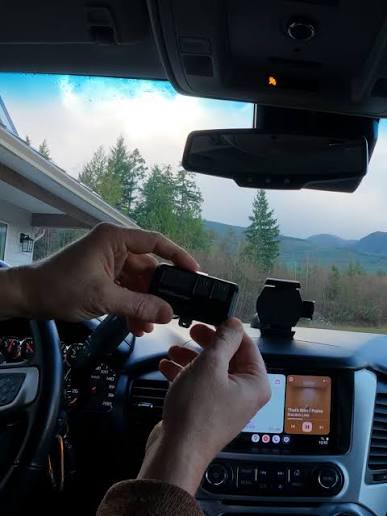
Introduction
There is nothing quite as frustrating as pulling into your driveway after a long day, only to realize you cannot get your new truck’s built-in transmitter to talk to your garage. If you are struggling to figure out how to program garage door opener in 2024 GMC Sierra, please know that you are not alone; this is one of the most common questions new Sierra owners ask. The good news is that the process is straightforward once you understand the specific sequence for the 2024 model year, and we are here to walk you through it like a friend sitting in the passenger seat.
Understanding the 2024 GMC Sierra HomeLink System
Before diving into buttons and lights, it is vital to understand what you are actually programming. The 2024 GMC Sierra does not use a proprietary “GMC” remote system; instead, it utilizes the HomeLink Universal Transceiver. This system is integrated directly into the overhead console or rearview mirror, depending on your trim level (AT4, Denali, etc.).
According to industry standards, HomeLink is compatible with nearly all major garage door opener manufacturers, including LiftMaster, Chamberlain, Genie, and Craftsman. However, the 2024 Sierra features updated software that streamlines the pairing process compared to older generations. Understanding this distinction prevents users from searching for non-existent “Sierra-specific” remotes and focuses efforts on the correct universal programming protocol.
Key Features of the 2024 System
- Tri-Frequency Compatibility: Works with 310, 315, and 390 MHz frequencies.
- Rolling Code Technology: Automatically syncs with modern security protocols to prevent code grabbing.
- Two-Way Communication: Provides visual feedback via LED indicators to confirm successful programming.
- Battery-Free Operation: Draws power directly from the vehicle’s electrical system.
Step-by-Step: How To Program Garage Door Opener In 2024 GMC Sierra
This tutorial covers the standard programming method for rolling-code openers, which accounts for over 90% of garage doors installed after 2006. Please ensure your vehicle is parked outside the garage during this process to prevent accidental activation.
Phase 1: Clear Previous Codes (If Applicable)
If this is a used 2024 Sierra or you are reprogramming a button, start fresh.
- Locate the three HomeLink buttons on your overhead console.
- Press and hold the two outer buttons simultaneously.
- Hold for approximately 10–20 seconds until the indicator light changes from solid amber to flashing amber.
- Release both buttons. Your system is now reset.
Phase 2: Program the Vehicle to the Remote
- Turn the ignition to ON/RUN (engine can be off, but electronics must be active).
- Hold your original handheld garage remote 1–3 inches away from the HomeLink button you wish to program.
- Simultaneously press and hold the handheld remote button AND the chosen HomeLink button.
- Watch the HomeLink indicator light. It will flash slowly at first, then rapidly.
- Once the light flashes rapidly (usually after 5–10 seconds), release both buttons.
- Test the programmed button. If the garage door activates, proceed to Phase 3. If not, repeat Phase 2, ensuring the remote battery is fresh.
Phase 3: Sync with the Garage Door Motor (Rolling Code Only)
This step is mandatory for modern openers and is often missed.
- Locate the “Learn” or “Smart” button on your garage door motor unit (usually near the antenna wire).
- Press and release the Learn button. Note: You typically have 30 seconds to complete the next step before the motor exits learning mode.
- Return to your Sierra and press the programmed HomeLink button twice within that 30-second window.
- Press the HomeLink button a third time if the door does not respond immediately.
- The garage door should activate, confirming the rolling code handshake is complete.
⚠️ Safety Warning: Never attempt to program your garage door opener while the vehicle is inside the closed garage. Exhaust fumes can accumulate quickly, and unexpected door movement can cause injury or property damage. Always perform programming outdoors.
Fixed Code vs. Rolling Code: Which Do You Have?
Identifying your opener type saves significant troubleshooting time. Here is a quick comparison to help you determine which path to follow.
| Feature | Fixed Code (Legacy) | Rolling Code (Modern) |
|---|---|---|
| Manufacture Date | Pre-1996 | Post-1996 (Standard after 2000) |
| Security Level | Low (Static Signal) | High (Changing Signal) |
| Programming Steps | Phase 1 & 2 Only | Phase 1, 2, & 3 Required |
| Learn Button Color | Usually None/Green | Yellow, Purple, Orange, or Red |
| Compatibility | Limited | Universal with 2024 Sierra |
For a deeper technical understanding of how these security protocols evolved, you can reference the Wikipedia article on Garage Door Openers, which details the history of rolling code technology and frequency standards.
Troubleshooting Common Programming Issues
Even with perfect instructions, technology sometimes hiccups. Here are solutions to the most frequent problems encountered when figuring out how to program garage door opener in 2024 GMC Sierra.
The Indicator Light Won’t Flash Rapidly
- Cause: Weak handheld remote battery or incorrect distance.
- Fix: Replace the CR2032 battery in your original remote. Try holding the remote at different angles and distances (0.5 to 6 inches) from the HomeLink button.
Door Opens Partially Then Reverses
- Cause: Safety sensor misalignment or travel limit issues.
- Fix: This is rarely a HomeLink issue. Check the photo-eye sensors at the base of your garage door tracks. Ensure they are clean, aligned, and unobstructed. Adjust the travel limits on the motor unit if necessary.
HomeLink Works Intermittently
- Cause: Radio frequency interference.
- Fix: LED bulbs in garage fixtures are notorious culprits. Swap them for “RF-shielded” LED bulbs specifically rated for garage door openers. Also, check for nearby ham radios or baby monitors operating on similar frequencies.
Third Press Doesn’t Activate Door
- Cause: Missed the 30-second Learn Mode window.
- Fix: Restart Phase 3 entirely. Press the Learn button on the motor and immediately return to the vehicle. Having a helper press the HomeLink button while you press the Learn button eliminates timing errors.
Frequently Asked Questions (FAQ)
Can I program multiple garage doors in my 2024 GMC Sierra?
Yes! The 2024 Sierra HomeLink system supports up to three separate devices. You can program your home garage, office parking gate, and a community entrance using the three distinct buttons. Each button operates independently and follows the same programming sequence.
Does programming HomeLink erase my existing garage remote codes?
No. Programming your Sierra adds a new authorized device to your garage door opener’s memory. Your existing handheld remotes and keypads will continue to work normally. Most modern openers support 20+ devices simultaneously.
Why won’t my 2024 Sierra program with my older Genie opener?
Older Genie models (pre-1995) may use dip-switch technology incompatible with newer HomeLink versions. You may need a HomeLink Compatibility Bridge (sold separately) to translate signals between the modern vehicle and legacy opener. Check your Genie model number against the official compatibility list before purchasing accessories.
Is there a way to program HomeLink without the original remote?
Generally, no. The original remote acts as the authentication token during initial setup. However, some newer Chamberlain/LiftMaster MyQ-enabled openers allow direct Wi-Fi-based programming through the MyQ app, bypassing the need for a physical remote. Consult your opener’s manual for smart-home integration options.
Will disconnecting my Sierra’s battery erase HomeLink settings?
Fortunately, no. HomeLink memory is stored in non-volatile flash memory, meaning your programmed codes persist even after battery replacement, jump starts, or extended storage. You only need to reprogram if you manually clear the system or replace the HomeLink module itself.
Can I use HomeLink for things other than garage doors?
Absolutely. The 2024 GMC Sierra HomeLink system can control gate operators, lighting systems, ceiling fans, and even some smart home devices equipped with RF receivers. Many homeowners use Button 3 for exterior landscape lighting, creating a seamless arrival experience beyond just opening the garage.
Conclusion
Mastering how to program garage door opener in 2024 GMC Sierra transforms your daily routine from fumbling with remotes to effortless, integrated convenience. By following the three-phase process outlined above—clearing old codes, pairing the vehicle, and syncing the rolling code—you can achieve reliable operation in under ten minutes. Remember to always prioritize safety by programming outdoors, and don’t hesitate to troubleshoot systematically if issues arise.
Your 2024 Sierra is an incredible machine, and its HomeLink system is designed to make life easier, not harder. With patience and the right guidance, you’ll be gliding into your garage hands-free in no time.
Found this guide helpful? Share it with fellow GMC Sierra owners on Facebook, Twitter, or your favorite truck forum! Helping another driver avoid programming frustration is the best kind of community support. Happy driving, and enjoy the seamless convenience of your newly synced garage door opener! 🚗🏠
Leave a Reply