Introduction
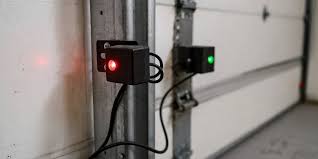
There is nothing quite as frustrating as trying to leave for work or come home, only to find your garage door refusing to close. You look at the safety eyes near the floor, and you notice something odd: one garage door sensor is yellow and one is green. This color discrepancy is not just a random light show; it is a specific diagnostic signal from your opener system telling you exactly what is wrong.
If you are seeing these lights, do not panic. This is a common issue that most homeowners can resolve in under ten minutes without calling a professional. In this guide, we will decode what those yellow and green lights mean, explain why they appear, and walk you through the exact steps to get your garage door working smoothly again.
What Do the Sensor Lights Mean?
Before we dive into fixes, it is crucial to understand the language your garage door opener is speaking. Most modern garage door openers, particularly popular brands like Chamberlain, LiftMaster, and Craftsman, use LED indicators on the safety reversal sensors to communicate status.
Typically, you have two sensors installed on either side of the garage door opening, about six inches off the ground. One is the sending unit (transmitter), and the other is the receiving unit (receiver).
- The Green Light: Usually found on the receiving sensor, a steady green light indicates that the sensor is receiving power and has a clear line of sight from the transmitter. It means “All Clear.”
- The Yellow (or Amber) Light: This light is often found on the sending unit or, in some models, indicates a warning state on the receiver. If you see one garage door sensor is yellow and one is green, it typically signifies that the sensors are powered but are not perfectly aligned, or there is a minor obstruction interfering with the infrared beam.
In many systems, a blinking yellow light suggests misalignment, while a solid yellow light might indicate standby mode or a wiring issue depending on the manufacturer. However, the combination of one yellow and one green is the classic signature of an alignment error.
Why Is One Sensor Yellow and the Other Green?
When you observe this specific color combination, your garage door opener’s logic board is preventing the door from closing as a safety precaution. The infrared beam that connects the two sensors is broken or weak. Here are the primary reasons this occurs:
1. Minor Misalignment
This is the most common cause. Over time, vibrations from the door opening and closing, or even accidental bumps from a car or lawn mower, can shift the sensor brackets by mere millimeters. Because the infrared beam is narrow, even a tiny shift can break the connection, causing the receiver to lose the signal and turn its indicator yellow (or blink) while the sender remains green.
2. Dirty Lenses
Dust, spider webs, mud, or condensation can accumulate on the small plastic lenses of the sensors. This debris scatters the infrared light, weakening the signal. The system interprets this weak signal as a broken beam, triggering the yellow warning light.
3. Sunlight Interference
Believe it or not, direct sunlight can interfere with garage door sensors. If the sun is shining directly into the receiving sensor’s lens, the intense ambient light can overwhelm the infrared signal. This often happens in the late afternoon or early morning. In this case, you might see the lights flicker or stay yellow until the sun moves.
4. Loose Wiring
If the wires connecting the sensors to the motor head are loose or frayed, the voltage reaching the sensors may be inconsistent. This can cause one sensor to function correctly (green) while the other struggles (yellow).
Step-by-Step Guide to Fixing Sensor Alignment
Fixing the issue where one garage door sensor is yellow and one is green is usually straightforward. Follow these steps carefully.
Step 1: Clean the Sensor Lenses
Before adjusting anything, rule out dirt.
- Take a soft, dry microfiber cloth.
- Gently wipe the lens of both the sending and receiving sensors.
- Check for spider webs around the bracket housing.
- Tip: Avoid using chemical cleaners, as they can leave a residue that attracts more dust.
Step 2: Check for Physical Obstructions
Ensure nothing is blocking the path between the two sensors. Even a leaf, a garden hose, or a box stored too close to the wall can interrupt the beam. Clear the area completely.
Step 3: Adjust the Sensor Brackets
This is the most critical step. You will need to realign the sensors so they are pointing directly at each other.
- Loosen the Wing Nut: Locate the wing nut or bolt holding the sensor bracket to the mounting rail. Do not remove it completely; just loosen it enough so the sensor can pivot.
- Align the Sensors: Look at the lights. Slowly adjust the angle of the sensor with the yellow light. Move it slightly up, down, left, or right.
- Watch for the Color Change: As you adjust, watch the yellow light. When the beam is re-established, the yellow light should turn solid green (or stop blinking, depending on your model). Both sensors should now show a steady green light.
- Tighten the Bracket: Once both lights are green, carefully tighten the wing nut while holding the sensor in place. Be careful not to shift it while tightening.
Step 4: Test the Door
Press your wall button or remote to close the door. If the sensors are aligned correctly, the door should close smoothly. If it reverses immediately upon touching the floor, the alignment may still be slightly off, or the force settings may need adjustment.
Troubleshooting Persistent Issues
If you have aligned the sensors and cleaned them, but one garage door sensor is yellow and one is green persists, consider these advanced checks.
| Issue | Symptom | Solution |
|---|---|---|
| Sunlight Glare | Lights work at night but fail during the day. | Install a shade or tube over the sensor to block direct sun. |
| Damaged Wire | Lights flicker or go out when moving the wire. | Inspect wires for cuts. Replace if damaged. |
| Bad Sensor Unit | One light never turns green despite alignment. | The LED or internal component may be failed. Replace the pair. |
| Voltage Drop | Lights are dim. | Check connections at the motor head. Ensure wires are secure. |
For more technical details on how infrared safety systems work, you can refer to general safety standards documented on Wikipedia.
FAQ Section
Q1: Can I bypass the sensors to close my garage door?
A: While it is technically possible to hold down the wall button to force the door closed (on some older models), it is highly discouraged. The sensors are a critical safety feature designed to prevent the door from crushing people, pets, or objects. Bypassing them creates a significant liability and safety hazard. Always fix the alignment instead.
Q2: Why does my sensor light blink yellow instead of staying solid?
A: A blinking yellow light almost always indicates misalignment. The sensor is detecting the beam intermittently. A solid yellow light (if applicable to your model) might indicate standby mode or a wiring fault. Consult your specific owner’s manual, as codes vary by brand.
Q3: Do I need to replace both sensors if one is broken?
A: Yes, it is recommended to replace both sensors as a pair. They are calibrated to work together, and buying a matched set ensures compatibility in frequency and voltage. Mixing old and new sensors can lead to persistent connectivity issues.
Q4: Can weather affect garage door sensors?
A: Absolutely. Heavy rain, snow, or extreme heat can affect performance. Moisture can get into the housing, causing short circuits or fogging the lens. In winter, ice buildup on the bracket can shift the angle. Regular maintenance checks during seasonal changes are advisable.
Q5: What if both lights are green but the door still won’t close?
A: If both sensors are green (indicating proper alignment) but the door reverses, the issue is likely with the travel limits or force settings on the motor unit, not the sensors. You may need to adjust the up/down limit screws on the back of the motor head.
Conclusion
Seeing one garage door sensor is yellow and one is green is a clear signal from your home’s security system that it needs a little attention. It is rarely a sign of catastrophic failure, but rather a simple maintenance issue like misalignment or dirt. By understanding what these lights mean and following the simple cleaning and alignment steps outlined above, you can restore your garage door’s functionality quickly and safely.
Remember, a well-maintained garage door is not just about convenience; it is about safety. Take a few minutes this weekend to check your sensors, and you will avoid the stress of a stuck door later.
Did this guide help you fix your garage door? Share this article with your neighbors or on social media to help others solve their sensor mysteries!
Leave a Reply