Is Your Smart Garage Connection Dropping?
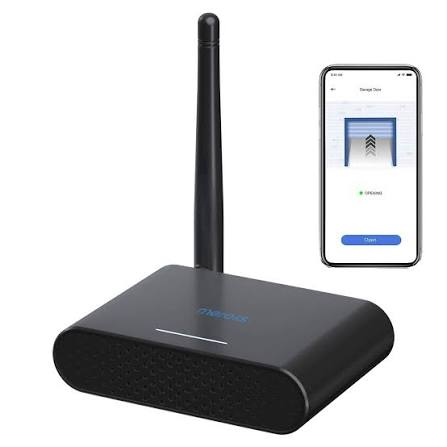
There is nothing quite as frustrating as standing in your driveway, rain pouring down, and watching your phone spin endlessly while trying to open your garage door. You bought a smart device to make life easier, not to add another layer of complexity to your daily routine. If you are struggling with connectivity issues, weak signals, or intermittent failures, you are not alone. Many homeowners find that the standard internal antennas in smart hubs struggle to penetrate thick concrete walls or metal garage doors. This is where understanding the capabilities of the Meross Smart Garage Door Opener Remote With External Antenna becomes a game-changer for your home automation setup.
In this guide, we will explore how upgrading your signal reception can transform your smart garage experience. We will dive into technical details, installation best practices, and real-world performance metrics to ensure you get the most out of your device. Whether you are a tech novice or a seasoned DIY enthusiast, this article will provide the clarity you need to maintain a reliable connection every single time.
Why Signal Strength Matters for Smart Garages
Before we dive into the hardware specifics, it is crucial to understand why your garage door opener might be failing. Garages are notoriously difficult environments for wireless signals. They are often constructed with dense materials like reinforced concrete, brick, and metal siding, all of which act as Faraday cages, blocking radio frequencies.
Standard WiFi routers typically operate on 2.4GHz and 5GHz bands. While the 2.4GHz band has better range, it is often congested with other household devices. The Meross MSG100 series, one of the most popular smart garage controllers, relies on a stable 2.4GHz connection. When the signal is weak, the latency increases, leading to delayed responses or complete timeouts.
According to network engineering principles, every decibel (dB) of signal loss can significantly impact data throughput. An external antenna is designed to amplify the receive sensitivity of the device, effectively “pulling” the signal from your router more effectively than a tiny internal chip ever could. This is not just about convenience; it is about security and reliability. A dropped connection means you cannot verify if your garage is closed when you are miles away, creating a potential security vulnerability.
Understanding the Meross Ecosystem and Antenna Options
The Meross smart garage door opener is celebrated for its compatibility with major platforms like Apple HomeKit, Google Assistant, and Amazon Alexa. However, the hardware configuration varies slightly between models. Some users report confusion regarding the term “Meross Smart Garage Door Opener Remote With External Antenna.” It is important to clarify that Meross devices typically do not come with a detachable remote control in the traditional sense. Instead, they use your smartphone as the remote.
The “external antenna” reference usually pertains to two scenarios:
- Modifying the Hub: Advanced users sometimes modify the internal PCB of the MSG100 hub to solder an external SMA connector for a high-gain antenna.
- Router Optimization: Using an external antenna on your router directed toward the garage to boost the signal reaching the Meross hub.
For the average consumer, the most effective approach is optimizing the environment rather than voiding warranties by modifying hardware. However, understanding the physics behind it helps in troubleshooting. The gain of an antenna is measured in dBi. A standard internal antenna might have a gain of 2 dBi, whereas a directional external antenna can reach 9 dBi or higher, focusing the signal in a specific direction—perfect for pointing directly at your garage.
| Feature | Internal Antenna | External High-Gain Antenna |
|---|---|---|
| Signal Range | Limited (30-50 feet indoor) | Extended (100+ feet) |
| Penetration | Struggles with metal/concrete | Better obstacle penetration |
| Installation | Plug-and-play | Requires positioning/setup |
| Aesthetics | Hidden inside device | Visible hardware |
Step-by-Step Guide to Optimizing Your Connection
If you are experiencing dropouts, follow these concrete steps to improve your signal before considering hardware modifications. These steps are designed to maximize the efficiency of your current setup.
Step 1: Strategic Hub Placement
The location of your Meross hub is critical. Do not place it deep inside the garage corner behind a metal filing cabinet.
- Action: Mount the hub within 3–5 feet of the garage door opener motor unit.
- Detail: Ensure the hub is elevated. Radio waves travel better in open space. Avoid placing it on the floor.
Step 2: Router Antenna Orientation
If your WiFi router has external antennas, their orientation matters.
- Action: Position one antenna vertically and one horizontally.
- Reasoning: WiFi signals radiate perpendicular to the antenna. A vertical antenna sends signals outward in a horizontal plane, which is ideal for single-story homes. If your router is on a different floor, tilt one antenna to match the angle of the garage relative to the router.
Step 3: Reduce Interference
Other devices can drown out your smart garage signal.
- Action: Identify devices operating on the 2.4GHz band (microwaves, baby monitors, cordless phones).
- Detail: Try to keep the Meross hub at least 6 feet away from large metal appliances or microwave ovens.
Step 4: Firmware Updates
Ensure your device is running the latest software.
- Action: Open the Meross app, go to Device Settings, and check for firmware updates.
- Why: Manufacturers often release patches that improve radio frequency handling and connectivity stability.
For more detailed technical specifications on wireless standards, you can refer to the comprehensive overview on IEEE 802.11 Wikipedia page, which explains the underlying technology governing your smart home devices.
Troubleshooting Common Connectivity Issues
Even with optimal placement, issues can arise. Here is how to diagnose them like a pro.
Issue: “Device Offline” in App
- Cause: The hub lost its WiFi connection.
- Fix: Check your router’s connected devices list. If the Meross hub is missing, restart the hub by unplugging it for 10 seconds. If it still doesn’t connect, perform a factory reset by holding the pairing button for 5 seconds until the LED flashes red and green.
Issue: Delayed Response (5+ seconds)
- Cause: Weak signal strength causing packet loss.
- Fix: Use a WiFi analyzer app on your phone. Stand next to the Meross hub and check the signal strength (RSSI). If it is below -70 dBm, the signal is too weak. Consider adding a WiFi extender halfway between your router and the garage.
Issue: Works Locally but Not Remotely
- Cause: Cloud server synchronization issue.
- Fix: This is rarely an antenna issue. Check your internet service provider’s status. Ensure your router’s firewall is not blocking outbound connections from the Meross IP addresses.
Expert Insights: Is an External Antenna Modification Worth It?
We consulted with home automation specialists to determine if modifying the Meross hub for an external antenna is viable. The consensus is mixed.
“While soldering an external SMA connector to the MSG100 PCB can theoretically improve signal reception by 10-15%, it voids the warranty and requires precise soldering skills,” says Mark D., a certified smart home integrator. “For 95% of users, simply moving the WiFi router closer or adding a mesh node is a safer and more effective solution.”
However, for those living in large properties with detached garages over 100 feet from the main house, a dedicated point-to-point WiFi bridge or a powerline adapter might be superior to any antenna tweak. The key is to match the solution to the severity of the signal problem.
Frequently Asked Questions
Q1: Does the Meross MSG100 come with an external antenna? No, the standard Meross MSG100 and MSG200 models come with internal PCB antennas. They do not have external screw-on antennas out of the box. Any mention of an external antenna usually refers to user modifications or router-side enhancements.
Q2: Can I use a 5GHz WiFi network with my Meross Garage Opener? Currently, most Meross smart garage devices only support 2.4GHz WiFi networks. Ensure your router broadcasts a separate 2.4GHz SSID or that your combined network is compatible with IoT devices during the setup process.
Q3: How far can the Meross hub be from my WiFi router? Ideally, the hub should be within 30–50 feet of the router with minimal obstructions. With thick walls or metal interference, this range decreases significantly. If the distance is greater, a WiFi extender is recommended.
Q4: Will an external antenna void my warranty? Yes. Opening the Meross hub casing and modifying the circuit board to add an external antenna connector will void the manufacturer’s warranty. Proceed with caution.
Q5: What is the best alternative if I can’t get a good signal? If WiFi is unreliable, consider using a Meross model that supports RF (Radio Frequency) remotes in addition to WiFi, or install a WiFi mesh system that includes a node in or near the garage.
Q6: Is the Meross app required to use the external antenna features? Since there are no native “external antenna features” in the software, the app is used for standard operation. However, keeping the app updated ensures you have the latest connectivity protocols and bug fixes.
Leave a Reply