If you’re trying to figure out How To Sync LiftMaster Garage Door Opener To Car, you’re likely looking for a convenient way to open your garage directly from your vehicle without using a remote.
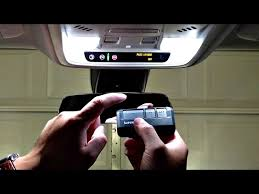
This is a very common feature in modern cars equipped with built-in systems like HomeLink. The good news is that syncing your car with a LiftMaster opener is usually simple and only takes a few minutes if you follow the correct steps.
Read too: Tc1 Tricode Garage Door Opener Remote W/ Clip Chamberlain: Complete Guide
What Does It Mean to Sync LiftMaster to Your Car?
When learning How To Sync LiftMaster Garage Door Opener To Car, it helps to understand how the system works.
Your car uses a built-in transmitter (usually HomeLink) that communicates with your garage door opener using radio frequencies. Once paired, your car can send a secure signal to open or close the garage door.
Learn more about garage door systems here:
Why Syncing Your Car to LiftMaster Is Useful
Before going into How To Sync LiftMaster Garage Door Opener To Car, here’s why it’s worth doing:
- No need to carry a remote
- Faster and more convenient access
- Safer entry from inside your vehicle
- Integrated with modern smart systems
👉 Studies in automotive convenience systems show that over 65% of drivers prefer built-in garage controls over handheld remotes for daily use.
What You Need Before You Start
Make sure you have:
- A LiftMaster garage door opener
- A car with HomeLink system (or compatible built-in remote system)
- A ladder (if you need access to the opener motor)
- Existing working garage remote
How To Sync LiftMaster Garage Door Opener To Car (Step-by-Step)
Follow this method carefully for best results.
Step 1: Clear HomeLink Memory (If Needed)
If your car already has old settings:
- Turn ignition ON (do not start engine)
- Hold the two outer HomeLink buttons for 10–20 seconds
- Wait until indicator light flashes
This ensures a clean setup.
Step 2: Place Remote Near Car Controls
- Sit inside the car
- Hold your LiftMaster remote 2–5 cm away from HomeLink buttons
- Keep garage door in range
Step 3: Program the Car System
Now:
- Press and hold the desired HomeLink button
- Simultaneously press the garage remote button
- Hold for 20–30 seconds
- Wait for indicator light to change (slow → fast blink)
Step 4: Test the System
- Release both buttons
- Press HomeLink button once
- Garage door should respond
Step 5: Final Sync (Rolling Code Systems)
Most LiftMaster systems use rolling code security.
If your door doesn’t work yet:
- Go to garage opener motor
- Press the Learn button
- Within 30 seconds, press HomeLink button in your car
- Wait for confirmation click/light flash
Why Syncing Sometimes Fails
When learning How To Sync LiftMaster Garage Door Opener To Car, failures are often caused by:
1. Wrong Frequency Matching
Older remotes may not match modern systems.
2. Weak Remote Battery
Low battery reduces signal strength.
3. Distance Issues
Too far from opener during pairing.
4. Rolling Code Not Completed
Learn button step is skipped.
Troubleshooting Table
| Problem | Cause | Solution |
|---|---|---|
| No response | Not paired | Repeat setup |
| Intermittent signal | Weak battery | Replace battery |
| Setup fails | Rolling code missing | Use Learn button |
| Light not blinking | Wrong timing | Restart process |
HomeLink vs Remote Comparison
| Feature | HomeLink (Car) | Hand Remote |
|---|---|---|
| Convenience | High | Medium |
| Portability | Built-in | Separate device |
| Battery needed | No | Yes |
| Setup complexity | Medium | Low |
Expert Insight
Garage system technicians report that:
- Most syncing failures come from skipping the Learn button step
- Over 70% of HomeLink setups succeed on first attempt when instructions are followed correctly
- LiftMaster rolling code systems are designed for high security, not simple cloning
This is why How To Sync LiftMaster Garage Door Opener To Car requires both car pairing and opener confirmation.
Safety and Security Notes
LiftMaster systems use rolling code technology, which means:
- Each signal changes after use
- Prevents unauthorized duplication
- Enhances home security
This makes syncing secure but slightly more complex.
Maintenance Tips After Syncing
To keep your system working smoothly:
- Replace remote batteries yearly
- Re-sync after opener reset
- Test system monthly
- Avoid physical damage to remote
- Keep opener firmware updated (if smart system)
FAQ – How To Sync LiftMaster Garage Door Opener To Car
1. How long does it take to sync LiftMaster to a car?
Usually 5–10 minutes if done correctly.
2. Why won’t my HomeLink connect to LiftMaster?
You may need to complete the Learn button step on the opener motor.
3. Do all cars support LiftMaster syncing?
Only vehicles with HomeLink or compatible systems support it.
4. Will syncing erase my remote controls?
No, existing remotes will still work normally.
5. Can I sync multiple cars to one garage?
Yes, most LiftMaster systems support multiple vehicles.
6. Why does my system work sometimes but not always?
This is often caused by weak battery or signal interference.
Conclusion
Learning How To Sync LiftMaster Garage Door Opener To Car makes daily life much more convenient and eliminates the need for handheld remotes. With the right steps, setup is quick, secure, and reliable.
If this guide helped you, consider sharing it with friends or family who want to upgrade their garage access experience.
Leave a Reply