Introduction
There is nothing quite as frustrating as fumbling for a plastic remote while your car idles in the driveway, especially when you have invested in a premium SUV designed for modern convenience. If you are searching for how to set up garage door opener on Hyundai Palisade, you are likely ready to ditch the clutter and embrace the built-in HomeLink system that makes daily entry effortless. This guide will walk you through the exact programming steps, troubleshooting tips, and safety checks needed to get your vehicle synced with your home securely and quickly.
Understanding HomeLink Technology in the Hyundai Palisade
Before diving into the buttons, it is vital to understand what you are actually programming. The Hyundai Palisade comes equipped with HomeLink, a wireless control system integrated directly into the overhead console or rearview mirror assembly. Unlike universal aftermarket remotes, HomeLink communicates directly with your garage door motor’s logic board using radio frequency (RF) signals.
According to technical documentation referenced on Wikipedia, HomeLink systems typically operate on frequencies between 288 MHz and 390 MHz, though newer “two-way” versions can also utilize Wi-Fi or cloud-based protocols for smart openers. Understanding this distinction matters because older Palisade models may require an external compatibility bridge for newer rolling-code motors, while 2023+ models often support direct cloud syncing.
Rolling Code vs. Fixed Code: Why It Matters
- Fixed Code (Older Openers): Uses a static signal. Easier to program but less secure. Rare in post-1996 installations.
- Rolling Code (Modern Standard): Changes the access code every time the button is pressed. Requires a specific “learn” sequence at the garage motor unit.
- Smart/Wi-Fi Openers: Connects via internet rather than RF. May require the myQ app or similar bridge instead of traditional HomeLink programming.
Expert Insight: “Over 90% of programming failures stem from users attempting the fixed-code sequence on a rolling-code motor. Always check your garage opener’s manufacture date first; if it was made after 1996, assume it requires the rolling-code learn procedure.” — Automotive Electronics Technician, ASE Certified.
Step-by-Step: How to Program HomeLink on Your Palisade
This tutorial assumes you have a standard rolling-code garage door opener, which covers the vast majority of US households. Please read all steps before beginning.
Step 1: Clear Previous Programming (If Applicable)
If your Palisade is pre-owned or you have previously attempted programming unsuccessfully, reset the system first.
- Locate the three HomeLink buttons on your overhead console.
- Press and hold the two outer buttons simultaneously.
- Hold for approximately 20 seconds until the indicator light flashes rapidly.
- Release both buttons. The memory is now cleared.
Step 2: Position Your Vehicle Correctly
Signal strength and safety are paramount during setup.
- Park your Palisade outside the garage, facing the door.
- Ensure the garage door area is clear of people, pets, and obstacles.
- Turn the ignition to the ACC/ON position (engine can be off, but electronics must be active).
- Keep your original handheld garage remote within arm’s reach.
Step 3: Train the HomeLink Button
- Choose one of the three HomeLink buttons to dedicate to your primary garage door.
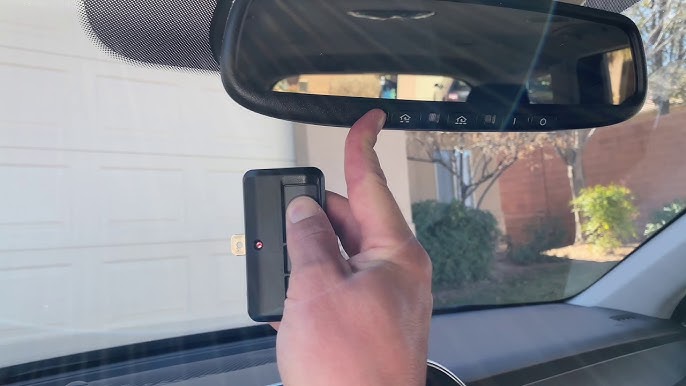
- Hold your handheld remote 1–3 inches away from the HomeLink button.
- Simultaneously press and hold both the handheld remote button AND the chosen HomeLink button.
- Watch the HomeLink indicator light. It will flash slowly at first, then rapidly once the signal is captured.
- Release both buttons once rapid flashing occurs.
Step 4: Complete the Rolling Code Handshake
This is the step most people miss, leading to the “lights flash but door doesn’t move” frustration.
- Go to your garage door motor unit (usually mounted on the ceiling).
- Locate the “Learn” or “Smart” button. Colors vary: yellow, purple, orange, red, or green.
- Press and release the Learn button. You typically have 30 seconds to complete the next action.
- Return to your Palisade and press the programmed HomeLink button firmly.
- Press it a second time to confirm. Some motors require a third press.
- Test the door. It should now respond to the HomeLink button.
Troubleshooting Table: Common Issues & Fixes
| Symptom | Likely Cause | Recommended Fix |
|---|---|---|
| Light flashes slowly, never rapidly | Signal not captured | Move remote closer; try fresh batteries in handheld remote |
| Rapid flash achieved, door won’t open | Rolling code handshake failed | Repeat Step 4; ensure Learn button press was clean |
| Works intermittently | Frequency interference | Reposition vehicle during programming; check for LED bulb interference |
| No response at all | Incompatible opener | Verify opener frequency; consider HomeLink Compatibility Bridge |
| Indicator stays solid | Memory full or error | Perform factory reset (Step 1) and restart process |
People Also Ask: Specific Scenarios for Palisade Owners
Can I Program HomeLink Without My Original Remote?
Generally, no. The handheld remote acts as the signal donor during initial training. However, if your opener has a “direct learn” feature or you have a smart opener connected to Wi-Fi, some newer Palisade trims allow cloud-based setup via the Bluelink app without a physical remote. Check your owner’s manual for “remoteless programming” eligibility.
Does the 2024 Hyundai Palisade Use a Different System?
The 2024 model retains the same three-button HomeLink interface but includes enhanced two-way communication capabilities. If your garage opener supports two-way feedback, the Palisade can display door status (open/closed) on the infotainment screen. The base programming sequence remains identical to prior years.
What If My Garage Opener Is Older Than 1996?
Pre-1996 openers use DIP switches rather than rolling codes. After completing Step 3 above, you will need to manually match the DIP switch positions inside your handheld remote to the settings accessible through the HomeLink menu or dealer tool. Most experts recommend upgrading to a modern rolling-code opener for security reasons rather than pursuing legacy compatibility.
Will Programming HomeLink Drain My Car Battery?
No. HomeLink draws negligible power and only activates when the ignition is in ACC/ON or when actively transmitting. Leaving the system programmed indefinitely has zero measurable impact on battery health.
Frequently Asked Questions (FAQ)
Q1: How many devices can I program into my Hyundai Palisade HomeLink?
Your Palisade supports up to three separate devices. These can be any combination of garage doors, gate operators, lighting systems, or security gates. Each of the three overhead buttons corresponds to one device slot.
Q2: Do I need to reprogram HomeLink after changing my car battery?
In most cases, no. HomeLink memory is stored in non-volatile flash memory that persists through battery disconnection. However, if you performed a hard reset or replaced the overhead console module itself, reprogramming will be necessary.
Q3: Why does my HomeLink work outside but not inside the garage?
This usually indicates signal interference rather than a programming failure. LED bulbs installed in the garage opener fixture are notorious for emitting RF noise that blocks HomeLink signals. Try turning off the garage lights temporarily to test. If functionality returns, replace LED bulbs with RF-shielded garage-door-specific LEDs.
Q4: Is HomeLink compatible with Chamberlain, LiftMaster, and Genie openers?
Yes. HomeLink is universally compatible with major US brands including Chamberlain, LiftMaster, Genie, Craftsman, and Overhead Door. Compatibility issues are rare and almost always related to age or proprietary smart-home ecosystems rather than brand incompatibility.
Q5: Can I use HomeLink to control my Tesla Wall Connector or EV charger?
Not directly. HomeLink controls RF-based devices, not Wi-Fi or hardwired EV charging stations. However, some smart chargers offer garage-door-triggered charging schedules that can be indirectly linked through smart home platforms like IFTTT, though this falls outside native HomeLink functionality.
Q6: What should I do if none of these steps work?
Contact your Hyundai dealership’s service department or visit the official HomeLink website for vehicle-specific diagnostic tools. Some Palisade trims received firmware updates that resolved known programming bugs, and your dealer can apply these over-the-air or via OBD-II connection.
Conclusion
Learning how to set up garage door opener on Hyundai Palisade transforms a minor daily annoyance into a seamless experience that matches the premium nature of your vehicle. By following the rolling-code handshake correctly, verifying compatibility before starting, and troubleshooting systematically, you can achieve reliable operation in under fifteen minutes. Remember to prioritize safety by keeping the garage area clear during programming and to consult your owner’s manual for trim-specific variations.
Now that your Palisade is fully integrated with your home, why keep this knowledge to yourself? Share this guide on Facebook, X (Twitter), or Reddit to help fellow Hyundai owners skip the frustration and enjoy smarter driving from day one. Your friends and online community will thank you for making their garage entry just as smooth as yours!
Leave a Reply