Introduction
There is nothing quite as frustrating as pulling into your driveway in the rain, only to realize you still have to fumble for a plastic remote or get out of your luxury sedan to open the gate manually. If you are searching for how to set up garage door opener in Mercedes C300, you are likely ready to embrace the seamless convenience of integrated vehicle technology but feel overwhelmed by the programming process. You deserve a smooth, secure entry experience without the guesswork, and this comprehensive guide is designed to walk you through every button press with confidence and clarity.
Understanding HomeLink Technology in Your Mercedes-Benz
Before diving into the buttons, it is vital to understand what you are actually programming. The Mercedes C300 utilizes the HomeLink system, a universal transceiver built directly into your vehicle’s overhead console or rearview mirror. Unlike traditional remotes that use fixed codes, modern HomeLink systems use rolling-code technology for enhanced security.
According to automotive safety standards and manufacturer specifications, HomeLink is compatible with nearly all major garage door opener brands sold in the United States, including LiftMaster, Chamberlain, Genie, and Craftsman. For a deeper technical understanding of how these radio frequency transceivers operate within vehicular ecosystems, you can refer to the Wikipedia entry on HomeLink. This foundational knowledge ensures you understand why certain steps are necessary, particularly when dealing with older versus newer garage motors.
Rolling Code vs. Fixed Code: Why It Matters
| Feature | Fixed Code (Older) | Rolling Code (Modern) |
|---|---|---|
| Security Level | Low (Susceptible to cloning) | High (Code changes each use) |
| Programming Steps | 2 Steps (Vehicle only) | 3 Steps (Vehicle + Motor Learn Button) |
| Common Era | Pre-1996 | 1996–Present |
| Mercedes C300 Compatible? | Yes | Yes (Standard) |
Note: Most Mercedes C300 owners will be using the Rolling Code method. If your garage motor was manufactured after 1996, assume you need the three-step process.
Step-by-Step: How to Program HomeLink in Mercedes C300
This tutorial assumes you have a standard W205 or W206 chassis Mercedes C300. Always ensure your vehicle is parked outside the garage during programming to prevent accidental closure or injury.
Phase 1: Clearing Previous Settings (Recommended)
If you purchased your C300 pre-owned or are reprogramming a button, start fresh.
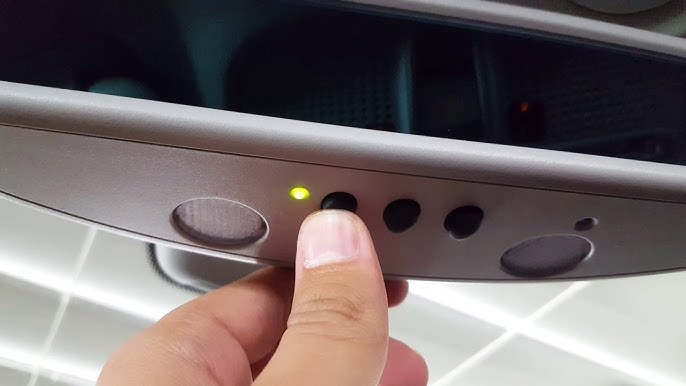
- Locate the three HomeLink buttons on your overhead console or rearview mirror.
- Press and hold the two outer buttons simultaneously.
- Hold for approximately 10 seconds until the indicator LED flashes rapidly (usually red or amber).
- Release both buttons. Your system is now erased and ready for new programming.
Phase 2: Programming the Vehicle Transmitter
- Turn your Mercedes C300 ignition to the “ON” position (engine running is recommended to prevent battery drain during extended programming).
- Hold your original garage door remote 1–3 inches away from the HomeLink buttons.
- Simultaneously press and hold your original remote button AND your chosen HomeLink button.
- Watch the HomeLink indicator light. It will flash slowly at first, then rapidly once the frequency is captured.
- Release both buttons immediately upon seeing the rapid flash.
Phase 3: Syncing with the Garage Door Motor (Rolling Code Only)
This is the step most users miss when learning how to set up garage door opener in Mercedes C300.
- Go to your garage door motor unit mounted on the ceiling.
- Locate the “Learn” or “Smart” button. It is typically yellow, purple, orange, or green and located near the antenna wire or light lens.
- Press and release the Learn button. You usually have 30 seconds to complete the next step before the motor exits learning mode.
- Return to your C300 and press your newly programmed HomeLink button firmly for 2 seconds, release, and repeat up to three times.
- Test the system. The door should activate via the car button.
Expert Safety Tip: Never program your garage door opener while the vehicle is inside the garage. The signal strength inside an enclosed space can cause erratic behavior, and accidental activation poses a significant crushing hazard. Always park outside with a clear line of sight to the door.
Troubleshooting Common Programming Failures
Even professionals encounter hiccups. If your Mercedes C300 isn’t syncing, check these variables before assuming hardware failure.
- Battery in Original Remote: A weak battery in your handheld remote is the #1 cause of programming failure. Replace it before retrying Phase 2.
- Distance Issues: Holding the remote too far (>3 inches) or too close (<1 inch) can prevent signal capture. Adjust incrementally.
- Frequency Mismatch: Some older C300 models (pre-2014) may not support newer 315MHz+ frequencies. Check your owner’s manual for frequency compatibility.
- LED Feedback: If the light never flashes rapidly during Phase 2, the vehicle isn’t receiving the signal. Try angling the remote differently or using a different button.
- Gate/Community Systems: Community gates often require a separate “repeater” or specific commercial programming sequence that differs from residential doors.
Maintaining Your HomeLink System for Long-Term Reliability
Once you’ve successfully learned how to set up garage door opener in Mercedes C300, maintenance is minimal but important.
- Annual Battery Check: While HomeLink draws power from your car, your original remote’s battery health affects reprogramming ease. Keep spares in your glovebox.
- Reprogram After Motor Replacement: If you replace your garage door opener, you must restart from Phase 1. The old rolling codes will not transfer.
- Software Updates: Mercedes occasionally releases MBUX or COMAND updates that improve HomeLink compatibility. Visit your dealer or check the Mercedes me app for available updates.
- Clean the Console: Dust and debris around the buttons can cause intermittent contact issues. Use compressed air gently to keep the area clean.
Frequently Asked Questions (FAQ)
1. Can I program my Mercedes C300 HomeLink without the original remote?
Generally, no. The HomeLink system requires the original transmitter to clone the frequency and code. However, if your garage motor has a “remote-less” programming feature or you have access to the motor’s learn button with a compatible keypad, some workarounds exist. Contact your garage door manufacturer for specific keyless entry programming options.
2. Why does my HomeLink work intermittently in my C300?
Intermittent operation usually indicates signal interference or a failing component. Check for LED bulbs near your garage motor (some emit RF interference), ensure your car battery is healthy, and verify the garage door safety sensors are aligned. If problems persist, the HomeLink module itself may need diagnostic testing at a Mercedes dealership.
3. Is HomeLink compatible with smart garage openers like MyQ or Tailwind?
Yes, but indirectly. HomeLink communicates with the motor, not the Wi-Fi hub. As long as your smart opener has a physical motor unit with a learn button, HomeLink will function as a secondary trigger. Your smartphone app and HomeLink can coexist without conflict.
4. How many devices can I store in my Mercedes C300 HomeLink?
Most C300 models feature three programmable buttons, allowing you to store up to three separate frequencies. This typically covers a home garage, office parking gate, and a community entrance. Each button operates independently and can be reprogrammed individually without affecting the others.
5. Does programming HomeLink void my Mercedes warranty?
Absolutely not. HomeLink is an OEM-integrated feature designed for consumer use. Programming it follows manufacturer-approved procedures and has zero impact on your vehicle’s warranty coverage. However, aftermarket modifications to the HomeLink wiring or module could raise warranty concerns.
6. My C300 is a 2024 model; is the process different?
Newer W206 chassis models may integrate HomeLink controls into the MBUX touchscreen rather than physical overhead buttons. The fundamental rolling-code programming logic remains identical, but the user interface differs. Consult your specific year’s digital owner’s manual via the MBUX system for visual guidance tailored to your trim level.
Conclusion
Mastering how to set up garage door opener in Mercedes C300 transforms your daily arrival experience from a chore into a moment of effortless luxury. By following the three-phase rolling code process, respecting safety protocols, and understanding the technology behind the buttons, you’ve unlocked a feature that adds genuine value to your ownership experience. Remember, patience during programming pays dividends in years of reliable, secure access.
Found this guide helpful? Share it with fellow Mercedes enthusiasts on Facebook, X (Twitter), or your favorite automotive forum! Helping another C300 owner avoid programming frustration is the best kind of community support. Safe driving and smooth entries ahead! 🚗✨
Leave a Reply