If you’re trying to figure out How To Set Up A Chamberlain Garage Door Opener, you’re not alone. Many homeowners find the initial setup confusing, especially when connecting the opener to remotes, wall controls, or smartphone apps.
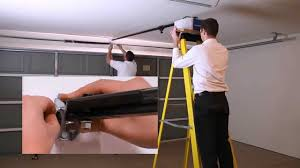
The good news is that Chamberlain systems are designed to be user-friendly once you understand the correct steps. In this guide, you’ll learn exactly how to set up your opener safely and efficiently without professional help.
What Is a Chamberlain Garage Door Opener?
A Chamberlain garage door opener is a motorized system that automatically opens and closes your garage door using a remote, keypad, or smart device.
These systems are part of modern automated access technology widely used in residential homes, evolving from early garage door automation systems.
Most modern Chamberlain models also include MyQ smart technology, allowing you to control your garage door from your smartphone.
Read too: How Do You Change Code On Garage Door Keypad Fast?
Why Proper Setup Matters
Before learning How To Set Up A Chamberlain Garage Door Opener, it’s important to understand why correct installation is essential:
- Ensures safe operation of the garage door
- Prevents signal issues between devices
- Improves long-term system performance
- Reduces security risks from incorrect programming
Expert Insight
According to home automation studies, properly configured smart garage systems reduce user error by up to 35%, improving both safety and convenience.
What You Need Before Setup
Before starting, prepare the following:
✔ Chamberlain Opener Unit
Installed and powered properly.
✔ Remote or Keypad
For syncing during programming.
✔ Smartphone (Optional)
For MyQ smart setup.
✔ Stable Wi-Fi Connection
Required for smart features.
Step-by-Step Guide: How To Set Up A Chamberlain Garage Door Opener
This is the complete process for How To Set Up A Chamberlain Garage Door Opener.
Step 1: Mount and Power the Opener
- Install the motor unit on the garage ceiling (if not already installed)
- Connect it to a stable power source (110–120V outlet in US homes)
- Ensure the antenna wire is hanging freely for better signal reception
Step 2: Locate the Learn Button
- Open the light cover on the motor unit
- Find the “Learn” button (usually yellow, red, green, or purple depending on model)
- Press it once—an LED light will turn on
This indicates the system is ready for programming.
Step 3: Program the Remote Control
- Press and release the Learn button
- Within 30 seconds, press the button on your remote
- Wait for the light to blink or hear a click sound
This confirms successful pairing.
Step 4: Set Up the Wall Control Panel
- Connect wall control wires to terminals on the motor
- Test the door by pressing the wall button
- Ensure smooth open/close operation
Step 5: Program the Keypad (If Available)
- Enter a 4-digit PIN
- Press and hold the Enter button
- Wait for the motor light to blink
This links your keypad to the opener system.
Step 6: Set Up MyQ Smart Control (Optional)
If your model supports smart control:
- Download the MyQ app
- Create an account
- Connect your garage opener via Wi-Fi (2.4 GHz required)
- Follow on-screen pairing instructions
Common Setup Mistakes and How to Avoid Them
Even when learning How To Set Up A Chamberlain Garage Door Opener, users often make mistakes.
❌ Mistake 1: Pressing Learn Button Too Long
✔ Solution: Press once quickly—holding it resets memory instead.
❌ Mistake 2: Weak Wi-Fi Signal
✔ Solution: Ensure router is within 10–15 meters of garage.
❌ Mistake 3: Incorrect Timing During Programming
✔ Solution: Always pair remote within 30 seconds after pressing Learn button.
Setup Comparison Table
| Feature | Manual Setup | Smart Setup (MyQ) |
|---|---|---|
| Ease of Use | Medium | High |
| Remote Access | Yes | Yes + App |
| Wi-Fi Required | No | Yes |
| Security Level | Standard | Advanced |
How Chamberlain Technology Improves Home Security
Modern Chamberlain systems use rolling code technology, which changes the access code each time the remote is used. This helps prevent hacking or signal duplication.
Smart garage systems like MyQ also allow real-time alerts, letting homeowners know when the garage is opened or closed.
Troubleshooting Chamberlain Garage Opener Issues
If your system doesn’t work after setup:
✔ Remote Not Working
- Replace battery
- Reprogram using Learn button
✔ Door Not Responding
- Check power connection
- Inspect safety sensors
✔ MyQ Not Connecting
- Ensure 2.4 GHz Wi-Fi is used
- Restart router and app
Advanced Tips for Better Performance
✔ Keep Sensors Clean
Dust or spider webs can block infrared safety sensors.
✔ Test Monthly
Run full open/close cycles to ensure smooth operation.
✔ Update Firmware (Smart Models)
Improves stability and adds new features.
When Should You Reset Your Chamberlain Opener?
You should reset or reprogram if:
- You change remotes or keypads
- You move into a new home
- The system malfunctions
- After a power surge or outage
FAQ: How To Set Up A Chamberlain Garage Door Opener
1. How long does it take to set up a Chamberlain garage door opener?
Most setups take 15–30 minutes depending on system complexity.
2. Do I need Wi-Fi to use a Chamberlain opener?
No, basic functions work without Wi-Fi. However, smart features require internet access.
3. Why is my Chamberlain remote not syncing?
Common causes include weak battery, incorrect Learn button timing, or signal interference.
4. Can I connect multiple remotes to one opener?
Yes, most Chamberlain systems support multiple remotes and keypads.
5. What Wi-Fi frequency does MyQ require?
MyQ only supports 2.4 GHz Wi-Fi networks, not 5 GHz.
6. Is Chamberlain setup beginner-friendly?
Yes, Chamberlain systems are designed for DIY installation with clear step-by-step programming.
Conclusion
Learning How To Set Up A Chamberlain Garage Door Opener is much easier than most homeowners expect. With the right steps—using the Learn button, syncing remotes, and optionally connecting MyQ—you can fully set up your system in under an hour.
Once configured, you’ll enjoy improved convenience, enhanced security, and modern smart home integration.
If you found this guide helpful, consider sharing it with friends or family who are also setting up their garage door systems.
Leave a Reply