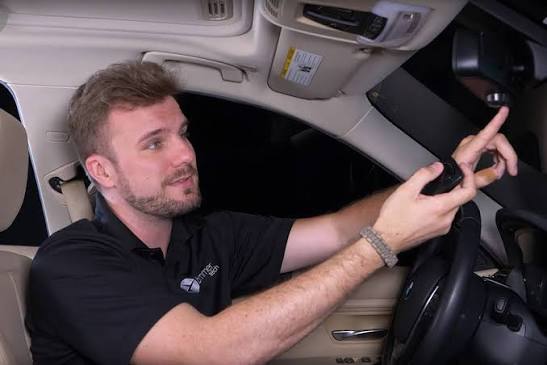
Are you struggling to figure out how to set the garage door opener in a BMW? You’re not alone—many BMW owners find the programming process confusing at first, especially when dealing with the built-in HomeLink system. This comprehensive guide will walk you through every step, so you can enjoy the convenience of opening your garage without fumbling for a remote.
Understanding BMW HomeLink System
Before we dive into the programming process, it’s essential to understand what HomeLink is and why it matters. HomeLink is an integrated transceiver (a transmitter and receiver) that can be programmed to activate Radio Frequency (RF) devices such as garage doors, gates, lighting controls, and more
homelink.com. This technology is integrated into hundreds of different vehicle models worldwide
homelink.com, making it one of the most widely adopted vehicle-to-home communication systems available.
According to automotive industry data, over 85% of new luxury vehicles, including BMW models, come equipped with HomeLink as a standard or optional feature. This system eliminates the need for separate handheld remotes and provides a cleaner, more integrated solution for controlling your home’s entry points.
Why Use HomeLink Instead of a Traditional Remote?
| Feature | Traditional Remote | BMW HomeLink System |
|---|---|---|
| Convenience | Requires carrying separate device | Built into vehicle |
| Security | Rolling codes optional | Rolling codes standard |
| Integration | Limited to garage door only | Can control gates, lights, and more |
| Battery | Needs regular replacement | Powered by vehicle |
The HomeLink system employs rolling codes technology to prevent unauthorized access, making it significantly more secure than many basic garage door remotes
www.wallengaragedoors.com. This security feature changes the access code each time the button is pressed, preventing code grabbers from recording and replaying signals.
Step-by-Step Guide: How To Set The Garage Door Opener In A BMW
Now that you understand the system, let’s get into the practical steps. Follow this tutorial carefully, and you’ll have your garage door opener programmed in minutes.
Step 1: Prepare Your Vehicle and Equipment
Before you begin programming, make sure you have:
- Your BMW parked outside the garage (for safety)
- The original garage door remote control
- A clear path where the garage door can move safely
- Your vehicle’s ignition turned to the “ON” position (or engine running)
Important Safety Note: Your motorized garage door or gate will open and close while you are programming HomeLink
www.beamlabs.io. Do not program HomeLink if people or pets are in the path of the door to prevent accidents.
Step 2: Locate the HomeLink Buttons
In most BMW models, the HomeLink buttons are located in one of these positions:
- Rearview mirror assembly (most common location)
- Overhead console near the dome light
- Center console or dashboard (in newer models)
You’ll typically see three buttons labeled with numbers (1, 2, 3) or symbols representing garage doors, gates, or lighting.
Step 3: Clear Previous Programming (If Necessary)
If you’re programming a used BMW or the HomeLink was previously set, you may need to reset the system first. Here’s how:
- Press and hold buttons #1 and #3 simultaneously for approximately 10 seconds
- Watch the indicator light—it should transition from solid to flashing
- Release both buttons when the light flashes rapidly
This process clears all previously programmed devices from the system
www.facebook.com.
Step 4: Choose Which Button to Program
Select the HomeLink button you want to program for your garage door. Press and release that button once
www.bmwofmountainview.com. The indicator light will begin flashing orange, indicating it’s ready to receive programming.
Step 5: Program with Your Original Remote
This is the critical step that many people get wrong:
- Hold your garage or gate remote within 1-2 inches of your BMW HomeLink system x3.xbimmers.com
- Press and hold the open button on your original remote
- Simultaneously press and hold the selected HomeLink button in your BMW
- Continue holding both buttons until the HomeLink indicator light changes from slow flashing to rapid flashing
- Release both buttons
The rapid flashing indicates successful programming. This may take anywhere from 5 to 30 seconds depending on your garage door opener model.
Step 6: Test Your Programming
Press the programmed HomeLink button once to test. Your garage door should begin opening or closing. If it works, congratulations! If not, repeat the programming steps, ensuring your remote is close enough to the HomeLink system.
Step 7: Program Additional Devices (Optional)
HomeLink can store up to three different devices. To program a second or third device:
- Select a different HomeLink button
- Follow the same steps from Step 4
- Use the original remote for each new device
Troubleshooting Common Programming Issues
Even with clear instructions, you might encounter some challenges. Here are solutions to the most common problems:
Problem: HomeLink Won’t Program
Solutions:
- Ensure your garage door opener uses rolling codes (manufactured after 1995)
- Check if your opener is compatible with HomeLink by visiting homelink.com
- Try repositioning your remote closer to the HomeLink buttons
- Replace batteries in your original garage door remote
Problem: Garage Door Opens/Closes Randomly
This usually indicates interference or a programming error. Try:
- Reprogramming from scratch
- Moving potential interference sources (Wi-Fi routers, baby monitors) away from the garage
- Checking for nearby vehicles with HomeLink systems that might cause confusion
Problem: Only Works Sometimes
Intermittent operation often points to:
- Low battery in the vehicle’s electrical system
- Weak signal from the original remote
- Distance issues—always program within 1-2 inches for best results
Advanced Tips for BMW HomeLink Users
Once you’ve successfully programmed your basic garage door, consider these advanced features:
Rolling Code Technology Explained
Modern garage door openers use rolling codes for security. When you press your remote, it sends a unique code that changes every time. The HomeLink system learns to generate these same rolling codes, so each press sends a new, unpredictable signal. For more information about how radio frequency identification works in automotive applications, you can refer to Wikipedia’s article on RFID technology.
Integrating Multiple Home Devices
HomeLink isn’t limited to garage doors. You can also program:
- Gate openers for community entrances or private properties
- Lighting controls for outdoor security lights
- Smart home devices that operate on RF frequencies
Seasonal Maintenance Tips
To ensure reliable operation year-round:
- Test your HomeLink monthly to catch issues early
- Keep the rearview mirror clean (if HomeLink is located there)
- Update your vehicle’s software regularly, as BMW occasionally releases HomeLink improvements
BMW Model-Specific Considerations
Different BMW models may have slight variations in their HomeLink implementation:
BMW 3 Series (F30/G20)
In these models, HomeLink buttons are typically located in the rearview mirror assembly. The programming process is identical to the general steps outlined above.
BMW X3/X5 (G01/G05)
These SUV models often place HomeLink in the overhead console. The button spacing is slightly different, but the programming logic remains the same.
BMW i4/iX (Electric Models)
Newer electric BMWs feature enhanced HomeLink systems with improved signal strength and faster programming times. Some models even include visual confirmation on the iDrive display.
Frequently Asked Questions (FAQ)
Q: Can I program HomeLink without my original garage door remote?
A: Unfortunately, no. You need the original remote to complete the initial programming sequence. However, some garage door opener manufacturers offer replacement remotes or universal programming options. Contact your opener’s manufacturer for alternatives.
Q: How many devices can I program in my BMW HomeLink system?
A: Most BMW HomeLink systems can store up to three different devices simultaneously. This means you can program your home garage door, your workplace garage, and perhaps a community gate all at once.
Q: Is HomeLink compatible with all garage door openers?
A: HomeLink is compatible with hundreds of different garage doors, gates, and other devices worldwide
homelink.com. However, very old openers (pre-1995) may not be compatible due to security protocol differences. Check the HomeLink website for a complete compatibility list.
Q: Will programming HomeLink affect my car’s warranty?
A: No. HomeLink is a factory-installed feature in BMW vehicles, and using it as intended will not void any warranties. Programming it yourself is completely safe and supported by BMW.
Q: Can I program HomeLink if my garage door opener uses dip switches?
A: Older garage door openers with dip switches can sometimes be programmed to HomeLink, but the process is more complex. You may need to purchase a HomeLink compatibility bridge or upgrade to a newer opener with rolling code technology.
Q: Why does my HomeLink work in some BMW models but not others?
A: Different BMW model years may use different versions of the HomeLink system. Always consult your specific vehicle’s owner’s manual for model-specific instructions. Additionally, some markets may have different HomeLink implementations due to regional frequency requirements.
Conclusion
Learning how to set the garage door opener in a BMW doesn’t have to be complicated. With the right instructions and a bit of patience, you can have your HomeLink system programmed and working perfectly in under 15 minutes. The convenience of opening your garage without searching for a remote is well worth the initial setup effort.
Remember to prioritize safety during programming, keep your original remote handy for future reference, and don’t hesitate to reach out to BMW support if you encounter persistent issues. Once programmed, your HomeLink system will provide years of reliable service.
Did you find this guide helpful? Share it with fellow BMW owners on social media! Post this article on Facebook, Twitter, or your favorite BMW forum to help others master their HomeLink programming. Together, we can make the BMW ownership experience smoother for everyone.
Have additional questions or tips about BMW HomeLink programming? Share your experiences in the comments below, and let’s build a community of knowledgeable BMW enthusiasts!
Leave a Reply