Introduction
There is nothing quite as frustrating as pulling into your driveway after a long day, only to realize you cannot remember how to sync your new vehicle with your home security system. If you are currently searching for how to set garage door opener on 2025 Ford Explorer, you are likely standing in your garage or sitting in your driver’s seat, ready to ditch the visor clip-on remote forever. We understand that navigating new automotive technology can feel overwhelming, but rest assured that the 2025 Explorer’s integrated universal transmitter is designed for user-friendly setup. This comprehensive guide will walk you through the exact programming process, safety protocols, and troubleshooting steps to get your HomeLink system working seamlessly today.
Understanding the 2025 Ford Explorer HomeLink System
Before diving into the buttons, it is vital to understand what you are actually programming. The 2025 Ford Explorer utilizes the HomeLink Wireless Control System, typically located in the overhead console near the rearview mirror or integrated directly into the digital dashboard interface depending on your trim level (ST-Line, Platinum, or Limited).
Unlike older “dip switch” remotes, this system uses rolling-code technology. According to Wikipedia, rolling code systems generate a new signal every time the button is pressed, preventing thieves from capturing and replaying your frequency to open your garage. This means the programming process involves a “handshake” between your car and your garage motor, not just copying a static signal.
Key Features of the 2025 System
- Tri-Channel Capability: Program up to three different devices (garage door, gate, smart lights).
- Rolling Code Compatibility: Works with all major manufacturers post-1996.
- Smart Home Integration: Select 2025 trims allow linking via cloud apps for status monitoring.
- Battery-Free Operation: Draws power directly from the vehicle’s electrical system.
Prerequisites: What You Need Before Starting
To ensure a smooth experience when learning how to set garage door opener on 2025 Ford Explorer, gather these items first. Skipping preparation is the #1 cause of failed programming attempts.
| Item | Purpose | Note |
|---|---|---|
| Original Handheld Remote | Signal cloning source | Must have fresh batteries |
| Vehicle Owner’s Manual | Trim-specific diagrams | Digital PDF acceptable |
| Stepladder | Reaching garage motor learn button | Safety first |
| Clear Line of Sight | Unobstructed signal path | Park outside, facing door |
| Smartphone/Timer | Tracking hold times | Essential for timing accuracy |
⚠️ Critical Safety Warning: Never program your garage door opener while the vehicle is inside the closed garage. Exhaust fumes can accumulate rapidly, and accidental door movement during calibration can cause injury or property damage. Always park outside with the ignition in “Accessory” or “Run” mode.
Step-by-Step: How To Set Garage Door Opener On 2025 Ford Explorer
Follow this precise tutorial. Timing matters significantly; use a stopwatch or phone timer for best results.
Step 1: Clear Previous Programming (If Applicable)
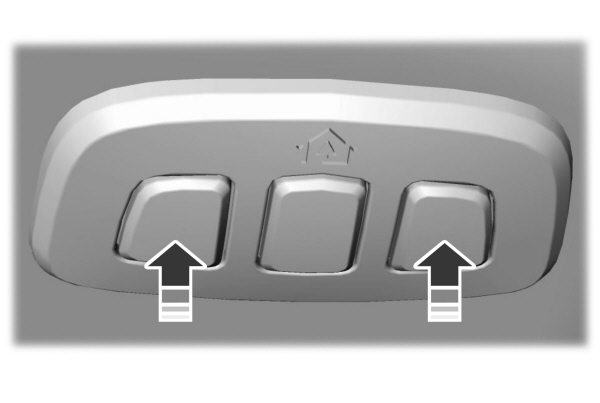
If your 2025 Explorer is pre-owned or you are reprogramming a button, clear old data first. Press and hold the two outer HomeLink buttons simultaneously for 10–20 seconds. Release when the indicator light begins to flash rapidly. Note: This clears ALL three buttons. Do not do this if another family member has already programmed their device.
Step 2: Position Your Vehicle Correctly
Park your Explorer outside the garage, approximately 3 to 5 feet from the door. Ensure the handheld remote has a direct line of sight to the HomeLink module. Turn the ignition to ON/RUN. The engine does not need to be running, but the electrical system must be active.
Step 3: Initiate the Training Mode
Hold your original handheld remote 1 to 3 inches away from the HomeLink buttons on your overhead console. Simultaneously press and hold:
- The desired HomeLink button in your Explorer.
- The transmit button on your handheld remote.
Maintain pressure on both. Watch the HomeLink indicator light closely. It will transition from a slow blink to a rapid, continuous flash. This usually takes anywhere from 10 to 30 seconds. Once rapid flashing occurs, release both buttons.
Step 4: Test the Initial Sync
Press the newly programmed HomeLink button once. Observe the indicator light:
- Solid Light: Programming successful for fixed-code systems (rare in 2025 context).
- Rapid Flash then Solid: Rolling code detected; proceed to Step 5.
- No Response/Same Slow Blink: Repeat Step 3 with fresh remote batteries.
Step 5: Complete the Rolling Code Handshake
This is the step most users miss. Locate the “Learn” or “Smart” button on your actual garage door motor unit (usually hanging from the ceiling). The color varies by brand (yellow, purple, orange, red, or green).
- Press and release the Learn button on the motor. You typically have 30 seconds to complete the next action.
- Return to your Explorer immediately.
- Press and hold the programmed HomeLink button for 2 seconds, then release.
- Repeat this press-hold-release cycle up to three times within the 30-second window.
The garage door should activate, confirming the rolling codes are synced. Test the button one final time to verify consistent operation.
Troubleshooting Common Programming Failures
Even with perfect execution, issues arise. Here are solutions based on real-world service data.
The Indicator Light Never Flashes Rapidly
- Cause: Dead remote battery or incompatible frequency.
- Fix: Replace CR2032 battery in handheld remote. Verify your opener isn’t an ancient fixed-code model incompatible with modern HomeLink 5.0+.
Door Opens Partially Then Reverses
- Cause: Safety sensor misalignment triggered by vibration during programming.
- Fix: Check photo-eye sensors at floor level. Clean lenses and ensure solid amber/green lights (not blinking). Reprogram after adjustment.
Works Intermittently
- Cause: LED bulb interference. Modern LED garage lights emit RF noise that blocks HomeLink signals.
- Fix: Swap to RFI-shielded LED bulbs specifically rated for garage door openers, or temporarily remove bulbs to test.
2025 Explorer Specific: Touchscreen vs. Physical Buttons
Some high-trim 2025 Explorers integrate HomeLink controls into the SYNC 4A touchscreen rather than physical overhead buttons. If you cannot locate physical buttons, navigate to Settings > Vehicle > HomeLink on your center display. The software-based programming follows identical timing protocols but provides visual feedback on-screen instead of LED blinks.
Pros and Cons of Integrated Garage Openers
Is using the built-in system worth the effort? Consider this balanced assessment.
✅ Advantages
- Security: No visible remote attracts break-ins; rolling codes prevent cloning.
- Convenience: One less item to carry; works even if you forget your key fob.
- Resale Value: Functional HomeLink is expected in premium SUVs like the Explorer.
- Reliability: Hardwired power eliminates dead battery surprises.
❌ Disadvantages
- Vehicle Dependency: Cannot open garage if Explorer is in shop or being driven by someone else.
- Programming Complexity: More involved than simple remote pairing.
- Transfer Hassle: Must reprogram when selling vehicle or changing openers.
- Trim Limitations: Base models may lack the feature entirely.
Frequently Asked Questions (FAQ)
1. Can I program my 2025 Ford Explorer without the original handheld remote?
Generally, no. The HomeLink system requires the original transmitter to clone the initial signal. However, if your garage opener supports HomeLink Direct Connect or Wi-Fi integration, you may bypass the handheld remote entirely by connecting through the MyFordPass app or the opener manufacturer’s cloud platform. Check your opener’s manual for “direct-to-car” compatibility.
2. Why does my HomeLink work for the main door but not the side gate?
Each HomeLink button operates independently. Gates often use different frequencies or dip-switch configurations than residential garage doors. You must repeat the full programming sequence separately for each button/device combination. Ensure your gate receiver is within range; gates sometimes require closer proximity during training.
3. Will programming HomeLink void my 2025 Explorer warranty?
Absolutely not. HomeLink is an OEM-integrated feature designed for consumer use. Programming it follows manufacturer specifications and has zero impact on your powertrain, electrical, or bumper-to-bumper coverage. Only unauthorized hardware modifications would risk warranty claims.
4. How many devices can I store in my 2025 Explorer’s HomeLink?
The standard system stores three distinct devices. These can be any combination of garage doors, entry gates, smart lighting, or security systems. If you need more capacity, consider aftermarket HomeLink expanders or utilizing smartphone-based smart home integrations that complement the built-in system.
5. My garage door opens but won’t close via HomeLink. What’s wrong?
This is almost always a safety sensor issue, not a programming failure. When closing remotely, the system relies entirely on photo-eye alignment. Vibrations from programming or seasonal ground shifts can misalign sensors. Inspect wiring connections, clean lens surfaces, and verify indicator lights are steady. If sensors check out, consult your opener technician as the logic board may need recalibration.
6. Does the 2025 Explorer support CarPlay/Android Auto garage control?
Yes, indirectly. While Apple CarPlay and Android Auto don’t natively control HomeLink, they can interface with smart garage platforms like Chamberlain myQ, LiftMaster, or Genie Aladdin Connect. If your opener is Wi-Fi enabled, add it to your phone’s smart home ecosystem, then access controls through compatible CarPlay/Android Auto apps. This provides backup access independent of HomeLink hardware.
Conclusion
Mastering how to set garage door opener on 2025 Ford Explorer transforms daily convenience and enhances home security through modern rolling-code technology. By following the precise positioning, timing, and handshake protocols outlined above, you can achieve reliable integration in under 15 minutes. Remember to prioritize safety by programming outdoors, maintain fresh remote batteries, and leverage the SYNC 4A touchscreen if your trim lacks physical buttons.
The freedom of keyless, seamless home entry is one of the underrated luxuries of owning a contemporary SUV. Don’t let initial hesitation prevent you from enjoying this feature. Did this guide help you successfully program your Explorer? Share your experience or remaining questions in the comments below, and please share this article on social media to help fellow Ford owners simplify their daily routines. Your next stress-free arrival home starts with taking action today!
Leave a Reply