If you’ve forgotten your PIN or your keypad suddenly stops working, you’re probably searching for How To Reset Chamberlain Garage Door Opener Keypad Without Code. This is a common issue for homeowners, especially when the keypad loses sync or the original code is unavailable.
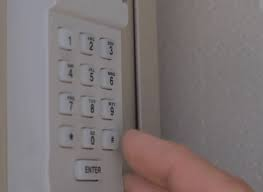
The good news is that you don’t need to replace your entire system. In most cases, you can reset and reprogram your Chamberlain keypad in just a few minutes using simple steps.
Read too: Tc1 Tricode Garage Door Opener Remote W/ Clip Chamberlain: Complete Guide
What Is a Chamberlain Garage Door Opener Keypad?
A Chamberlain keypad is a wireless entry system that allows you to open your garage door using a secure PIN instead of a remote or key.
A garage door opener system (like those made by Chamberlain) works through radio signals between the keypad, remote, and motor unit. You can learn more about general garage door systems here:
https://en.wikipedia.org/wiki/Garage_door_opener
Why Keypads Stop Working
Here are the most common reasons your keypad stops responding:
- Dead or weak battery
- Signal interference
- Memory reset on the opener unit
- Wrong PIN attempts locking the system
- Outdated programming after power outage
Understanding the cause helps you choose the right reset method.
Can You Reset Chamberlain Keypad Without the Code?
Yes — you can reset a Chamberlain garage door opener keypad without the original code.
Most Chamberlain systems store the PIN inside the garage door motor unit. This means you can erase the old settings directly from the opener and create a new code.
However, you will need access to the motor unit inside your garage, since that’s where the reset button is located.
Step-by-Step: How To Reset Chamberlain Garage Door Opener Keypad Without Code
Follow these steps carefully:
Step 1: Locate the Garage Door Opener Motor
Go to your garage ceiling and find the main motor unit. This is usually mounted in the center of the garage ceiling and has lights and a plastic cover.
Step 2: Find the “Learn” Button
Open the light cover on the motor unit and locate the LEARN button. It is usually:
- Yellow, red, purple, or green depending on model
- Located near the antenna wire or back panel
Step 3: Clear Existing Memory
Press and hold the LEARN button for about 6–10 seconds until the LED light turns off.
This action clears all previously stored remotes and keypad codes.
Step 4: Reprogram the Keypad
Now go back to your keypad:
- Enter your new 4-digit PIN
- Press and hold the ENTER button
- Wait for the garage light to blink or click sound from motor
- Release the button
Your new code is now saved.
Step 5: Test the Keypad
- Close the garage door
- Enter your new PIN
- Press ENTER
If the door opens, the reset was successful.
Troubleshooting If Reset Doesn’t Work
Sometimes the reset process may fail. Here’s how to fix common issues:
1. Keypad Not Responding
- Replace battery (usually 9V or CR2032 depending on model)
- Recheck signal range
2. Learn Button Not Working
- Unplug opener for 30 seconds
- Plug it back in and try again
3. Code Still Not Accepted
- Repeat full memory reset
- Ensure no other remotes are interfering
Pros and Cons of Resetting Without Code
| Pros | Cons |
|---|---|
| No need for old PIN | Requires physical access to motor |
| Quick and easy | Deletes all previous remotes |
| No technician needed | Must reprogram all devices |
Expert Insight: Why Resetting Works
According to smart home security principles, most modern garage systems use rolling memory encryption, meaning stored access codes are saved inside the main control board rather than the keypad itself.
That’s why resetting from the motor unit is the most effective method when you don’t know the original code.
Security Tip for Homeowners
After completing How To Reset Chamberlain Garage Door Opener Keypad Without Code, always choose a strong PIN:
- Avoid birthdays or simple numbers
- Use random 4-digit combinations
- Change your code every 6–12 months
This improves garage security and prevents unauthorized access.
When You Should Call a Professional
You may need expert help if:
- The Learn button is damaged
- The motor unit does not respond at all
- Wiring issues are suspected
- Multiple reset attempts fail
A certified technician can diagnose deeper electrical or circuit board problems.
FAQ: How To Reset Chamberlain Garage Door Opener Keypad Without Code
1. Can I reset my Chamberlain keypad without opening the motor unit?
No. You must access the motor unit because the reset function is located there.
2. Will resetting erase all remotes?
Yes. Pressing the Learn button clears all connected devices, including remotes and keypads.
3. How long does the reset process take?
Usually 5–10 minutes if done correctly.
4. What if I lost both keypad code and remote?
You can still reset using the Learn button method and reprogram everything from scratch.
5. Do I need Wi-Fi to reset my garage keypad?
No. Standard Chamberlain keypads do not require internet access.
6. Why is my keypad still blinking after reset?
This usually means it is not paired correctly. Repeat the reprogramming steps.
Conclusion
Learning How To Reset Chamberlain Garage Door Opener Keypad Without Code is a simple but powerful skill for any homeowner. By using the Learn button on your garage motor unit, you can erase old settings and restore full access in minutes.
This method saves time, avoids costly repairs, and gives you full control over your garage security.
If you found this guide helpful, consider sharing it with others who may be facing the same issue — it could save them from unnecessary service calls.
Leave a Reply