If your garage remote suddenly stops working or you’ve replaced your opener, you’re probably wondering How To Reprogram A Genie Intellicode Garage Door Opener without hiring a technician. Many homeowners face syncing issues after power outages, battery changes, or system resets.
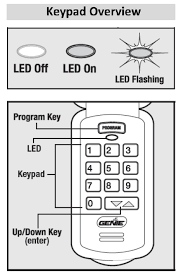
This guide will walk you through the exact steps to reprogram your Genie Intellicode system quickly, safely, and without confusion.
Read too: Tc1 Tricode Garage Door Opener Remote W/ Clip Chamberlain: Complete Guide
What Is a Genie Intellicode Garage Door Opener?
A Genie Intellicode system is a smart garage door technology that uses rolling code encryption to enhance security. Each time the remote is used, the access code automatically changes, preventing unauthorized duplication.
This type of technology is widely used in modern home automation systems, as explained in general wireless security concepts by Wikipedia, where dynamic encryption improves protection against signal hacking and replay attacks.
Why Do You Need To Reprogram a Genie Intellicode System?
Before learning How To Reprogram A Genie Intellicode Garage Door Opener, it’s important to understand why reprogramming is necessary:
Common Reasons:
- Replacing a lost or broken remote
- Power outage or system reset
- Battery replacement in remote or keypad
- Adding new remotes or users
- Fixing unresponsive garage operation
How To Reprogram A Genie Intellicode Garage Door Opener (Step-by-Step)
Follow these steps carefully to ensure successful setup.
Step 1: Locate the Learn or Program Button
On your Genie garage motor unit (mounted on the ceiling):
- Find the Program Set button
- It may be labeled “Learn,” “Set,” or “Program”
- Usually located near the antenna wire or light cover
Step 2: Enter Programming Mode
- Press the Program button once
- The indicator light will begin blinking or stay solid
- You now have 30 seconds to complete programming
👉 Timing is critical here.
Step 3: Activate the Remote Control
Take your Genie Intellicode remote:
- Press the button you want to program
- Hold for 2–3 seconds
- Release when the garage light blinks or clicks
This confirms successful pairing.
Step 4: Test the System
- Wait 5–10 seconds
- Press the remote again
- Confirm garage door opens or closes
If it works, programming is complete.
How Long Does It Take To Reprogram Genie Intellicode?
On average:
- Basic reprogramming: 2–5 minutes
- Full reset and setup: 5–10 minutes
- Multiple devices: up to 15 minutes
Most homeowners complete the process quickly once they understand the timing.
Types of Genie Intellicode Systems
1. Standard Remote System
- Basic push-button control
- Simple setup process
2. Wireless Keypad System
- PIN-based entry
- Mounted outside garage
3. Smart Genie System
- App-controlled access
- Wi-Fi connectivity
- Real-time monitoring
Genie Intellicode vs Fixed Code Systems
| Feature | Intellicode | Fixed Code |
|---|---|---|
| Security Level | High | Low |
| Code Changes | Yes (rolling) | No |
| Hacking Risk | Low | High |
| Modern Use | Standard | Obsolete |
Common Problems When Reprogramming Genie Intellicode
1. Remote Not Syncing
- Battery may be weak
- Programming window expired
2. Garage Door Not Responding
- Signal interference
- Incorrect programming sequence
3. Intermittent Operation
- Partial pairing
- Damaged remote button
Expert Insight: Why Intellicode Is More Secure
Genie Intellicode technology uses rolling encryption codes that change every time the system is activated. This prevents signal duplication, which was a common issue in older fixed-code systems.
Experts in home security systems emphasize that rolling code technology significantly reduces unauthorized access risks in residential environments.
How To Reset Genie Intellicode Garage Door Opener
If reprogramming fails:
Reset Steps:
- Press and hold Program button for 10–15 seconds
- Wait until LED turns off
- Release button
- Reprogram all remotes from scratch
This clears all stored devices.
How To Program Multiple Remotes
To add more devices:
- Press Program button on motor unit
- Activate first remote
- Repeat for additional remotes
- Wait for confirmation after each pairing
Most systems support 3–5 remotes depending on model.
Maintenance Tips for Long-Term Performance
To keep your system working smoothly:
- Replace remote batteries every 12–18 months
- Clean remote buttons regularly
- Test system monthly
- Keep antenna wire unobstructed
Safety Tips Before Programming
- Ensure garage door is closed
- Avoid standing under moving door
- Keep children away during setup
- Use stable ladder if accessing motor unit
FAQ: How To Reprogram A Genie Intellicode Garage Door Opener
1. How do I reprogram my Genie Intellicode garage door opener?
Press the Program button, activate your remote within 30 seconds, and wait for confirmation light or click.
2. Why is my Genie remote not working after reprogramming?
Common causes include weak battery, missed timing, or incomplete pairing.
3. Do I need to reset before reprogramming?
Not always, but resetting is recommended if multiple remotes are not responding.
4. How many remotes can I program to Genie Intellicode?
Most systems allow 3–5 remotes, depending on model capacity.
5. Does Genie Intellicode require Wi-Fi?
No, standard Intellicode systems work using radio frequency signals, not internet.
6. How do I know reprogramming was successful?
If the garage door responds immediately when pressing the remote, programming is complete.
Conclusion
Learning How To Reprogram A Genie Intellicode Garage Door Opener is simple once you understand the timing and steps. With just a few button presses, you can restore full control of your garage system, improve security, and ensure smooth daily operation.
Genie Intellicode systems are designed for convenience and protection, making them one of the most reliable garage technologies available today.
If this guide helped you, consider sharing it with friends or family who may also need help reprogramming their garage opener.
Leave a Reply