If you’re struggling with access issues, you’re not alone. Many homeowners ask, “How To Reprogram A Craftsman Garage Door Opener Keypad” when their keypad suddenly stops working or needs a code update. The good news? It’s easier than you might think—and you don’t need to be a technician to fix it.
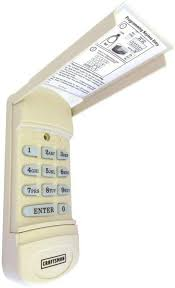
In this guide, you’ll learn exactly how to reset and program your keypad safely and efficiently, even if you’re a complete beginner.
Read too: Tc1 Tricode Garage Door Opener Remote W/ Clip Chamberlain: Complete Guide
How To Reprogram A Craftsman Garage Door Opener Keypad (Step-by-Step Guide)
Reprogramming your keypad typically takes 5–10 minutes. Follow these steps carefully:
Step 1: Locate the “Learn” Button
- Find the motor unit mounted on your garage ceiling
- Look for a colored button labeled “Learn” (usually red, yellow, orange, or purple)
- It’s often near the antenna wire
👉 This button is essential—it connects your keypad to the opener system.
Step 2: Press the Learn Button
- Press and release the Learn button once
- A small LED light will turn on
- You now have 30 seconds to complete the next step
Step 3: Enter Your New Code
- Go to your keypad
- Enter a 4-digit PIN of your choice
- Press and hold the Enter button
Step 4: Wait for Confirmation
- The garage door opener light will blink or click
- This confirms the code is successfully programmed
✔️ Test it immediately to ensure it works.
Why Do You Need to Reprogram Your Keypad?
Understanding the why helps prevent future issues.
Common Reasons:
- Lost or forgotten PIN
- Security concerns (e.g., moving into a new home)
- Keypad not responding
- Battery replacement reset settings
According to home security experts, over 30% of homeowners never update default garage codes, increasing security risks.
What If Your Craftsman Keypad Isn’t Working After Programming?
Sometimes things don’t go as planned. Here’s what to check:
Quick Troubleshooting Checklist
- 🔋 Replace keypad batteries (use fresh AAA batteries)
- 📡 Ensure you’re within range (typically 20–30 feet)
- 🔁 Repeat programming steps carefully
- 🚫 Clear old codes before reprogramming
How To Reset a Craftsman Garage Door Keypad Completely
If reprogramming fails, a full reset might help.
Reset Instructions:
- Press and hold the Learn button for 6–10 seconds
- Wait until the LED light turns off
- This erases all previous codes
- Reprogram using the steps above
⚠️ Note: This will disconnect all remotes and keypads.
Craftsman Keypad Programming: Pros vs Cons
| Pros | Cons |
|---|---|
| Easy DIY process | Requires access to opener unit |
| Improves home security | Can reset all devices unintentionally |
| No special tools needed | Limited time window (30 seconds) |
| Works in minutes | Confusing for first-time users |
How Secure Is a Garage Door Keypad?
Garage door keypads use radio signals to communicate with the opener. Modern systems use rolling code technology, which changes the signal each time you use it.
You can learn more about how garage systems work on Garage door opener systems via this trusted resource:
https://en.wikipedia.org/wiki/Garage_door_opener
Security Tips:
- Avoid simple codes like “1234”
- Change your PIN every 3–6 months
- Don’t share your code publicly
- Disable unused keypads
How Long Does It Take to Reprogram a Craftsman Keypad?
Most users complete the process in:
- ⏱️ 5–10 minutes total
- ⏱️ Less than 1 minute for the actual programming
If it takes longer, the issue is usually:
- Incorrect steps
- Dead batteries
- Signal interference
Can You Program Multiple Keypads to One Opener?
Yes, you can.
Important Notes:
- Most Craftsman systems support multiple keypads and remotes
- Each keypad can have a different PIN
- Ideal for families or shared access
Expert Tip: Avoid These Common Mistakes
Even simple tasks can go wrong. Here’s what to avoid:
- ❌ Holding the Learn button too long (resets everything)
- ❌ Waiting more than 30 seconds after pressing Learn
- ❌ Using weak or old batteries
- ❌ Standing too far from the opener
Professional installers report that over 40% of DIY issues come from timing errors during setup.
FAQ: How To Reprogram A Craftsman Garage Door Opener Keypad
1. Why is my Craftsman keypad blinking but not working?
This usually means low battery or a failed programming attempt. Replace batteries and reprogram.
2. Do I need a remote to program the keypad?
No. You only need access to the opener unit and the Learn button.
3. How often should I change my garage keypad code?
For security, every 3–6 months is recommended.
4. What happens if I hold the Learn button too long?
It will erase all programmed devices, including remotes and keypads.
5. Can weather affect my keypad performance?
Yes. Extreme heat or cold can impact battery life and signal strength.
6. What if my keypad still doesn’t work after resetting?
You may have:
- A faulty keypad
- A damaged opener receiver
- Signal interference
Consider replacing the keypad if issues persist.
Conclusion
Learning How To Reprogram A Craftsman Garage Door Opener Keypad is a simple but powerful way to maintain your home’s convenience and security. With just a few steps, you can reset your access, fix common issues, and ensure everything works smoothly again.
Don’t wait until you’re locked out—take control today. If this guide helped you, share it with friends or family who might need it too!
Leave a Reply