If your garage remote suddenly stops working or becomes unresponsive, you’re likely wondering how to replace battery in Genie garage door remote. This is one of the most common maintenance tasks for homeowners, and the good news is—it takes only a few minutes and requires no special tools.
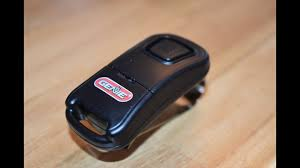
Why Your Genie Garage Door Remote Battery Matters
The battery inside your Genie remote powers the wireless signal that communicates with your garage door opener. When it weakens, your system becomes unreliable or completely stops working.
Read too: How Do You Change Code On Garage Door Keypad Fast?
Key Functions of the Battery:
- Sends signal to garage opener
- Ensures smooth remote operation
- Maintains consistent range and response
📊 Industry Fact: Most garage remotes use small coin or lithium batteries that typically last 12–24 months depending on usage.
Signs Your Genie Remote Battery Needs Replacement
Before replacing the battery, check for these symptoms:
Common Warning Signs:
- Garage door responds intermittently
- Reduced signal range
- Remote LED light is dim or not working
- Door does not respond at all
🔋 These signs usually indicate a weak or dead battery rather than a faulty remote.
How To Replace Battery In Genie Garage Door Remote (Step-by-Step)
Follow these simple steps to restore your remote’s functionality.
Step 1: Identify Your Genie Remote Model
- Check the back of the remote
- Look for model numbers like G3T-R, G1T-BX, or Intellicode
- This helps determine the correct battery type
💡 Most Genie remotes use CR2032 or CR2016 coin batteries.
Step 2: Open the Remote Case
- Locate the small seam or slot on the remote
- Use a flat screwdriver or coin to gently pry open
- Be careful not to damage the casing
✔️ Some models have a slide-back cover instead.
Step 3: Remove the Old Battery
- Carefully take out the old coin battery
- Note the positive (+) side direction
- Avoid touching internal circuit board
📌 Proper handling prevents damage to sensitive components.
Step 4: Insert the New Battery
- Place the new battery in the same orientation
- Ensure it fits snugly in the slot
- Confirm polarity matches the marking
🔋 Recommended battery types:
- CR2032 (most common)
- CR2016 (compact remotes)
Step 5: Close the Remote
- Snap the casing back together
- Ensure no gaps are left open
- Press firmly until it clicks
✔️ Your remote should feel solid and secure.
Step 6: Test the Remote
- Stand within 10–15 feet of the garage door
- Press the button once
- Check if the door responds instantly
✔️ If it works, your battery replacement is successful.
Battery Types Used in Genie Garage Remotes
| Battery Type | Voltage | Lifespan | Usage |
|---|---|---|---|
| CR2032 | 3V | 1–2 years | Most Genie remotes |
| CR2016 | 3V | 1–2 years | Slim remotes |
| Lithium Cell | 3V | Up to 2 years | Premium models |
📌 Always check your remote manual for exact specifications.
Common Problems After Battery Replacement
1. Remote Still Not Working
- Battery may be inserted incorrectly
- Try reprogramming the remote
2. Weak Signal
- Check for interference
- Replace battery with a high-quality brand
3. No LED Light
- Battery may be defective
- Ensure proper contact inside compartment
Advantages vs Disadvantages of Battery Replacement
Advantages:
- Quick DIY fix
- Restores full functionality
- Very low cost
- No technical skills needed
Disadvantages:
- Must match exact battery type
- Incorrect installation may cause issues
- Temporary fix if remote is damaged
Real-Life Example
A homeowner reported their Genie remote stopped working during winter:
- Issue: Weak CR2032 battery
- Fix time: 3 minutes
- Cost: $2–$5
- Result: Full functionality restored immediately
✔️ Simple maintenance avoided unnecessary replacement costs.
Pro Tips to Extend Remote Battery Life
Best Practices:
- Avoid leaving remote in hot cars
- Use high-quality lithium batteries
- Replace every 12–18 months proactively
- Keep spare batteries at home
🔋 Expert Insight: Temperature extremes can reduce battery lifespan by up to 30%.
Maintenance Checklist
- Test remote monthly
- Replace battery before it fully dies
- Clean battery contacts gently
- Store spare remote safely
When Should You Replace the Entire Remote?
Consider replacing the remote if:
- Buttons are physically damaged
- Circuit board is faulty
- Battery replacement does not help
- Remote is over 7–10 years old
FAQ: How To Replace Battery In Genie Garage Door Remote
1. How long does a Genie remote battery last?
Typically 1–2 years depending on usage.
2. What battery does Genie garage remote use?
Most commonly CR2032 or CR2016 coin batteries.
3. Why is my remote not working after battery change?
It may need reprogramming or correct battery orientation.
4. Can I replace the battery myself?
Yes, it is a simple DIY task.
5. Do I need to reprogram my remote after replacing the battery?
Usually no, unless the memory was reset.
6. Where can I buy replacement batteries?
They are available at hardware stores and online retailers.
Conclusion
Learning how to replace battery in Genie garage door remote is a quick and essential maintenance task that keeps your garage system running smoothly. With just a few simple steps, you can restore full remote functionality without needing professional help.
This easy DIY fix saves time, money, and frustration. If this guide helped you, share it on social media so others can quickly fix their Genie garage remotes too!
Leave a Reply