If your garage remote is slow to respond or completely unresponsive, you may need to learn How To Replace A Liftmaster Garage Door Opener Battery. This is one of the most common maintenance tasks homeowners face, especially after 1–2 years of use.
The good news is that replacing the battery is quick, simple, and can usually be done in just a few minutes without any technical skills.
What Is a LiftMaster Garage Door Opener Battery?
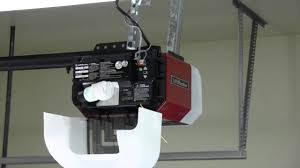
A LiftMaster garage door opener battery powers the remote control or backup battery system inside the motor unit. It ensures your garage door operates even during power outages or when the main power supply is interrupted.
Read too: Tc1 Tricode Garage Door Opener Remote W/ Clip Chamberlain: Complete Guide
LiftMaster systems are widely used in residential homes due to their reliability and smart technology integration. These systems rely on wireless signal transmission, which is part of broader home automation technology explained by Wikipedia.
Why You Need To Replace Your LiftMaster Battery
Before learning How To Replace A Liftmaster Garage Door Opener Battery, it’s important to understand why replacement is needed:
Common Reasons:
- Remote becomes slow or unresponsive
- Reduced signal range
- Garage door opens inconsistently
- Battery warning light appears
- Backup battery no longer holds charge
How To Replace A Liftmaster Garage Door Opener Battery (Step-by-Step)
Follow these simple steps carefully.
Step 1: Identify Your Battery Type
LiftMaster systems commonly use:
- CR2032 or CR2016 (remote control batteries)
- 12V backup battery (motor unit backup system)
👉 Always check your model manual before purchasing.
Step 2: Open the Remote or Battery Compartment
For remote control:
- Slide the back cover open
- Or use a small screwdriver if needed
- Be gentle to avoid breaking clips
For motor unit battery:
- Locate the battery cover on the ceiling unit
- Unscrew or unclip the panel
Step 3: Remove the Old Battery
- Take out the old battery carefully
- Note the polarity (+ and -) direction
- Dispose of it properly
Step 4: Insert the New Battery
- Place new battery in the same direction
- Ensure it fits snugly
- Avoid touching metal contacts
Step 5: Close the Compartment
- Snap or screw the cover back
- Ensure it is tightly secured
Step 6: Test the Garage Door Opener
- Press remote button
- Check response time
- Confirm smooth operation
How Long Does A LiftMaster Battery Last?
On average:
- Remote battery: 1–2 years
- Backup battery: 3–5 years
Usage frequency and climate conditions may affect lifespan.
Types of LiftMaster Batteries
1. Remote Control Batteries
- Small coin cells (CR2032, CR2016)
- Easy to replace
- Low cost
2. Backup System Battery
- 12V rechargeable battery
- Powers opener during outages
- Requires periodic replacement
Battery Replacement vs Repair: What’s Better?
| Option | Cost | Difficulty | Effectiveness |
|---|---|---|---|
| Battery Replacement | Low | Easy | High |
| Repair Service | High | Complex | Medium |
👉 In most cases, replacing the battery is the most practical solution.
Common Problems After Battery Replacement
1. Remote Still Not Working
- Incorrect battery orientation
- Weak replacement battery
2. Short Range Signal
- Interference from devices
- Low-quality battery
3. Backup Battery Warning Still On
- System reset required
- Battery not fully charged
Expert Insight: Why Battery Maintenance Matters
Regular battery maintenance ensures your garage system stays reliable. Experts in home automation systems recommend checking batteries at least once a year to prevent unexpected failure during emergencies.
Modern LiftMaster systems are designed for efficiency, but like all wireless devices, they depend heavily on stable power sources.
How To Reset After Battery Replacement
Sometimes a reset is needed after installing a new battery:
- Disconnect power for 30 seconds
- Reconnect power
- Test remote function
- Reprogram if necessary
Maintenance Tips for Longer Battery Life
- Replace batteries every 12–18 months
- Store remotes away from heat
- Avoid dropping remote devices
- Test system monthly
- Clean battery contacts regularly
Safety Tips When Replacing Battery
- Avoid mixing old and new batteries
- Keep batteries away from children
- Do not dispose in fire
- Use correct battery type only
FAQ: How To Replace A Liftmaster Garage Door Opener Battery
1. How do I replace a LiftMaster garage door opener battery?
Open the remote or battery compartment, remove the old battery, insert a new one, and test the system.
2. What type of battery does LiftMaster use?
Most remotes use CR2032 or CR2016 coin batteries, while backup systems use 12V batteries.
3. How often should I replace LiftMaster batteries?
Every 1–2 years for remotes and 3–5 years for backup systems.
4. Why is my garage remote not working after battery change?
It may be due to incorrect installation, weak battery, or need for system reset.
5. Do I need to reprogram my remote after battery replacement?
Usually no, but reprogramming may be needed in some cases.
6. Can I use any battery brand for LiftMaster?
It is recommended to use high-quality or OEM-approved batteries for best performance.
Conclusion
Learning How To Replace A Liftmaster Garage Door Opener Battery is one of the easiest ways to restore full functionality to your garage system. With just a few simple steps, you can improve reliability, extend device lifespan, and avoid unexpected failures.
Regular battery maintenance ensures smooth operation and keeps your home access system working when you need it most.
If this guide helped you, feel free to share it with friends or family who may also need help replacing their garage door opener battery.
Leave a Reply