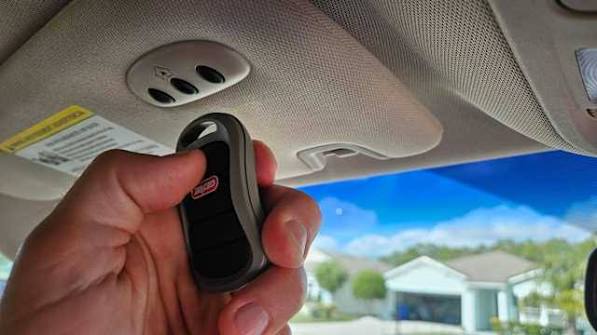
Have you ever pulled into your driveway, only to realize you need to dig through your bag or glove compartment just to find that bulky garage door remote? It’s frustrating, especially in bad weather or when you’re in a hurry. Learning how to program your garage door to your car can transform this daily hassle into a seamless, one-touch experience. This guide will walk you through the process safely and effectively, ensuring your vehicle and opener communicate perfectly.
Why Syncing Your Garage Door with Your Car Matters
Before diving into the technical steps, it is important to understand why this integration is worth your time. Modern vehicles often come equipped with built-in universal transmitters, such as HomeLink, Car2U, or AutoLearn systems. These systems eliminate the need for separate remotes, reducing clutter and increasing security.
According to industry standards, integrated systems use rolling code technology, which changes the access code every time you use it. This makes it significantly harder for thieves to intercept and replicate your signal compared to older, fixed-code remotes. By syncing your car, you are not just adding convenience; you are upgrading your home’s security posture.
Identifying Your Garage Door Opener System
The first step in learning how to program your garage door to your car
is identifying what type of opener you have. Not all openers are created equal, and the programming method depends heavily on the brand and age of your unit.
Common Brands and Their Features
- Chamberlain/LiftMaster: Often uses a yellow “Learn” button. Known for high security and rolling codes.
- Genie: Typically features a purple, red, or orange “Learn” button. Some older models may require specific dip switch settings.
- Craftsman: Similar to Chamberlain, often using a green or orange learn button.
- Linear/Other Universal Brands: May use a simple “Smart” button or require a compatible universal remote.
If you are unsure about your opener’s model, check the motor unit hanging from your garage ceiling. The label usually contains the model number and frequency (e.g., 315 MHz or 390 MHz). You can also refer to Wikipedia’s entry on garage door openers for a broader historical and technical overview of how these systems have evolved over time.
Step-by-Step Guide: How to Program Your Garage Door to Your Car
While every vehicle and opener combination has slight nuances, the general process follows a logical pattern. Below is a universal framework that applies to most modern cars with built-in transmitters.
Step 1: Clear Existing Codes (If Necessary)
If your car previously had a garage door programmed, or if you are troubleshooting a failed attempt, start by clearing the memory.
- Sit in your car with the ignition on (or in accessory mode).
- Press and hold the two outer buttons on your HomeLink or universal transmitter panel.
- Hold them for about 10–20 seconds until the indicator light flashes rapidly.
- Release the buttons. Your system is now reset.
Step 2: Put Your Car in Programming Mode
- Choose the button you want to use for your garage door.
- Press and hold this button. Do not release it yet.
- Watch for the indicator light to change from a slow blink to a rapid flash. This indicates the car is ready to receive a signal.
Step 3: Activate the Garage Door Opener
- Within 30 seconds of the car’s light flashing rapidly, locate the “Learn” or “Smart” button on your garage door motor unit. You may need a ladder for this.
- Press and release the “Learn” button. The LED on the motor unit will usually turn on or blink, indicating it is listening for a new remote.
- Return to your car and press the held button three times, then release it.
Step 4: Test the Connection
- Press the programmed button in your car.
- Observe if the garage door moves.
- If it does not work, repeat the process, ensuring you are within range (usually inside the garage or directly in front of it).
| Vehicle System | Typical Button Combination | Indicator Light Behavior |
|---|---|---|
| HomeLink | Hold two outer buttons | Slow blink to rapid flash |
| Car2U | Hold specific pair | Solid light to blinking |
| AutoLearn | Single button hold | Rapid flashing |
Troubleshooting Common Programming Issues
Even with careful following of instructions, things can go wrong. Here are the most common hurdles users face when trying to figure out how to program your garage door to your car.
The “Rolling Code” Conflict
Newer openers use rolling codes for security. If your car sends a fixed code, or if the synchronization fails, the opener may reject the signal.
- Solution: You may need to press the “Learn” button on the motor unit twice, or consult your car’s manual for a “compatibility mode” setting.
Interference from LED Bulbs
Surprisingly, LED light bulbs in your garage door opener can emit radio frequency interference that blocks the signal from your car.
- Solution: Try turning off the garage lights or replacing them with incandescent bulbs temporarily during programming. If successful, consider buying RF-filtered LED bulbs.
Distance and Angle Issues
Your car’s transmitter needs a clear line of sight to the motor unit’s antenna.
- Solution: Ensure you are parked within 10–15 feet of the opener. Avoid parking behind thick metal objects or other vehicles that might block the signal.
Advanced Tips for Seamless Integration
Once you have successfully learned how to program your garage door to your car, consider these tips to maintain optimal performance.
- Regular Testing: Test the connection once a month to ensure the battery in your car’s transmitter system is functioning well.
- Multiple Doors: If you have two garage doors, you can program both to different buttons in your car. Repeat the process for the second door, ensuring you select a different button.
- Security Updates: If you move into a new home, always clear and reprogram your car’s garage door settings. You never know who might have access to the previous codes.
FAQ Section
Q1: Can I program any car to any garage door opener?
A: Most modern cars with built-in universal transmitters (like HomeLink) are compatible with 95% of garage door openers manufactured after 1993. However, some very old or proprietary systems may require a compatibility bridge or a separate universal remote.
Q2: Why does my garage door close immediately after opening via my car?
A: This is often a safety sensor issue. Check the photo-eye sensors near the floor of your garage tracks. If they are misaligned or dirty, the door will reverse for safety. It can also indicate a programming glitch where the “close” signal is being sent incorrectly.
Q3: Do I need a professional to program my garage door to my car?
A: No, in most cases, you can do it yourself. The process is designed for consumer ease. However, if you have a complex smart-home integrated system or an older commercial-grade opener, consulting a professional might save time.
Q4: Is it safe to program my garage door to my car?
A: Yes, it is safe. Modern systems use encrypted rolling codes, making them more secure than traditional handheld remotes. Just ensure you clear the memory if you sell your car to prevent unauthorized access.
Q5: What if my car doesn’t have a built-in garage door button?
A: You can purchase a visor clip universal remote that matches your opener’s frequency. Alternatively, some aftermarket kits allow you to add a HomeLink module to vehicles that didn’t come with one from the factory.
Conclusion
Learning how to program your garage door to your car is a small investment of time that yields significant daily convenience. By following the steps outlined above, you can eliminate the hassle of searching for remotes and enjoy a smoother entry into your home. Remember to identify your opener type, clear old codes, and test the connection thoroughly.
If you found this guide helpful, please share it with friends or family who might be struggling with their garage door setup. A seamless drive-in experience is just a few button presses away!
Leave a Reply