Struggling with syncing your car to your garage? You’re not alone. Many drivers search for How To Program Your Garage Door Opener To Your Vehicle because the process can feel confusing at first. The good news is that with the right steps, you can connect your vehicle and garage door opener in just a few minutes—no technician required.
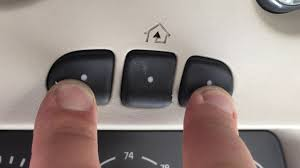
What Is a Built-In Garage Door Opener in a Vehicle?
Modern vehicles often include a built-in system like HomeLink or Car2U, allowing you to control your garage door directly from your car.
Key Benefits:
- No need for separate remotes
- Cleaner dashboard setup
- Increased convenience and security
According to industry data, over 70% of vehicles manufactured after 2015 include integrated garage door opener systems.
Read too: Tc1 Tricode Garage Door Opener Remote W/ Clip Chamberlain: Complete Guide
What Do You Need Before Programming?
Before starting, prepare the following:
Checklist:
- Your vehicle (parked near the garage)
- Garage door opener remote
- Ladder (if accessing opener unit)
- Fresh batteries in the remote
💡 Tip: Always program while the car is parked outside the garage for safety.
How To Program Your Garage Door Opener To Your Vehicle (Step-by-Step)
Follow these instructions carefully. The process usually takes 3–7 minutes.
Step 1: Clear Existing Codes
Before programming, reset your car’s system.
- Press and hold the two outer buttons on your vehicle’s control panel
- Hold for 10–20 seconds
- Indicator light will flash rapidly
This clears old connections.
Step 2: Sync the Remote with Your Vehicle
- Hold your garage remote 1–3 inches from the car’s control buttons
- Press and hold both:
- The remote button
- The desired button in your vehicle
Hold for about 10–15 seconds until the indicator light changes (slow to rapid blinking)
Step 3: Link to the Garage Door Opener
Now connect your vehicle to the opener unit.
- Go to your garage opener motor
- Press the Learn/Smart button
- Return to your car within 30 seconds
- Press the programmed button in your vehicle for 2–3 seconds
- Repeat 2–3 times until the door moves
✅ If the door opens or closes, the setup is successful.
Programming Time and Range
| Factor | Details |
|---|---|
| Total setup time | 3–7 minutes |
| Signal distance | 1–3 inches (initial pairing) |
| Learn mode window | ~30 seconds |
Common Problems and How to Fix Them
Even with clear instructions, issues can happen.
1. Indicator Light Not Changing
- Try holding buttons longer
- Replace remote battery
2. Garage Door Doesn’t Respond
- Repeat Learn button step
- Ensure correct button pairing
3. Rolling Code Issues
Modern openers use rolling code technology, which changes the signal each time for security.
Learn more about it here:
https://en.wikipedia.org/wiki/Rolling_code
4. Weak Signal
- Move closer to the opener
- Avoid interference from LED lights or metal objects
Compatibility: Which Vehicles Support This Feature?
Most vehicles from brands like:
- Ford
- Toyota
- Honda
- Chevrolet
support built-in systems like HomeLink.
Comparison Table:
| System | Compatibility | Setup Difficulty |
|---|---|---|
| HomeLink | Most vehicles | Easy |
| Car2U | Selected models | Moderate |
| Manual Remote | All vehicles | Very Easy |
Advantages vs Disadvantages
✅ Advantages
- Hands-free convenience
- No need for extra remotes
- Cleaner interior
❌ Disadvantages
- Initial setup can be tricky
- Not all vehicles support it
- Requires reprogramming after reset
Pro Tips for Smooth Programming
- Perform setup during daylight for better visibility
- Keep your remote steady during pairing
- Always check compatibility before starting
- Reprogram after replacing your garage opener
FAQ: How To Program Your Garage Door Opener To Your Vehicle
1. How long does it take to program a garage door opener to a car?
Typically 3–7 minutes, depending on your vehicle and opener model.
2. Do all cars support garage door programming?
No. Only vehicles with built-in systems like HomeLink or Car2U support it.
3. Why won’t my car connect to my garage door opener?
Common reasons include low battery, incorrect steps, or rolling code issues.
4. Can I program multiple garage doors to one vehicle?
Yes. Most systems support up to 3 different doors.
5. Do I need professional help?
No. The process is designed for DIY users.
6. Will resetting my car erase garage settings?
Yes. You’ll need to reprogram after a reset.
Conclusion
Mastering How To Program Your Garage Door Opener To Your Vehicle gives you a smoother, more convenient daily routine. With just a few steps, you can eliminate the need for separate remotes and enjoy seamless access to your garage.
If this guide helped you, share it with friends or family who might be struggling with the same setup. 🚗✨
Leave a Reply