Struggling with how to program remote control for Craftsman garage door opener? You’re not alone—many homeowners find the process confusing at first. The good news is that with the right steps, you can program your remote in just a few minutes, even if you’ve never done it before.
What Is a Craftsman Garage Door Opener and How Does It Work?
A Craftsman garage door opener is a motorized system that opens and closes your garage door using a remote control. Modern models use rolling code technology, which changes the access code each time you use it for better security.
According to industry estimates, over 80% of garage door openers installed after 2000 use rolling code systems to prevent unauthorized access.
Read too: Tc1 Tricode Garage Door Opener Remote W/ Clip Chamberlain: Complete Guide
To understand the technology behind it, you can explore this authoritative source:
https://en.wikipedia.org/wiki/Garage_door_opener
How To Program Remote Control For Craftsman Garage Door Opener (Step-by-Step)
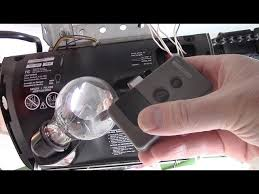
Step 1: Locate the “Learn” Button
The “Learn” button is usually found on the back or side of the motor unit mounted on your garage ceiling.
Common colors include:
- Yellow
- Red/Orange
- Purple
- Green
💡 Tip: Use a ladder and ensure good lighting when locating it.
Step 2: Prepare Your Remote Control
Before programming:
- Insert fresh batteries into the remote
- Stand within 1–2 meters (3–6 feet) of the opener
- Ensure the garage door is closed
Step 3: Activate the Learn Mode
- Press and release the “Learn” button
- A small LED light will turn on
- You now have 30 seconds to complete the next step
Step 4: Sync the Remote
- Press and hold the button on your remote
- Hold for 3–5 seconds, then release
- The opener light may blink or you’ll hear a click
✔️ This indicates successful programming.
Step 5: Test the Remote
- Press the remote button once
- The garage door should open or close
If it doesn’t work, repeat Steps 3–4 carefully.
Why Won’t My Craftsman Remote Program? (Common Fixes)
Troubleshooting Guide
| Issue | Cause | Solution |
|---|---|---|
| Remote not responding | Dead battery | Replace battery |
| No LED light | Power issue | Check outlet |
| Programming fails | Missed 30-second window | Retry quickly |
| Works intermittently | Signal interference | Move closer |
What Type of Craftsman Opener Do You Have?
Knowing your model helps simplify the process.
1. Older Fixed Code Models
- Manufactured before 1997
- Use DIP switches
- Less secure
2. Rolling Code Models (Modern)
- Manufactured after 1997
- Use “Learn” button
- Highly secure
Advantages vs Disadvantages of Programming Your Remote
Advantages
- Quick and easy setup
- Improved home security
- Supports multiple remotes
- Compatible with vehicles (HomeLink)
Disadvantages
- Requires physical access to opener
- Can reset accidentally
- Slight learning curve for beginners
Expert Tips for Faster Setup
- Always press the remote button within 30 seconds after hitting “Learn”
- If programming multiple remotes, repeat steps individually
- Label remotes if you have multiple garage doors
- Reset system if previous owners programmed unknown remotes
Experts in home automation note that timing errors account for over 60% of failed programming attempts.
How Many Remotes Can You Program?
Most Craftsman garage door openers allow:
- Up to 3–5 remotes depending on the model
- Additional devices like keypads and car systems
If memory is full, you may need to erase all codes and reprogram.
How To Reset Craftsman Garage Door Opener
If you’re starting fresh:
- Press and hold the “Learn” button for 6–10 seconds
- The LED will turn off
- All programmed remotes will be erased
⚠️ Important: You’ll need to reprogram all devices afterward.
FAQ: How To Program Remote Control For Craftsman Garage Door Opener
1. How long does programming take?
Usually 2–5 minutes if done correctly.
2. Can I program without the Learn button?
No. The Learn button is essential for syncing modern remotes.
3. Why does my remote work sometimes but not always?
This could be due to weak batteries or signal interference.
4. Can I use a universal remote?
Yes, but ensure it’s compatible with Craftsman systems.
5. Do I need a professional to program it?
No. Most homeowners can do it themselves with this guide.
6. Will resetting erase all remotes?
Yes. Resetting clears all previously programmed devices.
Conclusion
Learning how to program remote control for Craftsman garage door opener is easier than it seems. With just a few simple steps, you can regain full control of your garage and improve daily convenience.
Take a few minutes today to set it up—you’ll save time and avoid frustration every time you come home.
If this guide helped you, feel free to share it with friends or family who might need a quick and reliable solution 🚪
Leave a Reply