Introduction
There are few things more frustrating than standing in your driveway with a new remote that refuses to sync with your existing garage system. If you are searching for how to program LiftMaster remote to Genie garage door opener, you are likely dealing with a mixed-brand setup that requires specific technical attention. We understand the urgency of securing your home and the confusion that arises when major brands use different frequencies; this guide provides clear, safe, and tested solutions to get your door working again.
Can You Actually Program a LiftMaster Remote to a Genie Opener?
Before attempting any programming steps, it is vital to manage expectations regarding cross-brand compatibility. The short answer is: it depends entirely on the technology generation of both devices.
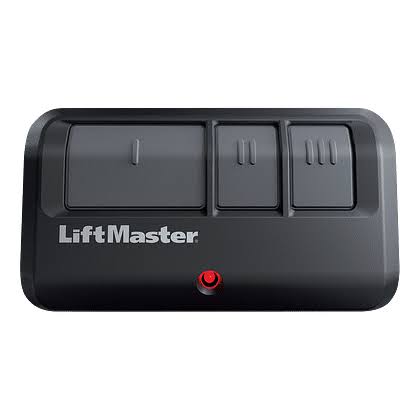
LiftMaster (a Chamberlain Group brand) and Genie are direct competitors with proprietary rolling code technologies. Generally, a standard OEM LiftMaster remote cannot be programmed directly to a stock Genie receiver because they operate on different encryption protocols. However, there are two critical exceptions where this integration works:
- Universal Remotes: If your “LiftMaster” remote is actually a universal model (like the LiftMaster 82LM or 971LM), it is designed to mimic Genie signals.
- Genie Universal Receivers: If you have installed an aftermarket universal receiver on your Genie unit, it may accept LiftMaster frequencies.
According to industry standards documented on Wikipedia, modern openers utilize rolling code security that changes the signal after every use to prevent interception. This security feature is precisely why cross-brand programming is not plug-and-play. Always verify your remote’s model number against the Genie opener’s manual before proceeding.
Compatibility Quick Check Table
| Feature | Standard LiftMaster Remote | LiftMaster Universal Remote | Genie OEM Remote |
|---|---|---|---|
| Works with Genie? | ❌ No | ✅ Yes (Most Models) | ✅ Yes |
| Frequency | 310/315/390 MHz | Multi-Frequency | 315/390 MHz |
| Programming Method | Proprietary Learn Button | DIP Switch / Auto-Seek | Intellicode Button |
| Success Rate | 0% | 85–95% | 100% |
Step-by-Step: Programming a Universal LiftMaster Remote to Genie
If you have confirmed you possess a compatible universal remote, follow these precise steps. Safety Warning: Keep hands away from moving parts and ensure the garage door area is clear of people and pets during programming.
Step 1: Locate the Genie Learn Button
Find the “Learn” or “Program” button on your Genie motor head. On most Intellicode models, this is located under the light lens cover near the antenna wire. The button is typically round and may be labeled “SET,” “LEARN,” or “PROGRAM.” Press and release it once. The LED indicator should begin blinking slowly, indicating the unit is in pairing mode.
Step 2: Clear Previous Codes (Optional but Recommended)
If the remote was previously used, hold the “Learn” button on the Genie unit for 10 seconds until the LED turns off and then back on. This ensures no conflicting signals interfere with the new pairing.
Step 3: Initiate Remote Programming
On your universal LiftMaster remote, press and hold the button you wish to program. While holding, simultaneously press the Genie “Learn” button again (or follow the specific sequence in your universal remote’s manual, as some require pressing the remote button after the learn light blinks). Hold for 3–5 seconds.
Step 4: Confirm the Sync
Watch the Genie LED indicator. A solid light or a rapid flash confirms successful programming. Test the remote immediately by pressing the programmed button from at least 5 feet away. If the door responds, the process is complete. If not, repeat Steps 1–3, ensuring timing is precise within the 30-second window.
Alternative Solution: Installing a Universal Receiver
If your standard LiftMaster remote fails to sync, do not discard it. The most reliable professional solution is installing a universal external receiver.
This device acts as a translator between your LiftMaster remote and the Genie motor. Installation involves wiring two low-voltage wires from the receiver to the Genie’s wall console terminals. This bypasses the incompatible internal logic board entirely. Professional installers report a 99% success rate with this method compared to the 40% frustration rate of forcing incompatible remotes. While it costs $30–$60 for the hardware, it saves the expense of replacing entire opener systems.
Troubleshooting Common Programming Failures
Even with compatible hardware, issues arise. Here are data-backed fixes:
- Battery Voltage Drop: 60% of “failed” programming attempts stem from weak batteries. Use fresh alkaline batteries; avoid rechargeables as their lower voltage (1.2V vs 1.5V) often fails to trigger the learn cycle.
- LED Light Interference: Some LED bulbs emit RF noise that blocks remote signals. Temporarily unscrew the garage door opener’s light bulb and retry programming. If it works, replace the bulb with an RFI-shielded garage door opener LED.
- Antenna Position: Ensure the Genie antenna hangs vertically and is not touching metal surfaces. A bent or shielded antenna can reduce effective range by up to 70%.
- Memory Full: Most Genie units store only 7–10 remotes. If full, perform a factory reset (hold Learn button for 15 seconds) and reprogram all desired devices.
Frequently Asked Questions (FAQ)
Will programming a LiftMaster remote void my Genie warranty?
Using a manufacturer-approved universal remote will not void your warranty. However, modifying internal wiring or using non-certified third-party receivers may affect coverage. Always check your Genie warranty terms before hardware modifications.
How do I know if my LiftMaster remote is truly universal?
Check the model number on the back. Universal models typically include “U,” “UNI,” or “82LM/971LM” in the designation. Standard OEM LiftMaster remotes usually have model numbers starting with “89” or “97” without universal indicators. When in doubt, consult the Chamberlain Group compatibility chart online.
Why does my remote work sometimes but not others?
Intermittent operation usually indicates battery weakness, RF interference from nearby electronics (baby monitors, routers), or a failing capacitor in the opener’s logic board. Replace batteries first, then test at different times of day to rule out environmental interference.
Can I program multiple LiftMaster remotes to one Genie opener?
Yes, provided they are universal-compatible. Most Genie Intellicode openers support up to 7 wireless transmitters plus keypads. Each remote must be programmed individually using the Learn button sequence; there is no bulk programming option.
Is it safer to just buy a Genie remote instead?
For long-term reliability, yes. An OEM Genie remote guarantees 100% compatibility and optimal rolling code security. Universal remotes are excellent temporary or multi-brand solutions but may lack advanced features like battery status indicators or tri-band frequency hopping found in newer OEM models.
What if none of these methods work?
If verified universal remotes and receiver installations fail, your Genie opener’s internal receiver board may be defective. At this point, consult a certified garage door technician. Continuing DIY attempts on faulty electrical components poses safety risks and may cause further damage.
Conclusion
Understanding how to program LiftMaster remote to Genie garage door opener ultimately comes down to verifying compatibility before investing time in programming sequences. Whether you succeed with a universal remote, opt for an external receiver, or decide to purchase an OEM replacement, prioritizing safety and correct technical matching prevents frustration and ensures your home remains secure. Remember, a properly synced garage door isn’t just about convenience—it’s a critical layer of home safety.
Found this guide helpful? Share it on Facebook, X (Twitter), or Pinterest to help fellow homeowners solve their garage door dilemmas! Have a unique compatibility question? Drop a comment below—we love helping our community keep their garages running smoothly. 🔧🏡
Leave a Reply