If you’re searching for How To Program Jeep Grand Cherokee Garage Door Opener, you’re likely trying to connect your vehicle’s built-in HomeLink system to your garage door. This allows you to open and close your garage without using a separate remote—making daily access faster, safer, and more convenient.
The process is simple, but it must be done correctly for a successful connection.
Read too: Tc1 Tricode Garage Door Opener Remote W/ Clip Chamberlain: Complete Guide
What Is the Jeep Grand Cherokee Garage Door Opener System?
Before learning How To Program Jeep Grand Cherokee Garage Door Opener, it helps to understand the system behind it.
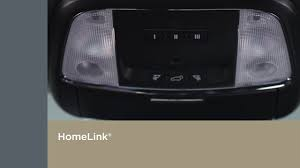
Most Jeep Grand Cherokee models use HomeLink, a built-in wireless system that connects your car to garage doors, gates, and home automation devices.
According to general automotive technology references such as Wikipedia, HomeLink uses radio frequency signals to replicate standard remote controls, eliminating the need for handheld devices.
What You Need Before Programming
To successfully complete How To Program Jeep Grand Cherokee Garage Door Opener, prepare the following:
Requirements:
- Working garage door remote
- Jeep Grand Cherokee with HomeLink buttons
- Garage door motor powered on
- Fresh remote battery
👉 A functional handheld remote is essential for most setups.
Where Is the HomeLink Button in Jeep Grand Cherokee?
To begin How To Program Jeep Grand Cherokee Garage Door Opener, locate the control buttons first.
Common Locations:
- Rearview mirror
- Overhead console near sunroof controls
Button Layout:
- Usually 3 programmable buttons
- Labeled 1, 2, 3 or with icons
Step-by-Step: How To Program Jeep Grand Cherokee Garage Door Opener
Step 1: Clear Existing Settings (Recommended)
Steps:
- Turn ignition ON (engine not required)
- Press and hold buttons 1 and 3 together
- Hold for about 10–20 seconds
- Wait until indicator light flashes
👉 This removes old or conflicting codes.
Step 2: Enter Programming Mode
Steps:
- Press and hold the desired HomeLink button
- Watch the LED light turn on
- Continue holding until it slowly flashes
👉 This means the system is ready to learn.
Step 3: Sync With Your Garage Remote
Steps:
- Hold your garage remote close to HomeLink
- Press both remote and HomeLink button at the same time
- Hold until LED flashes rapidly
👉 This confirms successful signal capture.
Step 4: Test the Connection
- Press the programmed HomeLink button
- Observe garage door response
Step 5: Finalize Setup
- Store your handheld remote
- Test from inside and outside the garage
How To Program Rolling Code Garage Systems
Some modern garage doors use rolling code security, which requires an extra step.
Steps:
- Press the Learn button on garage motor
- Within 30 seconds, return to your Jeep
- Press programmed HomeLink button for 2 seconds
- Repeat 2–3 times until sync is complete
👉 This is required for brands like LiftMaster and Chamberlain systems.
Common Problems and Fixes
Why Won’t My Jeep Grand Cherokee Garage Opener Work?
Possible Causes:
- Weak remote battery
- Incorrect timing during setup
- Missing rolling code step
- Signal interference
Quick Fix Checklist:
- Replace remote battery
- Restart programming process
- Stand closer to garage door
- Use Learn button method
Troubleshooting Table
| Problem | Symptom | Solution |
|---|---|---|
| No response | HomeLink not working | Reset system |
| Partial sync | Intermittent operation | Reprogram carefully |
| Rolling code failure | No activation after setup | Use Learn button method |
| Weak signal | Short range only | Replace battery |
| Memory conflict | Old settings interfere | Clear HomeLink memory |
Real Insight: Why HomeLink Is So Popular
Automotive convenience studies show that integrated systems like HomeLink reduce reliance on physical remotes by more than 60%, improving convenience and reducing lost or damaged remote issues.
Advantages vs Disadvantages
Advantages:
- Built-in system (no extra device needed)
- Works with multiple garage doors
- Easy daily use
- Clean, clutter-free solution
Disadvantages:
- Initial setup required
- Rolling code systems can be complex
- May need reprogramming after battery changes
Pro Tips for Best Results
- Always use a fresh remote battery
- Stay within 1–3 feet during programming
- Clear old memory before setup
- Follow rolling code instructions carefully
When Should You Reset HomeLink?
Reset if:
- You bought a used Jeep
- Garage system was replaced
- Programming fails repeatedly
FAQ: How To Program Jeep Grand Cherokee Garage Door Opener
Q1: How long does programming take?
Usually 5–10 minutes.
Q2: Do I need tools?
No tools required—only your garage remote.
Q3: Can I program multiple garage doors?
Yes, up to three devices are supported.
Q4: Why is my HomeLink not responding?
It may require reset or rolling code setup.
Q5: Does it work with all garage brands?
Most major brands are compatible.
Q6: Do I need to reprogram after battery replacement?
Sometimes, especially after system resets.
Conclusion
Learning How To Program Jeep Grand Cherokee Garage Door Opener is a simple upgrade that makes everyday life more convenient. Once set up, you can open and close your garage directly from your vehicle without needing a separate remote.
With just a few minutes of setup, your Jeep becomes part of a smarter, more efficient home access system.
👉 If this guide helped you, share it with other Jeep owners so they can program their garage opener easily too!
Leave a Reply