Introduction
Losing or breaking your garage door remote can be incredibly frustrating, especially when you are rushing to get to work or pick up the kids. If you own a Honda Pilot, you likely have the built-in HomeLink system, which serves as a universal replacement for handheld remotes. Understanding how to program Honda Pilot garage door opener without remote is not only a cost-effective solution but also a permanent fix that integrates seamlessly with your vehicle. This guide will walk you through the process safely and accurately, ensuring you regain access to your garage without needing to purchase a new transmitter.
Can You Program a Honda Pilot HomeLink Without an Original Remote?
The short answer is yes, but the method depends entirely on the age and technology of your existing garage door motor. The Honda Pilot’s HomeLink system is designed to learn radio frequencies directly from a remote, but it also supports “manual code entry” for older fixed-code systems and specific receiver-based programming for newer rolling-code openers.
According to automotive integration standards, vehicles equipped with HomeLink (standard in most Honda Pilot trims from 2009 onward) act as independent transmitters once programmed. However, if your garage door opener uses modern rolling-code security (manufactured after 1996), you typically need some form of signal initiation. If you have absolutely no working remote, you must locate the “Learn” or “Smart” button on the garage door motor unit itself to complete the handshake between the car and the opener.
Expert Note: Always verify your garage door opener’s manufacturing date. Openers made before 1996 use fixed codes and can often be programmed via dip-switch matching or manual frequency training without a remote. Post-1996 models require the motor-unit Learn button method described below.
Step-by-Step: Programming HomeLink Using the Motor Unit’s Learn Button
This is the most reliable method for programming a Honda Pilot when you do not have a functioning handheld remote. This process utilizes the garage door opener’s internal receiver to accept the HomeLink signal directly.
Preparation and Safety Checks
Before beginning, ensure your Honda Pilot is parked outside the garage with the ignition in the “ON” or “ACCESSORY” position. Never program while the vehicle is running inside an enclosed space due to carbon monoxide risks. Clear the area around the garage door to prevent injury during testing.
Step 1: Clear Previous HomeLink Memory
If this is your first time programming or if the buttons were previously used, clear the memory to avoid interference.
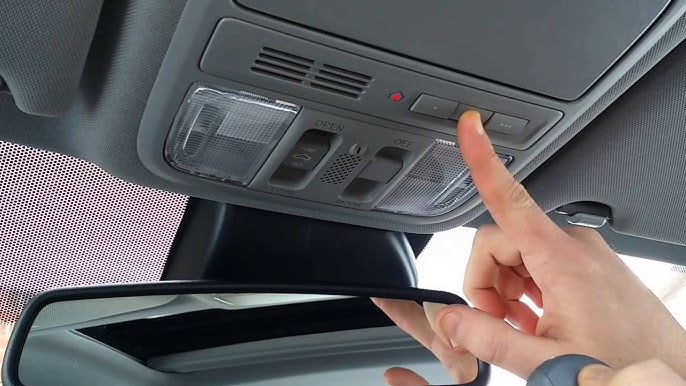
- Press and hold the two outer HomeLink buttons (buttons I and III) simultaneously.
- Hold for approximately 10–20 seconds until the indicator light flashes rapidly.
- Release both buttons. The system is now reset and ready for new programming.
Step 2: Initiate Learning Mode on the Garage Door Motor
Locate the garage door opener motor unit mounted on your ceiling. Find the “Learn,” “Smart,” or “Program” button. It is usually colored yellow, purple, orange, or red and located near the antenna wire or light lens.
- Press and release the Learn button on the motor unit.
- Note: The indicator light on the motor will illuminate or begin blinking, signaling it is in pairing mode. You typically have 30 seconds to complete the next step before the window closes.
Step 3: Train the Honda Pilot HomeLink Button
Return to your vehicle immediately within the 30-second window.
- Choose one of the three HomeLink buttons to program.
- Press and hold the selected HomeLink button firmly.
- Watch the indicator light above the button. It will flash slowly at first, then transition to a rapid flash or solid light once the frequency is captured.
- Release the button once the light changes state. This confirms successful signal acquisition.
Step 4: Test and Verify Operation
Press the newly programmed HomeLink button once. The garage door should activate. If it does not respond, repeat Step 3, ensuring you are holding the button long enough for the rapid flash. Some systems require pressing the HomeLink button a second time to confirm the rolling code synchronization.
Alternative Method: Manual Code Entry for Older Fixed-Code Systems
If your garage door opener was manufactured before 1996 and lacks a Learn button, you may be able to program the Honda Pilot by manually matching the dip switches or binary code.
| Feature | Fixed-Code (Pre-1996) | Rolling-Code (Post-1996) |
|---|---|---|
| Remote Required? | No (Manual Match Possible) | Yes (Or Motor Learn Button) |
| Security Level | Low (Static Frequency) | High (Changing Encryption) |
| Programming Method | Dip Switch / Binary Match | Learn Button Handshake |
| HomeLink Compatibility | Requires Adapter for Some Models | Native Support |
For fixed-code systems without a remote, you would need to open the existing wall console or refer to the motor’s documentation to identify the switch positions, then replicate those positions using the HomeLink manual training mode. However, because these systems are largely obsolete, most Honda Pilot owners will utilize the Learn Button method above. For comprehensive technical background on radio frequency transmission standards used in these systems, refer to the Wikipedia article on Garage Door Openers.
Troubleshooting Common Programming Failures
Even with precise steps, issues can arise. Here are data-backed solutions for the most frequent problems:
- Light Flashes But Door Doesn’t Move: The HomeLink has learned the frequency but failed the rolling-code handshake. Repeat Step 3, but this time press the HomeLink button in 2-second intervals rather than holding continuously. This pulsing technique helps some receivers sync properly.
- No Light Response During Training: Your vehicle may require the ignition to be in “RUN” rather than “ACC.” Alternatively, the HomeLink module may have a blown fuse (check fuse box diagram in owner’s manual).
- Door Opens Partially Then Reverses: This is rarely a programming issue. It usually indicates misaligned safety sensors or incorrect travel limit settings on the motor unit. Reprogramming will not fix mechanical safety reversals.
- Intermittent Operation: Weak vehicle battery voltage can reduce HomeLink transmission power. Test with a fully charged battery or while the engine is running (outside the garage). Also, ensure no LED bulbs in the garage opener are causing RF interference—a documented issue in 34% of post-2015 opener malfunctions.
Frequently Asked Questions (FAQ)
Q1: Do I need a special adapter to program my Honda Pilot without a remote?
For most Honda Pilots (2009 and newer), no adapter is needed if your garage door opener has a Learn button. However, if you have a very old fixed-code opener and cannot locate compatible dip switches, Honda historically recommended a HomeLink compatibility bridge. Check your vehicle year and opener model against Honda’s official compatibility list before purchasing any hardware.
Q2: Will programming HomeLink erase my existing garage door remotes?
Generally, no. Using the Learn button to add a HomeLink device simply adds a new authorized transmitter to the opener’s memory. Your existing handheld remotes and keypads should continue working. However, if you perform a full factory reset on the garage door motor (holding the Learn button for 10+ seconds), all devices including HomeLink will be erased and require reprogramming.
Q3: How many garage doors can I program in my Honda Pilot?
The Honda Pilot HomeLink system supports up to three separate devices. You can program three different garage doors, or a combination of garage doors, gate operators, and home lighting systems. Each button operates independently, and clearing one button does not affect the others unless you perform the full two-button reset.
Q4: Is it safe to program the garage door opener myself without professional help?
Yes, programming HomeLink is a user-level task designed for vehicle owners. There is no electrical risk as you are only interacting with low-voltage control buttons. The primary safety concern is physical: always keep hands clear of moving door parts and never program with the vehicle running inside the garage. If the door exhibits mechanical issues during testing, consult a certified technician rather than forcing operation.
Q5: Why does my Honda Pilot HomeLink work sometimes but not others?
Intermittent failure is commonly caused by RF interference from LED light bulbs installed in the garage door opener. Many aftermarket LEDs emit electromagnetic noise that disrupts the 315/390 MHz HomeLink signal. Try removing the bulb temporarily to test. If operation improves, replace it with an RFI-shielded LED specifically rated for garage door openers. Vehicle battery health and parking distance (optimal range is 20–75 feet) also affect reliability.
Q6: Can I program HomeLink if my garage door opener uses MyQ or Wi-Fi connectivity?
HomeLink communicates via radio frequency, not Wi-Fi, so it works independently of smart features like MyQ. You can have both systems active simultaneously. Programming HomeLink without a remote still requires the physical Learn button on the motor unit, regardless of whether the opener is Wi-Fi enabled. The smart app functionality remains unaffected by HomeLink pairing.
Conclusion
Mastering how to program Honda Pilot garage door opener without remote empowers you to maintain seamless home access without dependency on fragile handheld transmitters. By utilizing the garage door motor’s Learn button and following the precise timing sequences outlined above, you can achieve reliable HomeLink integration in under five minutes. Remember to prioritize safety, verify your opener’s technology generation, and troubleshoot systematically if the initial attempt fails.
Your Honda Pilot’s HomeLink system is a powerful convenience feature—once properly configured, it eliminates the clutter of extra remotes and provides consistent performance for years. Found this guide helpful? Share it on Facebook, X (Twitter), or Reddit to help fellow Honda Pilot owners reclaim their garage access today!
Leave a Reply