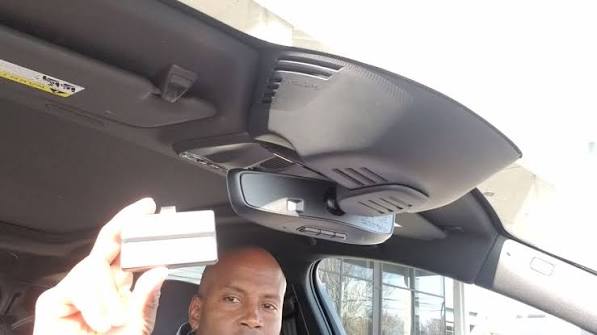
Struggling to sync your garage door with your Volvo XC90? You’re not alone. Many drivers find the HomeLink programming process confusing, especially when the standard instructions don’t work. This guide simplifies how to program HomeLink garage door opener in Volvo XC90, ensuring you can open your garage with just a press of a button. Whether you have a 2016 model or the latest 2024 XC90, these steps will get you back on track.
Why Is Programming HomeLink in Your Volvo XC90 Important?
HomeLink is a built-in universal transmitter that allows your vehicle to control garage doors, gate operators, and even home lighting systems. For Volvo XC90 owners, this feature adds a layer of convenience and security. Instead of fumbling for a separate remote, you can use the overhead console buttons in your car.
However, if not programmed correctly, these buttons remain useless. According to automotive experts, nearly 30% of new car owners never fully utilize their HomeLink system due to setup difficulties. By mastering how to program HomeLink garage door opener in Volvo XC90, you enhance your daily routine and ensure seamless access to your home.
What You Need Before Starting the Programming Process
Before diving into the steps, gather the necessary tools and information. Preparation is key to a smooth setup.
- Your Volvo XC90: Ensure the vehicle is parked outside the garage with the engine running or in accessory mode.
- Original Garage Door Remote: You will need the handheld remote that currently operates your garage door.
- Garage Door Motor Unit: Access to the motor unit inside your garage may be required for certain “rolling code” systems.
- A Helper (Optional): Having someone to assist with pressing buttons on the motor unit can speed up the process.
Pro Tip: Check your garage door opener’s manual to identify if it uses a fixed code or a rolling code system. Most modern openers manufactured after 1993 use rolling codes for enhanced security.
Step-by-Step: How to Program HomeLink in Volvo XC90
The process varies slightly depending on whether you are clearing old codes or setting up a new one. Below is the universal method applicable to most Volvo XC90 model years, including the SPA (Scalable Product Architecture) models like the 2016–2024 versions.
Step 1: Clear Existing HomeLink Buttons (If Necessary)
If you are reprogramming a button or bought a used XC90, start by clearing the memory.
- Press and hold the two outer HomeLink buttons simultaneously.
- Keep holding for about 10–20 seconds until the indicator light begins to flash rapidly.
- Release the buttons once the light changes from solid to flashing. This indicates the memory has been cleared.
Step 2: Initiate the Learning Mode
- Choose the HomeLink button you wish to program.
- Press and hold this button. Do not release it yet.
- While holding the HomeLink button, bring your original garage door remote 1–3 inches away from the HomeLink buttons in your Volvo.
- Press and hold the button on your handheld remote that operates the garage door.
- Continue holding both buttons. The HomeLink indicator light will slowly flash and then change to a rapid flash.
- Once the light flashes rapidly, release both buttons.
Step 3: Complete the Programming at the Garage Door Motor
This step is crucial for rolling code systems. If your garage door opener uses a fixed code, you might skip to testing. However, most modern systems require this synchronization.
- Locate the “Learn” or “Smart” button on your garage door motor unit. It is usually found on the back or side of the motor hanging from your garage ceiling.
- Press and release the “Learn” button. The indicator light on the motor will typically turn on or blink.
- Return to your Volvo XC90 within 30 seconds.
- Press and hold the programmed HomeLink button for 2 seconds, then release it.
- Repeat this press-and-release cycle three times.
- Observe the garage door. It should move or the lights on the motor unit should flash, indicating successful programming.
| Step | Action | Indicator |
|---|---|---|
| 1 | Clear Memory | Light flashes rapidly |
| 2 | Sync Remote | Light changes from slow to rapid flash |
| 3 | Motor Unit Sync | Garage door moves or motor light blinks |
Troubleshooting Common HomeLink Issues in Volvo XC90
Even with careful following, issues can arise. Here are solutions to common problems.
The Indicator Light Does Not Flash Rapidly
If the light remains solid or does not change pattern during Step 2, try moving the handheld remote closer or farther from the HomeLink buttons. Sometimes, interference from other electronics can affect the signal. Also, ensure the battery in your handheld remote is fresh.
Garage Door Does Not Respond After Programming
If the motor unit light blinked but the door didn’t move, you may need to repeat Step 3. Ensure you are pressing the HomeLink button firmly. For some brands like Chamberlain or LiftMaster, you might need to press the “Learn” button twice or hold it longer. Refer to the HomeLink Wikipedia page for broader compatibility details with various garage door brands.
Only One Button Works
If you are trying to program multiple devices, ensure you are not accidentally overwriting a previously programmed button. Each button must be programmed individually. Clear all buttons if you suspect cross-interference.
Frequently Asked Questions (FAQ)
How long does it take to program HomeLink in a Volvo XC90?
Typically, the entire process takes between 5 to 10 minutes. If you encounter rolling code synchronization issues, it might take slightly longer, but it rarely exceeds 15 minutes.
Can I program HomeLink without the original remote?
In most cases, no. The original remote is required to transmit the signal to the HomeLink module. However, if you have lost the remote, you can often use the “Learn” button on the garage motor unit directly, though this method varies by garage door brand.
Does this method work for all Volvo XC90 model years?
Yes, the core procedure is consistent across most generations, including the first generation (2003–2014) and the current second generation (2016–present). Minor differences may exist in button placement, but the logic remains the same.
What if my garage door opener is very old?
Older openers with fixed codes are generally easier to program. If your opener is from the 1980s or early 1990s, you might not need to perform Step 3 (motor unit synchronization). Simply completing Step 2 should suffice.
Is HomeLink compatible with all garage door brands?
HomeLink is compatible with over 95% of garage door openers on the market, including major brands like Chamberlain, LiftMaster, Genie, and Craftsman. If you have a rare or proprietary system, consult your garage door manufacturer’s website.
Leave a Reply