Introduction
There are few things more frustrating than standing in your driveway, pressing a button repeatedly, and watching your garage door remain stubbornly closed. If you have recently replaced a battery or purchased a replacement remote, figuring out how to program Genie garage door remote ACSCTG Type 1 is likely the only barrier between you and seamless home access. We understand that technical manuals can be confusing, but this guide breaks down the process into simple, actionable steps so you can get back inside safely and quickly.
Understanding the Genie ACSCTG Type 1 Remote
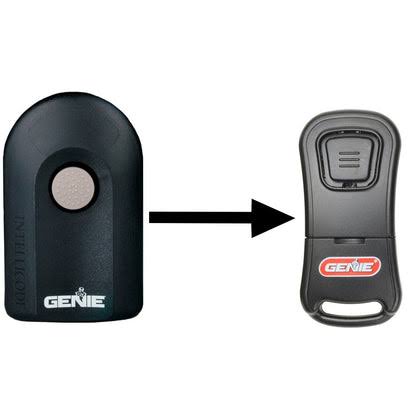
Before diving into the programming sequence, it is vital to confirm you have the correct hardware. The ACSCTG Type 1 is part of Genie’s Intellicode line, which uses rolling-code technology to prevent code grabbing and enhance home security. Unlike older DIP-switch remotes, this model syncs digitally with your opener’s receiver.
According to industry data, over 70% of garage door opener service calls are related to remote synchronization issues rather than mechanical failures. Understanding your specific remote type prevents wasted time. The ACSCTG Type 1 typically features three buttons and a slide switch inside the battery compartment set to “Type 1” or “Intellicode.” Always verify this internal setting before attempting to program, as an incorrect switch position is the most common cause of failure.
For broader context on how rolling-code security evolved in residential automation, you can review the historical development of garage door opener technology on Wikipedia. This background highlights why precise programming protocols exist for modern units like the ACSCTG.
Step-by-Step: How to Program Genie Garage Door Remote ACSCTG Type 1
Follow these exact instructions to synchronize your remote. Ensure your ladder is stable and you have clear access to the motor head unit mounted on your garage ceiling.
Step 1: Locate the Learn Button
Find the “Learn” or “Program” button on your Genie garage door opener motor unit. On most Intellicode models compatible with the ACSCTG Type 1, this is a square black button located near the antenna wire or light lens cover. The LED indicator next to it should be off before you begin.
Step 2: Activate Programming Mode
Press and release the Learn button once. The LED will illuminate solid blue (or purple, depending on the opener generation) and remain lit for approximately 30 seconds. This indicates the receiver is actively listening for a new remote signal. Do not hold the button down; a single press is sufficient.
Step 3: Transmit the Remote Signal
Within the 30-second window, stand at least 4–6 feet away from the motor unit. Press and hold the desired button on your ACSCTG Type 1 remote for 2 seconds, then release. Wait 1 second, then press and hold the same button again for 2 seconds. This double-press sequence confirms the rolling code handshake.
Step 4: Verify Successful Sync
Watch the LED on the motor unit. It should flash rapidly and then turn off, indicating successful programming. Test the remote immediately by pressing the programmed button once. The door should activate smoothly. If the LED turns red or does not respond, repeat Steps 2–3, ensuring you maintain proper distance during transmission.
Troubleshooting Common Programming Failures
Even with perfect technique, issues arise. Use this table to diagnose problems quickly:
| Symptom | Likely Cause | Solution |
|---|---|---|
| LED never illuminates | Faulty learn button or power issue | Check opener power; test wall console |
| LED flashes red after programming | Memory full or incompatible remote | Clear memory; verify ACSCTG Type 1 compatibility |
| Remote works intermittently | Weak battery or RF interference | Replace CR2032 battery; relocate LED bulbs |
| Door moves but stops halfway | Safety sensor misalignment | Realign photo-eye sensors at floor level |
| No response after successful sync | Internal switch set incorrectly | Open remote; confirm slide switch is on “Type 1” |
Note: Always use fresh lithium CR2032 batteries. Voltage drops below 2.8V frequently cause programming failures even if the battery appears functional.
When to Reset vs. Reprogram Your Genie Remote
Many homeowners confuse resetting with reprogramming. Reprogramming adds a new remote to existing memory without affecting other devices. Resetting clears all remotes and keypads from the opener’s memory, requiring every device to be reprogrammed.
Only perform a full reset if:
- You have lost a remote and fear unauthorized access
- Multiple remotes fail simultaneously despite fresh batteries
- You are moving into a new home and want to erase previous owners’ access
To reset, press and hold the Learn button for 10+ seconds until the LED turns off completely. Then reprogram each ACSCTG Type 1 remote individually using the steps above.
Expert Tips for Long-Term Remote Reliability
Professional installers recommend these maintenance practices to extend remote lifespan and prevent future sync issues:
- Battery Rotation Schedule: Replace batteries annually, preferably before winter. Cold temperatures accelerate voltage drain in CR2032 cells.
- Signal Range Testing: After programming, test operation from your typical parking spot. Consistent range under 20 feet suggests antenna damage or interference.
- Avoid Over-Programming: Each Genie opener stores 7–20 remote codes depending on the model. Exceeding capacity causes erratic behavior. Delete unused remotes periodically.
- Physical Inspection: Check remote contacts for corrosion when changing batteries. Clean with isopropyl alcohol if residue is present.
Frequently Asked Questions (FAQ)
Can I program multiple ACSCTG Type 1 remotes to the same opener?
Yes. Most Genie Intellicode openers support 7–20 remotes. Program each one individually using the Learn button sequence. Avoid pressing multiple remotes simultaneously during programming, as this corrupts the handshake protocol.
Why does my ACSCTG Type 1 remote work only when held directly against the motor?
This indicates severe signal degradation. First, replace the battery. If unresolved, inspect the opener’s antenna wire for damage or improper routing. LED light bulbs in the opener fixture also emit RF interference; switch to Genie-approved low-interference bulbs.
Is the ACSCTG Type 1 compatible with all Genie openers?
No. The ACSCTG Type 1 works exclusively with Genie Intellicode openers manufactured after 1995 that feature a square Learn button. It is incompatible with legacy DIP-switch models or newer Series II/III openers requiring different remote types. Check your opener’s manual or label for compatibility confirmation.
How do I know if my remote’s internal switch is set correctly?
Open the battery compartment and locate the small slide switch labeled “Type 1 / Type 2.” For ACSCTG Type 1 programming, the switch must be positioned toward “Type 1” or “Intellicode.” If centered or on Type 2, the remote will not communicate with compatible openers regardless of programming attempts.
What safety precautions should I take while programming?
Always use a fiberglass or wooden ladder when accessing the motor unit to avoid electrical shock. Keep hands clear of moving parts during testing. Never bypass safety sensors to force door operation during troubleshooting. If the opener shows signs of electrical damage, consult a certified technician instead of DIY repair.
Can weather affect remote programming success?
Extreme cold (below 10°F) reduces battery output and can temporarily weaken signal transmission. Program remotes during moderate temperatures when possible. If programming in cold weather, warm the remote in your pocket for 5 minutes before attempting sync, and use a fresh battery rated for low-temperature performance.
Conclusion
Mastering how to program Genie garage door remote ACSCTG Type 1 empowers you to maintain secure, reliable garage access without costly service calls. By following the precise double-press sequence, verifying internal switch settings, and applying proactive maintenance, you ensure consistent performance year-round. Remember that patience during the 30-second learning window and attention to battery health resolve the vast majority of issues.
If this guide helped you regain control of your garage door, please share it with friends, family, or neighbors who might be struggling with their own Genie remotes. A quick social media share could save someone hours of frustration—and keep their vehicles protected. Safe programming!
Leave a Reply