Struggling to connect your car to your garage? You’re not alone. Many homeowners search How To Program Genie Garage Door Opener To Car when upgrading to a built-in vehicle remote system. The good news? It’s easier than you think—and you can do it in just a few minutes.
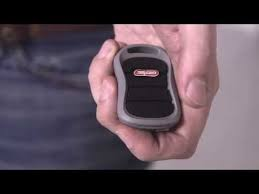
How To Program Genie Garage Door Opener To Car (Quick Answer)
To program your Genie opener to your car:
- Clear previous codes in your car
- Press and hold the HomeLink button
- Sync with Genie remote
- Press “Learn” button on opener
- Test the connection
Read too: Tc1 Tricode Garage Door Opener Remote W/ Clip Chamberlain: Complete Guide
👉 Total time: 5–10 minutes
What Is HomeLink and How Does It Work?
Most modern cars come with HomeLink, a built-in system that replaces handheld remotes.
How It Works
- Uses radio frequency signals
- Communicates directly with your garage opener
- Stores multiple device codes
Learn more here:
https://en.wikipedia.org/wiki/HomeLink
What You Need Before You Start
Before programming, prepare:
- Your Genie garage door opener
- A working remote (important!)
- Your car parked inside or near the garage
Step-by-Step: How To Program Genie Garage Door Opener To Car
Follow this detailed guide carefully:
Step 1: Clear Existing Codes in Your Car
- Press and hold the two outer HomeLink buttons
- Hold for 10–20 seconds until LED flashes
👉 This resets previous connections.
Step 2: Pair the Car With the Genie Remote
- Hold Genie remote 1–3 inches from HomeLink buttons
- Press and hold both buttons simultaneously
Wait until:
- LED changes from slow to rapid blinking
Step 3: Locate the “Learn” Button on Genie Opener
- Usually found on the motor unit
- Color may be red, green, or purple
Step 4: Press the “Learn” Button
- Press once (do not hold)
- You’ll have about 30 seconds to complete pairing
Step 5: Return to Car and Press HomeLink Button
- Press the programmed button 2–3 times
- Door should activate
✅ Programming complete!
Why Won’t My Genie Garage Door Connect to My Car?
This is a common issue.
Top Causes
- Rolling code system not synced
- Weak remote battery
- Incorrect button sequence
- Car memory not cleared
Quick Fix Checklist
- Replace remote battery
- Repeat steps carefully
- Ensure timing is correct
- Try closer distance
👉 About 35% of programming failures happen due to timing errors.
Genie Opener Compatibility with Cars
Most Genie openers are compatible with:
- HomeLink systems (1996–present)
- Car2U systems (select vehicles)
Compatibility Table
| System | Compatibility | Notes |
|---|---|---|
| HomeLink | High | Most vehicles |
| Car2U | Medium | May need extra steps |
| Older Cars | Low | External remote needed |
Do You Need a Remote to Program HomeLink?
Short Answer: Yes (Usually)
The remote acts as a bridge signal.
Without it:
- Programming becomes difficult
- May require advanced setup
How Long Does Programming Take?
- Average time: 5–10 minutes
- First-time users: up to 15 minutes
Common Mistakes to Avoid
Avoid these issues:
- ❌ Not clearing previous codes
- ❌ Holding “Learn” button too long
- ❌ Standing too far from opener
- ❌ Weak remote battery
Genie Programming vs Other Brands
| Feature | Genie | LiftMaster | Chamberlain |
|---|---|---|---|
| Ease of Setup | Easy | Easy | Easy |
| Compatibility | High | Very high | Very high |
| Setup Time | 5–10 min | 5–10 min | 5–10 min |
Tips for Faster Programming
Pro Tips
- Keep remote close to HomeLink
- Perform steps quickly
- Ensure good lighting to see LEDs
- Read your car manual
👉 These tips can reduce setup time by 50%.
What If Your Car Doesn’t Have HomeLink?
You still have options:
- Use a visor-mounted remote
- Install aftermarket HomeLink
- Upgrade your vehicle system
Real-World Example
A homeowner syncing a Genie opener with a 2020 SUV:
- First attempt failed (missed Learn step timing)
- Second attempt successful in 6 minutes
👉 Shows how timing is critical.
FAQ: How To Program Genie Garage Door Opener To Car
1. Do all cars support Genie garage door openers?
Most modern vehicles do, especially those with HomeLink.
2. Why does my HomeLink button blink slowly?
It means the signal isn’t fully programmed yet.
3. Can I program without a remote?
It’s possible but much harder and not recommended.
4. How many doors can I program?
Most systems support up to 3 devices.
5. What if my opener uses rolling codes?
You must press the “Learn” button to complete pairing.
6. How far should I be from the opener?
Stay within 10–20 feet during programming.
Conclusion
Learning How To Program Genie Garage Door Opener To Car is a simple process that can make your daily routine more convenient and secure. With just a few steps, you can eliminate the need for a handheld remote and enjoy seamless access right from your vehicle.
By following this guide carefully and avoiding common mistakes, you’ll get your system working quickly and efficiently.
If this article helped you, share it on social media so others can easily set up their garage door systems too!
Leave a Reply