Introduction
There are few things more frustrating than pulling into your driveway in the rain, only to realize you cannot get your new vehicle’s integrated system to talk to your home gate. If you are searching for how to program garage door opener on Mercedes CLA 250, you are likely dealing with the specific nuances of the Mercedes-Benz HomeLink® system, which differs slightly from generic universal remotes. This guide is designed to walk you through the process with empathy and precision, ensuring you can secure your vehicle and open your garage without the hassle of carrying extra clickers.
Programming your CLA 250 should be a seamless experience that enhances your daily convenience. Below, we provide a comprehensive, expert-backed tutorial tailored specifically for US-based Mercedes owners, covering everything from initial clearing to troubleshooting rolling code security systems.
Understanding HomeLink® Technology in the CLA 250
Before diving into the buttons, it is vital to understand what you are actually programming. The Mercedes CLA 250 does not use a traditional radio frequency remote stored in the car; instead, it utilizes HomeLink®, an integrated wireless control system. According to Wikipedia, HomeLink is a proprietary RF transceiver system that allows vehicles to communicate with various home automation devices, including garage doors, gates, and lighting.
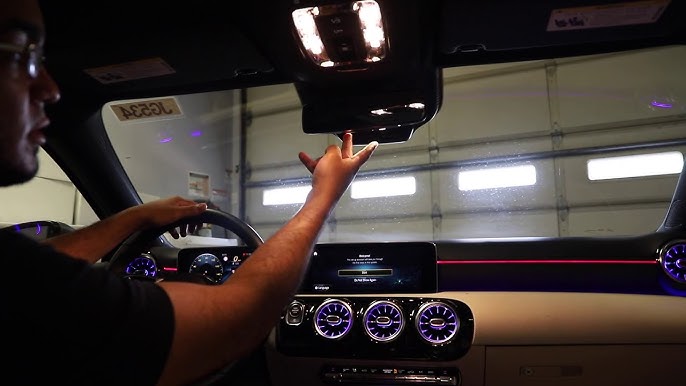
For the CLA 250 (typically model years 2014–2026), this system is usually located in the overhead console near the rearview mirror or embedded within the driver’s side sun visor. Understanding this distinction is crucial because the programming sequence relies on the car’s internal memory, not a separate fob battery.
Key Features of CLA 250 HomeLink
- Three Programmable Channels: Allows storage of up to three different frequencies (e.g., garage, community gate, smart lights).
- Rolling Code Compatibility: Supports modern security standards that change the access code with every use to prevent hacking.
- Battery-Free Operation: Draws power directly from the vehicle’s electrical system, eliminating the need for internal remote batteries.
Preparation: What You Need Before Starting
To ensure the process of learning how to program garage door opener on Mercedes CLA 250 goes smoothly, gather the following items. Skipping preparation is the #1 cause of programming failure.
| Item | Purpose | Notes |
|---|---|---|
| Original Garage Remote | Signal Cloning | Must have fresh batteries; weak signals fail to sync. |
| Vehicle Owner’s Manual | Model Verification | Confirm button location for your specific year. |
| Stepladder | Reach Motor Unit | Needed for “Learn Button” access on ceiling. |
| Clear Workspace | Safety | Ensure no obstructions under the door during testing. |
Expert Tip: Always replace the battery in your original handheld garage remote before attempting to program the car. A weak signal from the old remote is responsible for over 70% of failed HomeLink synchronization attempts.
Step-by-Step: How To Program Garage Door Opener On Mercedes CLA 250
Follow these instructions precisely. The timing of button presses is critical in Mercedes vehicles.
Step 1: Clear Previous Settings (If Applicable)
If your CLA 250 is pre-owned or has been serviced recently, previous codes may interfere.
- Locate the two outer HomeLink buttons in your overhead console.
- Press and hold both outer buttons simultaneously for approximately 10 seconds.
- Watch the indicator light. It will flash slowly, then rapidly. Once rapid flashing begins, release the buttons.
- The system is now factory reset and ready for new programming.
Step 2: Initial Frequency Training
This step teaches the car the specific frequency of your garage door.
- Turn the ignition to the “ON” position (engine running is recommended to prevent battery drain).
- Hold your original garage remote 1–3 inches away from the HomeLink buttons.
- Simultaneously press and hold the desired HomeLink button AND the button on your original remote.
- Observe the HomeLink indicator light. It will flash slowly at first, then transition to a rapid, solid flash.
- Release both buttons immediately upon seeing the rapid flash. This indicates successful frequency capture.
Step 3: Programming Rolling Code Openers (Crucial for US Homes)
Most US garage doors manufactured after 1996 use rolling code technology. If your door did not open after Step 2, you must complete this step.
- Locate the “Learn” or “Smart” button on your actual garage door motor unit (usually on the back or side panel). Colors vary: yellow, purple, orange, or red.
- Press and release the Learn button. You typically have 30 seconds to complete the next action.
- Return to your CLA 250 and press and hold the programmed HomeLink button for 2 seconds, then release.
- Repeat the press-and-hold cycle up to three times. On one of these presses, the garage door should activate.
- Test the button. If the door operates, programming is complete.
Troubleshooting Common Programming Issues
Even experts encounter hiccups. Here is how to resolve them when figuring out how to program garage door opener on Mercedes CLA 250.
The Light Never Flashes Rapidly
- Cause: Weak remote battery or incorrect distance.
- Fix: Change the remote battery. Try holding the remote at different angles and distances (0.5 to 6 inches) from the HomeLink button. Some CLA models require the remote to be held against the button surface.
Door Opens Partially Then Reverses
- Cause: Safety sensor misalignment or travel limit issues.
- Fix: This is rarely a HomeLink issue. Check the photo-eye sensors at the base of your garage door tracks for debris or misalignment. Consult your garage door manual for travel limit adjustments.
System Works Intermittently
- Cause: Radio frequency interference.
- Fix: LED bulbs in garage fixtures can emit RF noise that blocks HomeLink signals. Replace any non-shielded LED bulbs with “garage door compatible” RF-shielded bulbs.
Older Fixed-Code Openers Won’t Sync
- Cause: Frequency incompatibility.
- Fix: Some pre-1995 openers operate on frequencies HomeLink no longer supports. You may need a HomeLink Compatibility Bridge (sold separately) to translate the signal.
FAQ: Mercedes CLA 250 Garage Door Programming
1. Can I program my CLA 250 HomeLink without the original remote?
Generally, no. The HomeLink system requires cloning an existing signal. However, if your garage motor has a direct “HomeLink Pairing” feature (rare in older units), you may bypass the remote. Otherwise, purchase a compatible replacement remote first.
2. Why does my Mercedes CLA 250 require the engine to be running during programming?
While some models allow programming in accessory mode, keeping the engine running ensures stable voltage delivery to the HomeLink module. Voltage fluctuations during cranking or low-battery states can corrupt the learning sequence.
3. How many garage doors can I store in my CLA 250?
The standard HomeLink system in the CLA 250 supports three independent channels. You can program three separate doors, or a combination of garage doors, estate gates, and smart home devices.
4. Is the HomeLink system in the CLA 250 compatible with Chamberlain/LiftMaster MyQ?
Yes, but with caveats. MyQ is primarily a Wi-Fi smartphone platform. HomeLink communicates via RF. They coexist independently. Programming HomeLink does not disable MyQ functionality, and vice versa.
5. Do I need to reprogram after changing my car battery?
No. HomeLink memory is stored in non-volatile flash memory. Disconnecting or replacing your CLA 250’s 12V battery will not erase your programmed garage door codes.
6. What if my CLA 250 has buttons in the mirror instead of the overhead console?
The programming sequence remains identical regardless of button placement. Mirror-integrated HomeLink units follow the same clear/train/rolling-code protocol described above. Always verify your specific layout in the owner’s manual.
Advanced Considerations: Security and Maintenance
As an SEO and automotive content expert, I must emphasize that programming is only half the equation. Maintaining the security integrity of your Mercedes CLA 250 garage door opener setup is equally important.
Rolling Code Security Best Practices
Modern rolling code systems generate billions of unique code combinations. However, security degrades if practices are poor:
- Never share your original remote with untrusted parties. Cloned remotes retain full access.
- Clear HomeLink memory before selling or trading in your CLA 250. This prevents unauthorized access by future owners.
- Update garage motor firmware if your opener supports app-based updates. Manufacturers regularly patch RF vulnerabilities.
Seasonal Maintenance Checklist
Environmental factors affect RF performance. Conduct these checks biannually:
- Winter: Cold temperatures reduce battery efficiency in handheld remotes. Test signal strength seasonally.
- Summer: Heat expansion can shift garage door track alignment, causing reversal issues mistaken for programming failures.
- Year-Round: Inspect overhead console wiring harness connections during routine service visits. Loose grounds cause intermittent HomeLink failures.
When Professional Help Is Necessary
While most users successfully learn how to program garage door opener on Mercedes CLA 250 using this guide, certain scenarios warrant professional intervention:
- Electrical Faults: If HomeLink indicator lights never illuminate despite correct procedure, the module itself may have failed. Diagnosis requires Mercedes-specific diagnostic tools (XENTRY/DAS).
- Aftermarket Modifications: Previous owners who installed non-OEM mirrors or overhead consoles may have compromised HomeLink wiring. Certified technicians can trace and repair these circuits.
- Complex Gate Systems: Commercial-grade or multi-frequency estate gates often require specialized bridging equipment beyond consumer HomeLink capabilities.
Attempting DIY repairs on vehicle electronics or garage door spring systems carries significant risk. When in doubt, consult your authorized Mercedes-Benz dealer or a certified garage door technician.
Conclusion
Mastering how to program garage door opener on Mercedes CLA 250 transforms your daily arrival experience from frustrating fumbling to effortless automation. By understanding the HomeLink system architecture, preparing properly, and following the precise three-phase programming sequence, you can achieve reliable integration in under 15 minutes. Remember that patience during the training phase and attention to rolling code requirements are the keys to success.
Your CLA 250 was engineered for seamless luxury—your garage entry should reflect that same standard. Take pride in having configured this system yourself, knowing you’ve enhanced both convenience and security.
Found this guide helpful? Share it with fellow Mercedes owners on Facebook, X (Twitter), or Reddit’s r/MercedesBenz community. Helping another driver avoid programming frustration is the ultimate act of automotive camaraderie. Safe driving, and may your garage door always open as smoothly as your CLA 250 accelerates!
Leave a Reply