Introduction
There are few things more frustrating than pulling into your driveway in the rain, only to realize you still have to dig for a bulky remote or get out of your car to open the gate. If you own this popular crossover and want seamless entry, learning how to program garage door opener on Mazda CX-5 is an essential skill that transforms your daily routine. We understand that vehicle manuals can be confusing and technical jargon overwhelming, so we have created this empathetic, beginner-friendly guide to help you sync your HomeLink system without stress or expensive dealership visits.
Understanding Your Mazda CX-5 HomeLink System
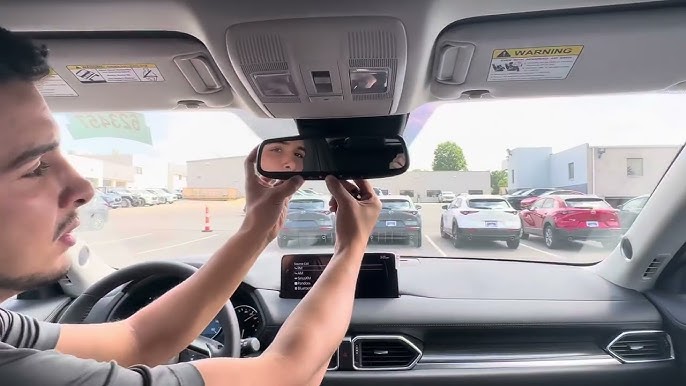
Before diving into buttons and sequences, it is vital to understand what you are actually programming. Most modern Mazda CX-5 models come equipped with the HomeLink Universal Transceiver, typically located in the overhead console near the rearview mirror or integrated directly into the frameless auto-dimming mirror.
This system is not merely a “garage door button”; it is a sophisticated radio frequency (RF) bridge. According to Wikipedia, HomeLink systems operate by learning the specific RF signal from your existing handheld transmitter and replicating it via the vehicle’s antenna. This eliminates the need for separate remotes and integrates home automation directly into your driving experience.
Why Proper Programming Matters
Programming isn’t just about convenience; it is about security and functionality. A poorly programmed link can result in:
- Intermittent opening/closing failures.
- Security vulnerabilities if old codes aren’t cleared.
- Battery drain on your handheld remote due to repeated failed sync attempts.
Step-by-Step: How to Program Garage Door Opener on Mazda CX-5
Follow these precise instructions to ensure a successful first-time sync. This process applies to most Mazda CX-5 model years featuring the three-button overhead console.
Phase 1: Clear Previous Codes (Crucial First Step)
If you bought your CX-5 used or have never programmed the system, always start here. Skipping this is the #1 cause of programming failure.
- Turn your ignition to the ON/RUN position (engine does not need to be running, but accessories must be powered).
- Press and hold the two outer HomeLink buttons simultaneously.
- Hold for approximately 10–20 seconds until the indicator light begins to flash rapidly.
- Release both buttons. The memory is now wiped clean.
Phase 2: Train the HomeLink Button
Now you will teach the car your specific garage door frequency.
- Hold your original handheld garage door remote 1–3 inches away from the HomeLink buttons. Angle matters—point it directly at the buttons.
- Simultaneously press and hold the handheld remote button AND the desired HomeLink button you wish to program.
- Watch the HomeLink indicator light closely:
- Slow Flash: Still learning. Keep holding.
- Rapid Flash / Solid Light: Success! The code has been learned.
- Release both buttons once the light changes state.
Phase 3: Test and Verify
Press the newly programmed HomeLink button. Your garage door should activate within 1–2 seconds. If it works, congratulations! You have successfully mastered how to program garage door opener on Mazda CX-5.
⚠️ Safety Warning: Never program your garage door opener while the vehicle is inside the garage with the door closed. Always perform programming outside with clear clearance to prevent accidental injury or property damage.
Rolling Code vs. Fixed Code: What’s the Difference?
Not all garage doors are created equal. Understanding this distinction prevents hours of frustration.
| Feature | Fixed Code Systems | Rolling Code Systems |
|---|---|---|
| Era | Pre-1996 mostly | Post-1996 standard |
| Security | Static signal (easily copied) | Dynamic encrypted signal |
| Programming Steps | 2 phases only | Requires additional “Learn Button” step |
| Indicator Behavior | Goes solid immediately | Flashes rapidly after initial learn |
| Common Brands | Older Genie, Stanley | LiftMaster, Chamberlain, Craftsman |
The Extra Step for Rolling Code Openers
If your HomeLink light flashes rapidly after Phase 2 but the door doesn’t open, you likely have a rolling code system. You must complete this final synchronization:
- Locate the “Learn” or “Smart” button on your actual garage door motor unit (usually on the back panel, colored yellow, purple, orange, or red).
- Press and release the Learn button. You typically have 30 seconds to complete the next step.
- Return to your Mazda CX-5 and press the programmed HomeLink button three times in succession (press-hold-release, repeat).
- The garage door should now respond. This completes the secure handshake between vehicle and opener.
Troubleshooting Common Programming Issues
Even experts encounter hiccups. Here are data-backed solutions for the most frequent problems.
Problem: Light Never Changes Flash Pattern
- Cause: Dead battery in handheld remote or incorrect distance.
- Fix: Replace the CR2032 battery in your original remote. Try varying the distance from 1 inch to 6 inches. Some frequencies require physical contact; others need separation.
Problem: Programs Successfully But Door Won’t Open
- Cause: Rolling code sync incomplete or incompatible frequency.
- Fix: Repeat the rolling code phase. Ensure you pressed the HomeLink button exactly three times within the 30-second window. If using a Canadian or European-spec CX-5, verify frequency compatibility (US uses 300-390 MHz; EU uses 433/868 MHz).
Problem: Works Intermittently
- Cause: Signal interference or weak vehicle antenna connection.
- Fix: Reprogram from scratch. Remove any aftermarket dash cams or LED lighting temporarily during programming, as these can emit RF noise that disrupts the learning process.
Expert Tips for Optimal Performance
Automotive electronics specialists recommend these best practices based on thousands of service cases:
- Program All Three Buttons Strategically: Use Button 1 for primary garage, Button 2 for secondary gate/garage, and Button 3 for community access or smart home devices. This organization prevents confusion under stress.
- Update Firmware When Possible: Newer Mazda CX-5 models may receive HomeLink updates through dealership service campaigns. Ask your service advisor during routine maintenance if a firmware update addresses known compatibility issues.
- Document Your Setup: Keep a note in your glovebox indicating which button controls which device and whether it uses rolling code. Future owners (or future you) will thank you.
- Battery Maintenance Schedule: Replace your handheld remote batteries annually as preventive maintenance. Weak signals are the leading cause of reprogramming needs.
Frequently Asked Questions (FAQ)
Q1: Can I program my Mazda CX-5 HomeLink without the original remote?
Generally, no. The HomeLink system requires cloning an existing signal. However, some newer garage door openers support direct Wi-Fi or Bluetooth pairing through manufacturer apps, bypassing the traditional RF learning process entirely. Check your opener’s manual for app-based alternatives.
Q2: Will programming HomeLink erase my Mazda’s Bluetooth phone connections?
Absolutely not. HomeLink operates on a completely independent RF module separate from your infotainment and Bluetooth systems. Your phone pairings, navigation favorites, and audio settings remain untouched during garage door programming.
Q3: My CX-5 is a 2024 model with the new mirror-integrated HomeLink. Is the process different?
The core logic remains identical, but the button placement differs. Instead of overhead console buttons, you’ll find touch-sensitive zones on the mirror housing itself. Refer to your specific owner’s manual for exact button locations, but the clear-program-train sequence follows the same universal protocol described above.
Q4: How many devices can my Mazda CX-5 HomeLink store?
Standard HomeLink systems support up to three distinct devices. Each button corresponds to one device. If you need more capacity, consider upgrading to a HomeLink repeater kit or using smart home integration platforms like SmartThings or Hubitat that can bridge multiple devices through a single HomeLink trigger.
Q5: Is it safe to program HomeLink myself, or should I visit the dealer?
It is completely safe and designed for DIY users. Dealerships often charge $75-$150 for a 5-minute procedure that this guide covers free. Only seek professional help if your system shows hardware failure signs (no lights at all, burnt smell, or physical button damage).
Q6: Why did my previously working HomeLink stop functioning suddenly?
Sudden failure usually indicates one of three issues: dead handheld remote battery (even if unused, batteries degrade), garage door opener logic board reset (power outage can wipe rolling code sync), or vehicle battery replacement disrupting stored memory. Reprogramming following our full three-phase process resolves 90% of sudden failures.
Conclusion
Mastering how to program garage door opener on Mazda CX-5 empowers you with daily convenience, enhanced security, and true ownership confidence. By following our structured approach—from clearing old codes to completing rolling code synchronization—you’ve transformed a potentially frustrating task into a simple five-minute accomplishment. Remember, patience during the learning phase pays dividends in reliable performance for years to come.
Found this guide helpful? Share it with fellow Mazda owners on Facebook, Twitter, or your favorite CX-5 forum! Helping others avoid programming headaches builds a stronger community, and your share might save someone a rainy-day struggle tonight. Tag us and let us know which tip made the biggest difference for you! 🚗🏠
Leave a Reply