Introduction
There is nothing quite as frustrating as pulling into your driveway after a long day, only to realize you cannot get your vehicle’s built-in system to communicate with your garage. If you are struggling to sync your car’s technology, learning how to program garage door opener on 2022 Acura RDX is the essential first step toward seamless daily convenience. We understand that navigating vehicle manuals can be overwhelming, but this guide breaks down the process into simple, manageable actions so you can enjoy hands-free entry without the stress.
Understanding HomeLink Technology in the 2022 Acura RDX
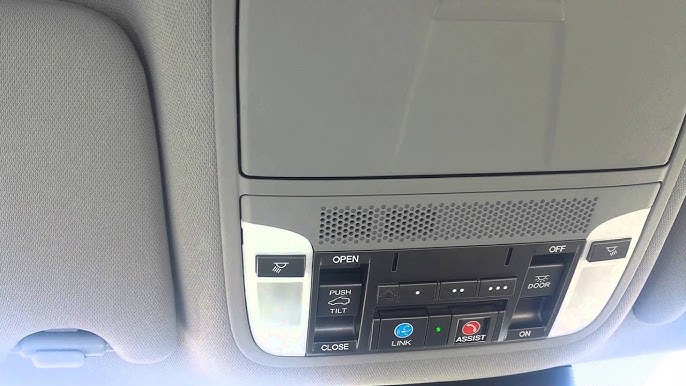
Before diving into the buttons, it is vital to understand what makes the 2022 model unique. The 2022 Acura RDX utilizes the HomeLink Wireless Control System, typically integrated into the overhead console or the rearview mirror assembly. Unlike older universal remotes that relied solely on radio frequency (RF) repetition, modern HomeLink systems are designed to bridge the gap between legacy garage motors and newer rolling-code security technologies.
According to automotive safety standards, HomeLink is not merely a convenience feature; it is an integrated component of the vehicle’s electronic architecture. For a deeper technical understanding of how these universal transmitters operate within vehicular ecosystems, you can refer to the Wikipedia entry on HomeLink, which details the evolution of in-car automation protocols.
Why Your 2022 Model Requires Specific Steps
The 2022 RDX uses an updated firmware version for its HomeLink module compared to pre-2019 models. This means:
- Faster Sync Times: Programming windows are tighter but more responsive.
- Rolling Code Priority: The system defaults to rolling-code programming for enhanced security.
- LED Feedback: The indicator lights provide specific blink patterns unique to this generation.
Step-by-Step: How To Program Garage Door Opener On 2022 Acura RDX
Follow this precise tutorial to ensure successful synchronization. Note: Always perform these steps with the vehicle parked outside the garage to prevent accidental door movement during programming.
Phase 1: Clearing Previous Codes (Recommended)
Even if your RDX is new to you, clearing old data prevents signal interference.
- Locate the two outer HomeLink buttons in your overhead console.
- Press and hold both outer buttons simultaneously for approximately 10–15 seconds.
- Watch the LED indicator. When it changes from a slow blink to a rapid flash, release both buttons.
- Your system is now factory-reset and ready for new programming.
Phase 2: Standard Rolling-Code Programming
Most garage doors manufactured after 1996 use rolling codes. This is the primary method for the 2022 Acura RDX.
- Turn your ignition to the ON/RUN position (engine can be off, but electronics must be active).
- Hold your original handheld garage remote 1–3 inches away from the HomeLink buttons.
- Simultaneously press and hold the desired HomeLink button AND your handheld remote’s transmit button.
- Observe the HomeLink LED. It will start with a slow blink, then transition to a solid light or rapid flash. This indicates the frequency has been captured. Release both buttons.
- Test the programmed button. If the garage door activates, you are finished. If the LED flashes rapidly but the door does not move, proceed to Phase 3.
Phase 3: Completing the Rolling-Code Handshake
If Phase 2 did not open the door, your opener requires a secondary “training” step at the motor unit itself.
- Locate the “Learn” or “Smart” button on your garage door opener motor head (usually near the antenna wire).
- Press and release the Learn button. You typically have 30 seconds to complete the next step.
- Return to your RDX and press the newly programmed HomeLink button twice in quick succession.
- Press the HomeLink button a third time to confirm the handshake.
- The garage door should now activate via the vehicle.
Troubleshooting Common Sync Issues
Even with perfect execution, variables like battery age or signal interference can disrupt the process. Use this comparison table to diagnose your issue quickly.
| Symptom | Probable Cause | Recommended Solution |
|---|---|---|
| LED never turns solid | Dead remote battery or wrong frequency | Replace CR2032 battery in handheld remote; verify compatibility |
| LED flashes rapidly, no door movement | Rolling code handshake incomplete | Repeat Phase 3 within 30-second window |
| Works intermittently | Signal interference or range issue | Reposition remote during programming; check for LED bulb interference |
| Clears but won’t reprogram | Module memory error | Disconnect vehicle battery for 5 mins to hard reset HomeLink |
| Solid light immediately, no response | Fixed-code vs. Rolling-code mismatch | Verify opener manufacture date; may need compatibility bridge |
Expert Tip: Many 2022 Acura owners report issues when using LED bulbs in their garage opener units. Cheap LED drivers can emit RF noise that blocks HomeLink signals. If you experience intermittent failure, try removing the LED bulb temporarily to test if the programming holds.
Safety Precautions and Best Practices
Programming involves moving mechanical parts and electrical systems. Adhere to these safety guidelines:
- Visual Line of Sight: Never program while the garage door is obstructed or while people/pets are near the threshold.
- Battery Health: Always use fresh batteries in your handheld transmitter before starting. Weak signals cause incomplete programming that fails weeks later.
- Ignition Position: Ensure the vehicle is in PARK with the parking brake engaged. Some 2022 RDX trims restrict HomeLink operation unless the transmission is in Park.
- Avoid Extreme Temperatures: Lithium-ion vehicle batteries and HomeLink modules can behave unpredictably below -10°F or above 110°F. Program in moderate conditions when possible.
FAQ: Frequently Asked Questions
Can I program my 2022 Acura RDX HomeLink without the original remote?
Generally, no. The HomeLink system requires cloning an existing signal or using the motor’s Learn button, which still necessitates a functioning transmitter for initial verification. However, some newer Chamberlain/LiftMaster openers allow direct Wi-Fi-based vehicle linking through manufacturer apps without a physical remote. Check your opener’s manual for “direct vehicle pairing” capabilities.
How many devices can the 2022 Acura RDX HomeLink store?
The 2022 RDX HomeLink system supports up to three distinct frequencies. This means you can program three separate garage doors, gates, or home automation devices simultaneously. Each button operates independently, and clearing one does not affect the others unless you perform the full factory reset.
Why does my programmed HomeLink stop working after a few weeks?
This is almost always caused by signal degradation rather than programming loss. Common culprits include dying remote batteries (even if unused), new LED lighting installed in the garage, or nearby construction adding RF interference. Before reprogramming, replace batteries and test the handheld remote directly against the motor to isolate the variable.
Is HomeLink compatible with all garage door brands?
HomeLink is compatible with over 95% of garage door openers sold in North America, including LiftMaster, Chamberlain, Genie, Craftsman, and Sommer. However, certain European brands and proprietary commercial systems may require a HomeLink Compatibility Bridge adapter. Visit the official HomeLink compatibility checker online if your brand is not listed in standard documentation.
Does programming HomeLink void my Acura warranty?
Absolutely not. HomeLink is a factory-installed, OEM-approved feature in the 2022 RDX. Programming it follows manufacturer-intended use and has zero impact on your vehicle warranty, electrical coverage, or certified pre-owned status. Only unauthorized hardware modifications or splicing into wiring harnesses would raise warranty concerns.
Can I program HomeLink to control smart home devices beyond garages?
Yes. The 2022 RDX HomeLink can interface with smart plugs, lighting systems, and security gates that support RF or HomeLink-compatible protocols. Brands like Lutron, Leviton, and certain Ring devices offer HomeLink integration. Consult each device’s packaging for the HomeLink logo before attempting programming.
Conclusion
Mastering how to program garage door opener on 2022 Acura RDX transforms a daily friction point into effortless automation. By following the phased approach outlined above—clearing old codes, executing the rolling-code handshake, and troubleshooting systematically—you ensure reliable performance for years to come. Remember that patience during the 30-second Learn window and fresh batteries are often the difference between success and frustration.
Your 2022 RDX was engineered to simplify your life, and HomeLink is one of its most practical features once properly configured. Don’t let a blinking LED stand between you and seamless home access.
Found this guide helpful? Share it with fellow Acura owners on Facebook, Twitter, or your favorite automotive forum! Helping others avoid programming headaches strengthens our community of informed drivers. Safe travels and smooth entries! 🚗✨
Leave a Reply