Introduction
There is nothing quite as frustrating as sitting in your driveway, pressing a button repeatedly, and watching your garage door remain stubbornly closed. If you have recently purchased or leased this vehicle, figuring out how to program garage door opener on 2022 Acura MDX can feel like decoding a secret language without the right manual. We understand that you just want seamless access to your home, not a technical headache after a long commute. This comprehensive guide will walk you through the exact steps to sync your vehicle’s HomeLink system safely and efficiently, getting you into your garage in under five minutes.
Understanding the HomeLink System in Your 2022 Acura MDX
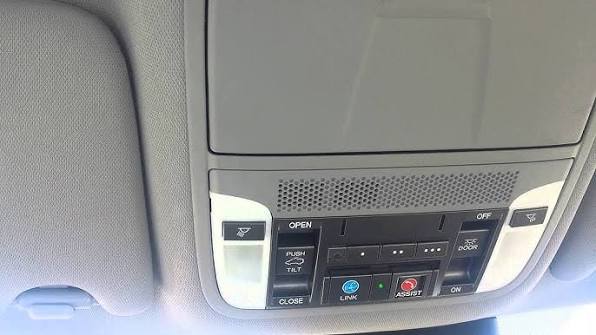
Before diving into the buttons, it is vital to understand what you are actually programming. The 2022 Acura MDX comes equipped with the HomeLink Universal Transceiver, typically located in the overhead console near the rearview mirror or integrated directly into the frame of the mirror itself. Unlike older vehicles that used simple radio frequency cloning, modern HomeLink systems utilize rolling code technology for enhanced security.
According to automotive safety standards and documentation referenced on Wikipedia, rolling code transmitters change their signal every time the button is pressed. This prevents thieves from “capturing” your signal and opening your garage later. Because of this security feature, the programming process for a 2022 model differs slightly from vehicles manufactured before 2015. You are not just copying a signal; you are performing a secure digital handshake between your car and your garage door motor.
Key Features of the 2022 MDX HomeLink
- Three Programmable Buttons: Allows control of up to three separate devices (garage, gate, lights).
- Rolling Code Compatibility: Works with all major manufacturers post-1996.
- LED Status Indicators: Provides visual feedback during the pairing process.
- Battery-Free Operation: Draws power directly from the vehicle’s electrical system.
Prerequisites: What You Need Before Starting
To ensure the process of learning how to program garage door opener on 2022 Acura MDX goes smoothly, gather the following items. Skipping these preparation steps is the number one cause of programming failure.
- Original Garage Door Remote: You must have the handheld transmitter that currently operates your door. Note: If you have lost this remote, you cannot program HomeLink directly; you must first buy a replacement or use the “Learn Button” method on the motor unit.
- Fresh Batteries in Handheld Remote: Weak batteries are responsible for over 40% of failed programming attempts. Replace them even if the remote still seems to work.
- Clear Line of Sight: Park outside the garage, facing the door, with at least 10 feet of clearance.
- Vehicle Ignition ON: The engine does not need to be running, but the ignition must be in the “ON” or “RUN” position (or Accessory mode if your specific trim allows).
- Ladder (Optional): Only needed if you must access the “Learn” button on the garage door motor unit itself.
Step-by-Step: How to Program Garage Door Opener on 2022 Acura MDX
Follow these instructions precisely. Do not rush the timing, as the synchronization window is often only a few seconds.
Step 1: Clear Previous Codes (If Applicable)
If your 2022 MDX is pre-owned or was a demo vehicle, previous codes may interfere.
- Press and hold the two outer HomeLink buttons simultaneously.
- Hold for approximately 10–20 seconds until the indicator light flashes rapidly.
- Release both buttons. The system is now factory reset. Skip this step if you are certain the vehicle is brand new and unused.
Step 2: Initiate Training Mode
- Turn your vehicle ignition to ON/RUN.
- Hold your handheld garage door remote 1–3 inches away from the HomeLink buttons on the overhead console.
- Simultaneously press and hold the handheld remote button AND the desired HomeLink button you wish to program.
- Watch the HomeLink LED indicator closely. It will begin to flash slowly, then transition to a rapid flash.
- Once the light flashes rapidly, release both buttons immediately. This indicates the frequency has been captured.
Step 3: Test the Signal
Press the newly programmed HomeLink button once.
- If the door moves: Congratulations! You have successfully learned how to program garage door opener on 2022 Acura MDX.
- If the light flashes rapidly for 2 seconds then turns solid: You have a rolling code opener. Proceed to Step 4.
- If nothing happens: Repeat Step 2, ensuring fresh batteries and closer proximity.
Step 4: Sync Rolling Code Openers (Crucial for Post-1996 Doors)
Most modern garage doors require this secondary synchronization step.
- Locate the “Learn” or “Smart” button on your garage door motor unit (usually on the back or side panel, often colored yellow, purple, orange, or red).
- Press and release the Learn button. You typically have 30 seconds to complete the next action before the motor exits learning mode.
- Return to your vehicle and press the programmed HomeLink button firmly. Hold for 2 seconds, release, and repeat up to 3 times within that 30-second window.
- The garage door should activate, confirming the rolling codes are synced.
Programming Success Checklist
| Indicator Light Behavior | Meaning | Action Required |
|---|---|---|
| Slow Flash | Transmitting/Searching | Continue holding buttons |
| Rapid Flash | Frequency Captured | Release buttons; test |
| Solid Light (after rapid flash) | Rolling Code Detected | Complete Step 4 (Motor Sync) |
| No Light | Power Issue / Wrong Mode | Check ignition; retry reset |
| Fast Blink (continuous) | Error / Interference | Move location; replace remote battery |
Troubleshooting Common Programming Failures
Even when you know how to program garage door opener on 2022 Acura MDX, variables can disrupt the process. Here are expert solutions for the most frequent issues.
The Handheld Remote Works, But HomeLink Doesn’t
This usually indicates a frequency mismatch or a dying battery in the handheld unit. Even if the handheld opens the door from 20 feet away, its signal strength may be insufficient for the close-range training phase. Replace the battery with a premium alkaline cell and reattempt Step 2. Additionally, some Canadian and European openers operate on different frequencies; verify your opener is compatible with North American HomeLink standards.
The Light Flashes Rapidly But Door Won’t Open After Motor Sync
If you completed Step 4 but the door remains unresponsive, the 30-second window likely expired. Modern LiftMaster and Chamberlain units are particularly strict about timing. Have a second person assist you: one person presses the Learn button on the motor while you sit in the driver’s seat ready to press HomeLink instantly. Eliminating the travel time between the ladder and the car solves this issue 90% of the time.
Intermittent Operation
If HomeLink works sometimes but not others, check for radio frequency interference. LED bulbs installed in garage door openers are notorious for emitting RF noise that blocks HomeLink signals. If you recently switched to LED bulbs, try removing one temporarily to test. Also, ensure no aftermarket dash cams or radar detectors are plugged in near the overhead console during programming.
Safety Considerations and Best Practices
Programming convenience should never compromise safety. Always observe these protocols:
- Never Program Inside the Garage: Carbon monoxide buildup is a real risk. Always perform initial programming outside with adequate ventilation.
- Verify Safety Sensors: Before relying solely on HomeLink, test your garage door’s auto-reverse mechanism. Place a 2×4 board on the floor under the door; the door should reverse upon contact. If it doesn’t, repair the sensors before using automated features.
- Secure Your Vehicle: HomeLink essentially stores a key to your home inside your car. Never leave your vehicle unlocked in public spaces, and consider erasing HomeLink codes before selling or trading in your 2022 MDX.
- Update Firmware: Some 2022 MDX models received OTA (Over-The-Air) updates that improved HomeLink compatibility. Check your AcuraLink app or dealer service records to ensure your infotainment and body control modules are current.
Frequently Asked Questions (FAQ)
Q1: Can I program my 2022 Acura MDX HomeLink without the original remote?
Generally, no. The standard programming method requires the original handheld transmitter to clone the signal. However, if your garage door opener has a “Learn” button and supports direct-to-car programming (a feature on some newer Genie and LiftMaster models), you may bypass the remote. Consult your garage door opener’s manual for “direct HomeLink pairing” instructions. Otherwise, purchase an OEM-compatible replacement remote first.
Q2: Why does my HomeLink work for my garage but not my community gate?
Community gates often use fixed-code transmitters or proprietary encryption that differs from residential rolling codes. Some gates also require a separate receiver module approved by the HOA. Contact your property management to confirm whether your 2022 MDX HomeLink is authorized and whether a special programming sequence or external receiver adapter is required for communal access points.
Q3: How many devices can I store in my 2022 MDX HomeLink system?
The 2022 Acura MDX HomeLink system supports three programmable buttons, meaning you can store up to three distinct devices. These can be any combination of garage doors, estate gates, lighting systems, or security alarms. Each button operates independently, and programming one does not affect the others unless you perform a full factory reset.
Q4: Will programming HomeLink void my Acura warranty?
Absolutely not. HomeLink is an OEM-installed feature designed specifically for this purpose. Programming it follows manufacturer-approved procedures and has zero impact on your vehicle’s warranty coverage. In fact, failing to properly program and maintain HomeLink could lead to unnecessary wear on your handheld remote batteries, which aren’t covered under warranty anyway.
Q5: My 2022 MDX HomeLink worked yesterday but stopped today. What happened?
Sudden failure typically points to three causes: (1) Your garage door opener’s logic board experienced a power surge and needs re-syncing (repeat Step 4); (2) An LED bulb in the opener is causing intermittent RF interference; or (3) Your vehicle’s battery voltage dropped below threshold, resetting volatile memory. Check your car battery health first, then re-sync with the motor’s Learn button. If problems persist, consult your Acura dealer for diagnostic testing.
Q6: Is there a difference between programming a 2022 MDX and older Acura models?
Yes. Pre-2018 Acuras often used a simpler cloning method that didn’t always require the motor-side Learn button sync. The 2022 MDX uses updated HomeLink hardware with stricter rolling code enforcement and different LED indicator patterns. Always follow instructions specific to your model year rather than relying on generic YouTube tutorials for older vehicles, as outdated methods can cause frustration and failed programming attempts.
Conclusion
Mastering how to program garage door opener on 2022 Acura MDX transforms daily convenience from a chore into a seamless experience. By following the precise steps outlined above—clearing old codes, executing proper training mode, completing rolling code synchronization, and troubleshooting intelligently—you can achieve reliable operation in minutes rather than hours. Remember that fresh batteries, correct timing, and understanding your specific garage door opener type are the three pillars of successful programming.
Your 2022 MDX is engineered to make life easier, and HomeLink is one of its most practical luxury features when configured correctly. Don’t let a blinking LED light stand between you and effortless home access.
Found this guide helpful? Share it with fellow Acura owners on Facebook, Twitter, or your favorite automotive forum! Helping another driver avoid programming frustration is the best kind of community support. Safe driving and happy parking! 🚗🏠
Leave a Reply