Introduction
There are few things more frustrating than pulling into your driveway after a long day, only to realize you cannot get your vehicle’s built-in remote to sync with your garage. If you are struggling with this exact issue, understanding how to program garage door opener on 2021 Toyota Highlander is the key to restoring seamless, keyless entry to your daily routine. This guide provides empathetic, expert-backed instructions designed specifically for US drivers who want a secure and functional setup without the guesswork or expensive dealership visits.
Understanding HomeLink Technology in Your 2021 Highlander
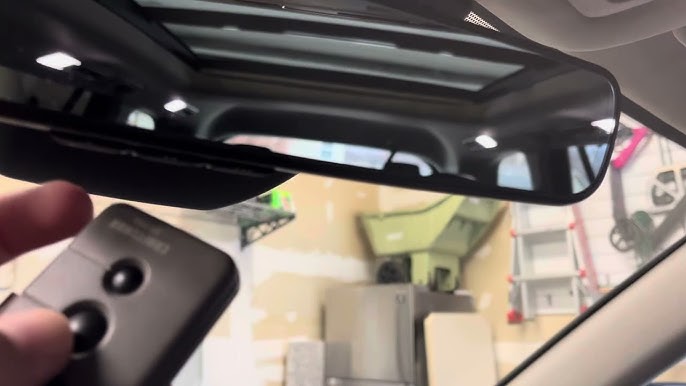
Before diving into the buttons, it is vital to understand what you are actually programming. The 2021 Toyota Highlander comes equipped with the HomeLink Wireless Control System, typically located in the overhead console near the rearview mirror or integrated directly into the mirror assembly itself. Unlike older universal remotes that relied on simple radio frequency cloning, modern HomeLink systems use rolling-code technology for enhanced security.
According to automotive safety standards and manufacturer documentation referenced on Wikipedia, rolling-code systems generate a new encrypted signal every time the button is pressed. This prevents thieves from using “code grabbers” to intercept your signal and open your garage later. Because of this security feature, the programming process for a 2021 model differs slightly from vehicles manufactured before 2015. You are not just copying a signal; you are initiating a secure handshake between your SUV and your garage door motor.
Why Factory Instructions Can Be Confusing
Many owners find the owner’s manual dense or overly technical. The manual often assumes you know whether your garage opener uses “fixed code” or “rolling code.” For the vast majority of US homes built or updated after 1996, you have a rolling-code system. This tutorial focuses primarily on that standard, while providing notes for legacy systems.
Step-by-Step: How To Program Garage Door Opener On 2021 Toyota Highlander
Follow these precise steps to ensure successful synchronization. Safety First: Always ensure your garage door area is clear of people, pets, and obstacles before beginning, as the door may activate unexpectedly during testing.
Phase 1: Clear Previous Settings (Recommended)
If you purchased the Highlander used or have previously attempted programming unsuccessfully, start fresh.
- Locate the three HomeLink buttons in your overhead console.
- Press and hold the two outer buttons simultaneously.
- Hold for approximately 10 seconds until the indicator LED changes from solid to flashing.
- Release both buttons. Your system is now reset and ready for new programming.
Phase 2: Initial Button Training
This step teaches the Highlander the specific frequency of your handheld garage remote.
- Sit in the driver’s seat with the ignition in ON/RUN mode (engine can be off, but electronics must be active).
- Hold your original handheld garage remote 1–3 inches away from the HomeLink buttons.
- Simultaneously press and hold the desired HomeLink button AND the button on your handheld remote.
- Watch the HomeLink indicator light. It will flash slowly at first, then rapidly.
- Once the light flashes rapidly (usually after 10–20 seconds), release both buttons.
- Test the programmed button. If the garage door moves, you have a fixed-code opener and are finished. If nothing happens or the light remains solid, proceed to Phase 3.
Phase 3: Rolling Code Synchronization (Most Common)
For most 2021 Highlander owners in the US, this is the critical missing link.
- Go to your garage door motor unit mounted on the ceiling.
- Locate the “Learn” or “Smart” button. It is typically yellow, orange, red, or purple and located near the antenna wire or under the light lens.
- Press and release the Learn button. Note: You usually have 30 seconds to complete the next step before the motor exits learning mode.
- Return to your Highlander immediately.
- Press and hold the programmed HomeLink button for 2 seconds, then release.
- Repeat this press-hold-release cycle up to three times.
- On the third press, the garage door should activate, confirming successful synchronization.
Expert Tip: If your 2021 Highlander has a dedicated HomeLink mirror with a single button rather than three, the process is identical, but you only have one programmable slot. Ensure you do not overwrite an existing gate or lighting control unless intended.
Troubleshooting Common Programming Failures
Even with perfect execution, variables can interfere. Use this table to diagnose issues quickly.
| Symptom | Likely Cause | Solution |
|---|---|---|
| Light never flashes rapidly | Dead battery in handheld remote | Replace CR2032 or AAA battery in original remote |
| Sync fails at Phase 3 | Missed 30-second window | Restart Phase 3; move closer to motor |
| Door opens but won’t close via HomeLink | Safety sensor misalignment | Check infrared sensors at floor level; clean lenses |
| Intermittent operation | Signal interference | Remove LED bulbs near opener; they emit RF noise |
| Works outside, fails inside car | Vehicle tint or glass coating | Metallic window tint blocks RF; test with window down |
The LED Bulb Interference Issue
A frequently overlooked problem in modern garages is LED bulb interference. Many energy-efficient LED bulbs emit radio frequency noise that jams the HomeLink signal. If your programming worked perfectly but suddenly stops, try removing the LED bulbs from the garage opener fixture and testing again. If functionality returns, replace them with RF-shielded LED bulbs specifically rated for garage door openers.
Compatibility: Which Openers Work With 2021 Highlander?
Not all systems are created equal. The 2021 Toyota Highlander HomeLink system is compatible with virtually all major US brands manufactured after 1996, including:
- Chamberlain / LiftMaster (Security+ 2.0 and MyQ)
- Genie (Intellicode)
- Craftsman (AssureLink)
- Sommer
- Marantec
Important Note for Smart Openers: If you have a newer Wi-Fi-enabled opener (like MyQ), HomeLink still operates via traditional RF signals. However, some users prefer integrating their Highlander with smart home ecosystems via aftermarket modules like the HomeLink Bridge. While convenient, native HomeLink programming remains the most reliable method because it does not depend on internet connectivity.
FAQ: Frequently Asked Questions
1. Do I need my original garage remote to program the 2021 Highlander?
In most cases, yes. The HomeLink system needs to clone the signal from an existing transmitter. However, if you have lost your original remote, many newer garage motors allow direct pairing by pressing the Learn button and then activating HomeLink within the time window. Consult your garage opener’s manual for “remote-less” programming procedures.
2. Why does my HomeLink work sometimes but not others?
Intermittent failure is almost always caused by RF interference or weak batteries. Start by replacing the battery in your handheld remote (even if it seems fine). Next, check for LED bulbs, wireless routers, or baby monitors near the garage motor. Finally, verify that your vehicle’s battery is healthy; low voltage can weaken the HomeLink transmitter.
3. Can I program multiple garage doors on my 2021 Highlander?
Absolutely. The 2021 Highlander typically features three programmable HomeLink buttons. Each button can store a different device: one for your primary garage, one for a secondary garage or gate, and one for outdoor lighting or a community entrance. Simply repeat the programming phases for each button independently.
4. Is it safe to program HomeLink myself, or should I visit a dealer?
Programming HomeLink is completely safe and designed for DIY completion. Dealerships often charge $50–$100 for a service that takes less than five minutes. The only risk is accidental door activation, which is mitigated by ensuring the door path is clear. There is no risk of damaging your vehicle’s electronics through proper programming attempts.
5. My 2021 Highlander has HomeLink but my garage is pre-1996. What now?
Older fixed-code openers lack rolling-code security and may require a compatibility bridge. HomeLink sells a “Compatibility Bridge” adapter that translates modern rolling-code signals to legacy fixed-code receivers. Before purchasing, verify your opener’s manufacture date on the motor housing label. Upgrading to a modern opener is often more cost-effective and significantly safer.
6. Does programming HomeLink affect my Toyota warranty?
No. Using factory-installed HomeLink features as intended does not void any portion of your Toyota warranty. The system is an OEM component designed for this exact purpose. Only unauthorized electrical modifications or aftermarket wiring splices could potentially impact warranty coverage.
Conclusion
Mastering how to program garage door opener on 2021 Toyota Highlander transforms your driving experience from mildly annoying to effortlessly convenient. By following the phased approach outlined above—clearing old codes, training the button, and completing the rolling-code handshake—you gain reliable, secure access without dealership fees or technical frustration. Remember that patience during the 30-second sync window and awareness of LED interference are the two most common success factors.
Your Highlander’s HomeLink system is a powerful tool designed to simplify your life. Take five minutes today to complete this setup, and enjoy the satisfaction of seamless entry for years to come.
Found this guide helpful? Share it with fellow Toyota owners on Facebook, Reddit’s r/Toyota, or your local Highlander owners’ group! Helping another driver avoid programming headaches is the best kind of community support. Safe driving and happy syncing! 🚗🏠
Leave a Reply