Introduction
There are few things more frustrating than pulling into your driveway after a long day, only to realize you cannot get your vehicle’s built-in transmitter to sync with your home security system. If you are struggling with this exact issue, learning how to program garage door opener in 2022 Ford Explorer is the solution you need to regain seamless access to your home. This guide is designed to walk you through the process with empathy and precision, ensuring you can set up your HomeLink system without unnecessary stress or expensive dealership visits.
Understanding the HomeLink System in Your 2022 Explorer
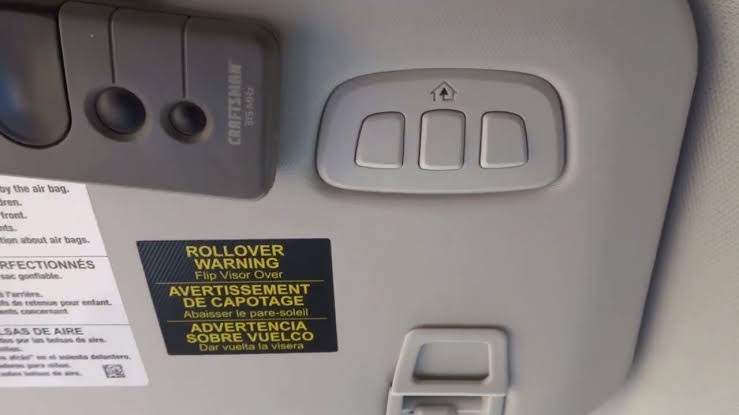
Before diving into the buttons, it is vital to understand what you are actually programming. The 2022 Ford Explorer comes equipped with the HomeLink Universal Transceiver, typically located in the overhead console near the rearview mirror or integrated directly into the frame of the auto-dimming mirror.
Unlike older vehicles that used simple radio frequency cloning, modern HomeLink systems utilize rolling code technology. This security feature changes the access code every time the button is used, preventing thieves from intercepting your signal. According to automotive safety standards, this synchronization requires a specific “handshake” between your vehicle and the garage door motor unit.
For a deeper technical understanding of how these wireless transceivers operate within vehicular ecosystems, you can refer to the comprehensive overview on Wikipedia. Understanding this background helps explain why simply holding a button down for three seconds often fails; the system requires a deliberate training sequence to establish a secure link.
Step-by-Step: How to Program Garage Door Opener in 2022 Ford Explorer
This tutorial assumes you have a standard rolling-code garage door opener (manufactured after 1996). Please ensure your vehicle is parked outside the garage during programming to prevent accidental door movement or carbon monoxide buildup.
Phase 1: Clearing Previous Codes (Recommended)
If you bought the Explorer used or are reprogramming a button, start fresh. Skipping this step is the most common cause of programming failure.
- Locate the two outer HomeLink buttons in your overhead console.
- Press and hold both outer buttons simultaneously for approximately 20 seconds.
- Watch the indicator light. It will flash slowly at first, then rapidly.
- Release both buttons once the rapid flashing begins. The memory is now cleared.
Phase 2: Training the Vehicle Transmitter
Now we teach the Ford Explorer to recognize your handheld remote.
- Turn your vehicle’s ignition to the ON/RUN position. The engine does not need to be running, but the electrical system must be active.
- Hold your original garage door remote 1–3 inches away from the HomeLink buttons. Angle matters; try pointing it directly at the buttons or slightly tilted.
- Simultaneously press and hold the HomeLink button you wish to program AND the button on your handheld remote.
- Observe the HomeLink indicator light. It will blink slowly at first. Keep holding both buttons.
- Wait for the light to change from a slow blink to a rapid, solid flash. This usually takes between 10 to 30 seconds.
- Release both buttons immediately upon seeing the rapid flash.
Pro Tip: If the light never turns solid after 60 seconds, your remote may use a different frequency band. Try moving the remote closer or changing the angle. Some Canadian or European models require a compatibility bridge.
Phase 3: Training the Garage Door Motor Unit
Your car now knows the remote’s signal, but the garage door doesn’t know the car yet. You must complete the handshake at the motor unit.
- Locate the “Learn” or “Smart” button on your garage door opener motor housing. It is usually colored yellow, purple, red, or orange and located near the antenna wire.
- Press and release the Learn button. You typically have 30 seconds to complete the next step before the motor exits learning mode.
- Return to your vehicle and press the newly programmed HomeLink button firmly for 2 seconds, then release.
- Repeat this press-hold-release cycle up to three times.
- Test the button. The garage door should activate.
Troubleshooting: When Programming Fails
Even with perfect execution, variables can interfere. Use this comparison table to diagnose issues quickly.
| Symptom | Likely Cause | Recommended Solution |
|---|---|---|
| Light blinks slowly but never turns solid | Frequency mismatch or weak battery | Replace handheld remote battery; verify remote FCC ID matches HomeLink compatibility list |
| Light turns solid but door won’t open | Motor unit not in learn mode | Press Learn button again; ensure you act within 30-second window |
| Door opens partially then reverses | Safety sensor obstruction | Check photo-eye alignment at floor level; clean lenses |
| Programming works intermittently | Rolling code desynchronization | Repeat Phase 3 training sequence; hold HomeLink button longer |
| No indicator light response | Blown fuse or wiring issue | Check interior fuse panel; inspect overhead console connection |
Essential Safety Precautions
Programming involves moving mechanical parts and electrical systems. Always prioritize safety over speed.
- Never program inside a closed garage. Exhaust fumes accumulate quickly, and an accidentally triggered door can damage property or injure pets.
- Keep hands clear of moving parts. During the testing phase, stand to the side of the door track, never directly underneath.
- Verify safety sensors. Before relying on HomeLink, test the auto-reverse feature by placing a 2×4 board under the door. The door must reverse upon contact.
- Secure your handheld remote. After successful programming, store your original remote in a secure location. Do not leave it visible in the vehicle.
Frequently Asked Questions (FAQ)
Can I program my 2022 Ford Explorer to a Chamberlain/LiftMaster MyQ opener?
Yes, but the process differs slightly. Chamberlain/LiftMaster units with yellow Learn buttons often require you to press the HomeLink button twice during Phase 3 instead of three times. If the standard method fails, consult the specific MyQ manual, as some newer models require a HomeLink Compatibility Bridge for older vehicle protocols.
Why does my HomeLink work sometimes but not others?
Intermittent operation usually indicates rolling code desynchronization. This happens when the HomeLink button is pressed while out of range of the garage door, causing the vehicle’s internal counter to advance without the motor updating. Simply repeat Phase 3 (training the motor unit) to resync the codes. Avoid pressing the button unnecessarily when away from home.
Do I need to reprogram after replacing my car battery?
Generally, no. HomeLink memory is stored in non-volatile memory and survives battery disconnection. However, if you experience issues after a battery replacement, perform a soft reset by clearing and reprogramming. Voltage fluctuations during battery swaps can occasionally corrupt the stored signal profile.
Can I program multiple garage doors or gates?
Absolutely. The 2022 Ford Explorer HomeLink system supports up to three distinct devices. Each button operates independently. You can program one button for your primary garage, another for a secondary garage or gate, and a third for community access points or smart lighting systems. Simply repeat the full programming sequence for each additional device using a different button.
What if my garage door opener was manufactured before 1996?
Pre-1996 openers use fixed-code technology, which is incompatible with modern HomeLink rolling-code systems. You have two options: install a HomeLink Compatibility Bridge (available through authorized dealers) or upgrade your garage door opener to a modern rolling-code unit. Upgrading is strongly recommended for security reasons, as fixed codes are vulnerable to replay attacks.
Does programming void my Ford warranty?
No. Programming HomeLink is a user-serviceable function explicitly documented in your 2022 Ford Explorer Owner’s Manual. It does not involve modifying vehicle electronics, software, or hardware. Warranty coverage remains fully intact. However, damage caused by improper installation of aftermarket accessories or forced physical manipulation of the console would not be covered.
Conclusion
Mastering how to program garage door opener in 2022 Ford Explorer transforms daily convenience and enhances your home security posture. By following the structured phases outlined above—clearing old codes, training the vehicle transmitter, and completing the motor unit handshake—you eliminate guesswork and achieve reliable synchronization. Remember that patience during the 30-second learning window and proper remote positioning are the most critical success factors.
Your 2022 Explorer’s HomeLink system is a powerful tool designed to simplify your life, not complicate it. With this knowledge, you can confidently manage access to your home without depending on dealership appointments or third-party technicians.
Found this guide helpful? Share it with fellow Ford Explorer owners on Facebook, Twitter, or your favorite automotive forum! Helping others avoid programming frustration strengthens our community of informed drivers. Safe travels and smooth entries! 🚗🏠
Leave a Reply