Introduction
There is nothing quite as frustrating as pulling into your driveway only to realize you cannot get your new vehicle’s integrated system to talk to your home’s gate or garage. If you are currently sitting in your driver’s seat searching for how to program garage door opener Hyundai Santa Fe 2022, please know that this is a very common hurdle for new owners, not a defect in your car. The HomeLink® Wireless Control System is incredibly convenient once set up, but the initial synchronization process can be unintuitive without the right guidance. This comprehensive guide will walk you through every step of the programming process safely and accurately, ensuring you can enjoy seamless entry to your home without fumbling for a separate remote ever again.
Understanding HomeLink® Technology in the 2022 Santa Fe
Before diving into buttons and sequences, it is vital to understand what you are actually programming. The 2022 Hyundai Santa Fe comes equipped with the HomeLink® Wireless Control System, typically located in the overhead console near the rearview mirror or integrated directly into the frameless auto-dimming mirror itself.
Unlike traditional universal remotes that use rolling codes stored in a battery-powered device, HomeLink acts as a transceiver that communicates directly with your garage door motor’s logic board. According to technical documentation referenced on Wikipedia, HomeLink supports three primary frequencies and protocols: fixed code, rolling code, and Security+ 2.0. Identifying which protocol your specific garage door opener uses is the first step toward successful programming, as the “rolling code” procedure differs significantly from older “fixed code” systems.
Fixed Code vs. Rolling Code: What Do You Have?
- Fixed Code (Older Systems): Typically manufactured before 1996. These use a static frequency. Programming is usually a single-step process inside the vehicle.
- Rolling Code (Modern Systems): Manufactured after 1996. These change the access code every time the button is pressed to prevent theft. This requires a two-step process: programming the car and pressing the “Learn” button on the garage motor.
- Security+ 2.0 / Yellow Learn Button: Newer LiftMaster/Chamberlain/Craftsman units. These often require a specific repeater kit or an extended hold time during programming.
Expert Tip: Check the color of the “Learn” or “Smart” button on your actual garage door motor unit hanging from the ceiling. A yellow button usually indicates Security+ 2.0, while red, orange, or purple buttons typically indicate standard rolling code technology. Knowing this color saves significant trial-and-error time.
Step-by-Step: How to Program Garage Door Opener Hyundai Santa Fe 2022
Safety is paramount. Before beginning, ensure your garage door area is clear of people, pets, and objects. The door will move during testing. Park your Santa Fe outside the garage, facing the door, with the ignition in the ACC/ON position (engine running is recommended to prevent battery drain).
Phase 1: Clearing Previous Codes (Recommended)
Even if your Santa Fe is brand new, clearing the memory ensures no ghost signals interfere.
- Locate the two outer HomeLink buttons in your overhead console.
- Press and hold both outer buttons simultaneously for approximately 10–20 seconds.
- Watch the indicator light. It will flash slowly at first, then rapidly.
- Release the buttons once the rapid flashing begins. The memory is now factory reset.
Phase 2: Training the HomeLink Transmitter
This is the core answer to how to program garage door opener Hyundai Santa Fe 2022.
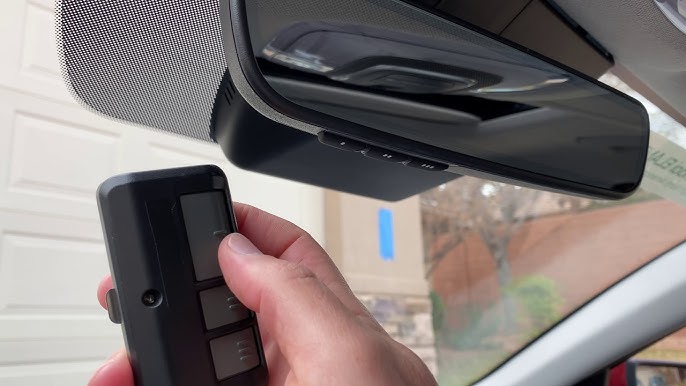
- Hold your original handheld garage remote 1–3 inches away from the HomeLink buttons. Angling it slightly can sometimes help signal reception.
- Simultaneously press and hold the desired HomeLink button AND the button on your handheld remote.
- Observe the HomeLink indicator light. It will flash slowly, then transition to a rapid flash (or solid light, depending on trim). This confirms the vehicle has learned the signal.
- Release both buttons. Test by pressing the programmed HomeLink button briefly. If the garage door activates, you have a fixed-code system and are finished. If the light flashes rapidly but the door does not move, proceed to Phase 3.
Phase 3: Completing Rolling Code Synchronization
Most 2022 Santa Fe owners will need this step because modern openers use rolling codes.
- Go to your garage door motor unit. Locate the “Learn” or “Smart” button (usually near the antenna wire or light lens).
- Press and release the Learn button. You typically have 30 seconds to complete the next step before the motor exits learning mode.
- Return to your Santa Fe immediately. Firmly press and hold the programmed HomeLink button for 2 seconds, then release. Repeat this press-hold-release cycle up to 3 times.
- On the third press, the garage door should activate. The synchronization is now complete.
Troubleshooting Table: Common Programming Failures
| Symptom | Probable Cause | Recommended Solution |
|---|---|---|
| Light never flashes rapidly | Signal interference or dead remote battery | Replace handheld remote battery; reposition remote angle; try parking closer |
| Rapid flash but door won’t open | Rolling code sync incomplete | Repeat Phase 3; ensure Learn button was pressed within 30-second window |
| Works intermittently | Frequency conflict or weak signal | Reprogram using fresh batteries; check for LED bulb interference in garage fixture |
| Solid light, no response | Incompatible protocol (Security+ 2.0) | Verify compatibility; may require HomeLink Repeater Kit (Part #HOMELINKRPTR) |
| Erases after car turns off | Did not complete full sequence | Restart from Phase 1; ensure ignition stays ON throughout entire process |
Critical Safety and Maintenance Considerations
Programming your garage door opener is not just about convenience; it intersects directly with home safety. The U.S. Consumer Product Safety Commission mandates that all automatic garage doors have functioning photoelectric sensors and auto-reverse mechanisms. After successfully programming your HomeLink, always test the safety reversal system by placing a 2×4 board flat on the floor under the door. The door must reverse upon contact. If it does not, do not use the HomeLink system until a professional repairs the opener.
Additionally, be aware that certain LED light bulbs installed in garage openers can emit radio frequency interference that blocks HomeLink signals. If your programming worked perfectly but suddenly stops after changing a light bulb, swap back to an incandescent or an RF-shielded LED specifically rated for garage door openers.
Frequently Asked Questions (FAQ)
Q1: Can I program my Hyundai Santa Fe HomeLink without the original remote?
Generally, no. The HomeLink system needs to clone an existing signal. However, if your garage opener has a “Learn” button and you know the exact model, some newer HomeLink versions support direct-to-motor programming without a handheld remote. Consult your opener’s manual for “direct programming” instructions specific to your motor brand.
Q2: Why does my HomeLink work for the garage but not my community gate?
Community gates often use different frequencies or commercial-grade receivers that require specialized programming sequences. Some gates also use encrypted commercial protocols incompatible with residential HomeLink. Contact your HOA or property management for the correct programming procedure, as they may provide a dedicated transmitter or specific instructions for resident vehicles.
Q3: Will programming HomeLink erase my existing garage door remotes?
No. Programming HomeLink adds a new authorized device to your opener’s memory; it does not delete previously programmed remotes or keypads. However, if you press and hold the “Learn” button on the motor for too long (usually 10+ seconds), you may accidentally wipe all devices. Always press and release the Learn button briefly unless the manufacturer explicitly instructs otherwise.
Q4: My 2022 Santa Fe has HomeLink buttons but they don’t respond at all. What’s wrong?
First, verify your trim level includes active HomeLink hardware. Some base trims have the button housing but lack the internal module. Check your vehicle’s build sheet or window sticker. If confirmed present, check fuse #XX (refer to owner’s manual for exact location) and ensure the overhead console connector is seated properly. A dealership diagnostic scan can confirm module communication.
Q5: How many devices can I program into my 2022 Santa Fe HomeLink?
The 2022 Hyundai Santa Fe HomeLink system supports up to three distinct devices. This means you can program your garage door, a second garage or shed, and a community gate or outdoor lighting system simultaneously. Each device occupies one of the three programmable buttons in the overhead console.
Q6: Is there a subscription fee to use HomeLink in my Santa Fe?
No. Unlike some connected car services, HomeLink is a standalone hardware feature with no monthly fees, subscriptions, or app requirements. Once programmed, it functions indefinitely for the life of the vehicle. Be cautious of third-party apps or services claiming to charge for HomeLink activation; these are unnecessary and potentially fraudulent.
Conclusion
Mastering how to program garage door opener Hyundai Santa Fe 2022 transforms daily routines from minor frustrations into seamless experiences. By understanding the distinction between fixed and rolling codes, following the precise three-phase programming sequence, and respecting critical safety protocols, you unlock the full potential of your vehicle’s integrated technology. Remember that patience during the synchronization phase—especially the 30-second Learn button window—is the difference between success and repeated failure.
Your HomeLink system is designed to last the lifetime of your Santa Fe, providing reliable, secure access without batteries or extra clutter. Now that you have successfully synced your vehicle, take a moment to appreciate the engineering that makes modern driving more connected to your home than ever before.
Found this guide helpful? Share it with fellow Hyundai owners on Facebook, Twitter, or your favorite automotive forum! Helping another Santa Fe driver avoid programming headaches is the best way to pay forward the knowledge. Safe driving and smooth entries ahead! 🚗🏡
Leave a Reply