Introduction
There are few things more frustrating than pulling into your driveway after a long day, only to realize you still have to fumble for a plastic remote or get out of the car to open the garage manually. If you own this specific SUV model and are searching for how to program garage door opener 2018 Jeep Grand Cherokee, you are not alone; many owners find the integrated HomeLink system slightly different from older vehicles. The good news is that syncing your vehicle’s overhead console to your garage door is a straightforward process that takes less than ten minutes once you know the correct sequence. This guide will walk you through every step with empathy and precision, ensuring you achieve seamless entry without the guesswork.
Understanding the HomeLink System in Your 2018 Jeep
Before diving into buttons and indicators, it is vital to understand what you are actually programming. The 2018 Jeep Grand Cherokee utilizes the HomeLink Wireless Control System, typically located in the overhead console near the rearview mirror or integrated directly into the auto-dimming mirror itself. Unlike universal aftermarket remotes, HomeLink does not use batteries; it draws power directly from the vehicle’s electrical system and communicates via radio frequency (RF) signals.
According to automotive technology standards, HomeLink operates on frequencies ranging from 288 MHz to 398 MHz, covering the vast majority of North American garage door openers manufactured after 1995. However, because the 2018 Grand Cherokee sits in a transition period between analog and digital rolling-code security protocols, identifying whether your garage opener uses fixed code or rolling code technology is the first critical step. Rolling code systems change the access code every time the door is used to prevent signal theft, requiring an extra synchronization step at the garage motor unit itself.
Fixed Code vs. Rolling Code: What’s the Difference?
| Feature | Fixed Code (Older) | Rolling Code (Newer/Standard) |
|---|---|---|
| Security Level | Low (Code never changes) | High (Code changes per use) |
| Programming Steps | Vehicle Only | Vehicle + Garage Motor Unit |
| Indicator Light | Rapid Flash → Solid | Slow Flash → Rapid Flash → Solid |
| Common Brands | Pre-1995 Genie/LiftMaster | Post-1996 Chamberlain/Craftsman |
| Reset Required? | Rarely | Yes, if changing doors |
Understanding this distinction prevents the most common error: assuming the programming is complete when the vehicle light turns solid, while the garage door remains unresponsive because the motor unit was never trained.
Step-by-Step: How to Program Garage Door Opener 2018 Jeep Grand Cherokee
Follow these instructions precisely. Ensure your vehicle is parked outside the garage during programming to avoid accidental closure or carbon monoxide buildup. Keep your original handheld transmitter handy, as it is required for the training process.
Step 1: Clear Previous Codes (Recommended)
Even if this is a new-to-you vehicle, clearing old memory ensures no conflicting signals exist.
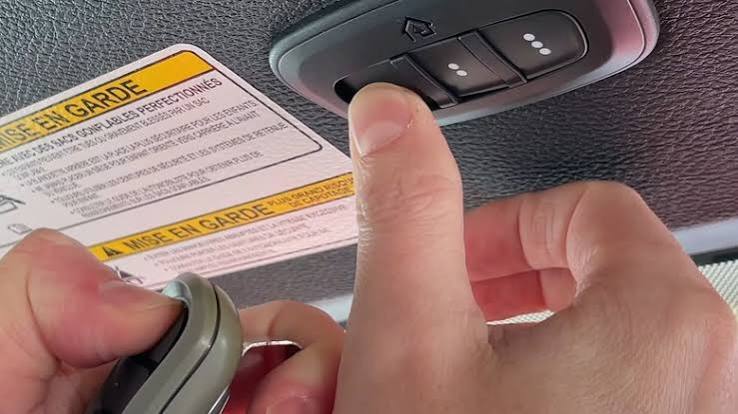
- Locate the two outer HomeLink buttons in your overhead console.
- Press and hold both outer buttons simultaneously for approximately 20 seconds.
- Watch the indicator light: it will flash slowly, then rapidly. Release the buttons only when the rapid flashing begins.
- All three channels are now erased. Note: This clears all programmed devices, including gates and lights.
Step 2: Train the HomeLink Button to Your Handheld Remote
This step teaches the Jeep the unique frequency of your existing garage remote.
- Hold your original handheld transmitter 1–3 inches away from the HomeLink button you wish to program. Angle it toward the button; do not press the HomeLink button yet.
- Simultaneously press and hold the handheld transmitter button AND the chosen HomeLink button.
- Observe the HomeLink indicator light. It will flash slowly at first. Continue holding both buttons until the light flashes rapidly (this may take up to 30 seconds).
- Release both buttons. The rapid flash confirms the frequency has been captured.
- Test by pressing the programmed HomeLink button briefly. If the garage door moves, you have a fixed-code system and are finished. If the light is solid but the door does not move, proceed to Step 3.
Step 3: Synchronize Rolling Code Garage Openers
If Step 2 resulted in a solid light but no door movement, your system uses rolling code technology. You must complete this step within 30 seconds of completing Step 2.
- Locate the “Learn” or “Smart” button on your garage door motor unit (usually on the back panel, colored yellow, red, purple, or orange).
- Press and release the Learn button. An LED on the motor unit will illuminate or begin blinking, indicating it is in pairing mode.
- Return to your Jeep immediately. Firmly press and hold the programmed HomeLink button for 2 seconds, then release.
- Repeat the press-hold-release cycle up to three times. On one of these presses, the garage door should activate.
- Once the door moves, the programming is complete. The HomeLink button now transmits a synchronized rolling code.
⚠️ Safety Warning: Never program HomeLink while the vehicle is inside a closed garage. Exhaust fumes contain carbon monoxide, which is odorless and deadly. Always perform programming outdoors with adequate ventilation. For comprehensive safety standards regarding garage door automation, refer to Wikipedia’s Garage Door Opener Safety Guidelines, which detail federal entrapment protection requirements and sensor alignment protocols.
Troubleshooting Common Programming Failures
Even experienced technicians encounter hiccups. If your 2018 Jeep Grand Cherokee refuses to sync, consult this diagnostic checklist before visiting a dealer.
The Indicator Light Never Flashes Rapidly
- Battery Check: Replace the battery in your handheld transmitter. A weak signal is the #1 cause of training failure.
- Distance Adjustment: Try holding the remote at different distances (0.5″, 1″, 2″, 3″) and angles. Some frequencies require precise alignment.
- Frequency Mismatch: Verify your garage opener operates within 288–398 MHz. European or Asian-market openers may be incompatible with US-spec HomeLink units.
Light Flashes Rapidly But Door Won’t Open After Rolling Code Sync
- Timing Issue: You exceeded the 30-second window after pressing the Learn button. Restart Step 3 entirely.
- Learn Button Color Matters: Yellow Learn buttons (LiftMaster/Chamberlain post-2011) sometimes require a double-tap of the HomeLink button instead of a hold. Consult your motor unit manual.
- Memory Full: Some garage motors store only 5–7 remotes. Clear the motor’s memory by holding its Learn button for 10 seconds until the LED goes out, then reprogram all remotes.
HomeLink Works Intermittently
- Signal Interference: LED bulbs in garage fixtures can emit RF noise that blocks HomeLink signals. Switch to incandescent bulbs or RF-shielded LEDs rated for garage door openers.
- Antenna Position: Ensure the garage motor’s antenna wire hangs vertically and is not coiled or touching metal surfaces.
- Vehicle Battery Voltage: Low vehicle battery voltage can weaken HomeLink transmission. Test your Jeep’s battery if issues persist across multiple devices.
Expert Tips for Optimal HomeLink Performance
Beyond basic programming, these professional insights ensure reliable daily operation:
- Program Multiple Drivers Separately: Use different HomeLink buttons for each driver. This allows individual troubleshooting and prevents confusion about which button controls which door.
- Update Firmware: Some 2018 Grand Cherokees received Uconnect updates that improved HomeLink compatibility. Check with your dealer or Mopar website for available software updates.
- Gate and Light Control: HomeLink isn’t limited to garage doors. The same programming method works for community gates, outdoor lighting, and ceiling fans equipped with RF receivers.
- Document Your Setup: Keep a note in your glove box listing which HomeLink button corresponds to which device and the date of last programming. This saves significant time during future troubleshooting.
Frequently Asked Questions (FAQ)
Can I program my 2018 Jeep Grand Cherokee HomeLink without the original remote?
Generally, no. The original handheld transmitter is required to transfer the unique frequency code to the vehicle. However, if your garage opener has a “Learn” button and you know the exact brand/model, some newer HomeLink versions support direct-to-motor programming without a remote. Check the HomeLink compatibility database online using your garage opener’s model number. If neither option works, you’ll need to purchase a compatible replacement remote first.
Why does my HomeLink work for the garage but not for my community gate?
Community gates often use different frequencies or encryption protocols than residential garage doors. Some gates require a separate receiver module or operate on commercial-only frequencies outside HomeLink’s range. Additionally, gates with timer-to-close features may intentionally block repeated signals to prevent accidental activation. Contact your HOA or gate maintenance company to confirm HomeLink compatibility and obtain any necessary adapter modules.
Will programming HomeLink erase my existing garage door remotes?
No. Programming HomeLink adds a new device to your garage motor’s memory; it does not delete previously paired remotes. However, if you clear the garage motor’s memory during troubleshooting (holding the Learn button for 10+ seconds), ALL devices including HomeLink and handheld remotes will be erased and must be reprogrammed. Only clear motor memory as a last resort.
Is HomeLink compatible with smart garage openers like MyQ or Tailwind?
Yes, but with caveats. Smart openers with built-in Wi-Fi (like Chamberlain MyQ) still use traditional RF for HomeLink communication, so standard programming applies. However, purely Wi-Fi/Bluetooth openers without RF capability (some Tailwind models) cannot be programmed to HomeLink directly. In these cases, you may need a HomeLink-to-Wi-Fi bridge accessory or must rely solely on smartphone control. Always verify RF compatibility before purchasing smart openers if HomeLink integration is essential.
How do I reset a single HomeLink button without clearing all three?
Unfortunately, the 2018 Jeep Grand Cherokee HomeLink system does not support individual button resets. Clearing any channel requires erasing all three channels simultaneously (Step 1 above). After clearing, you must reprogram any remaining devices. Plan accordingly and allocate 10–15 minutes to re-sync all active devices after a reset.
Does extreme weather affect HomeLink performance?
Extreme cold (below -20°F) can temporarily reduce lithium battery output in handheld transmitters, weakening the training signal. Similarly, intense heat can cause thermal expansion in garage motor components, potentially misaligning safety sensors. However, HomeLink itself is vehicle-powered and weather-sealed, so its transmission strength remains consistent. If issues arise seasonally, focus diagnostics on the handheld remote battery and garage motor mechanical condition rather than the vehicle system.
Conclusion
Mastering how to program garage door opener 2018 Jeep Grand Cherokee transforms your daily routine from minor frustration to effortless convenience. By understanding the distinction between fixed and rolling code systems, following the precise three-step programming sequence, and applying targeted troubleshooting when needed, you can achieve reliable integration in under fifteen minutes. Remember to prioritize safety by always programming outdoors, keep your handheld remote’s battery fresh, and document your setup for future reference.
The integrated HomeLink system in your Grand Cherokee is a powerful feature designed to simplify modern living—don’t let initial setup challenges prevent you from enjoying it. Once programmed correctly, you’ll appreciate the seamless transition from road to home every single day.
Found this guide helpful? Share it with fellow Jeep owners on Facebook, Reddit’s r/JeepGC community, or your neighborhood group! Helping others avoid programming headaches is what the Jeep community is all about. Have a unique troubleshooting tip we missed? Drop it in the comments below—your experience could save someone hours of frustration. Safe driving and happy syncing! 🚙🏡
Leave a Reply