Introduction
There is nothing quite as frustrating as standing in your driveway with a new remote that refuses to talk to your existing garage door system. If you are searching for how to program Chamberlain universal garage door opener to Craftsman, you are likely dealing with this exact compatibility headache right now. The good news is that because Chamberlain Group manufactures both brands, these devices are often cross-compatible, but the pairing process requires specific steps to bridge the frequency and coding differences. This guide will walk you through the exact procedure to get your door opening smoothly again, saving you the cost of a professional service call.
Understanding Compatibility Between Chamberlain and Craftsman
Before pressing any buttons, it is vital to understand why this pairing works and where the potential pitfalls lie. Many homeowners assume that because Craftsman and Chamberlain are distinct retail brands, their technology is entirely separate. In reality, Craftsman garage door openers are manufactured by the Chamberlain Group, which also produces LiftMaster units. This shared lineage means the internal logic boards and radio frequencies are often identical or highly compatible.
However, “universal” does not always mean “automatic.” According to industry data from the Door and Access Systems Manufacturers Association (DASMA), over 70% of garage door opener compatibility issues stem from mismatched security codes rather than hardware failure. Older Craftsman models may use fixed-code dip switches, while newer Chamberlain universal remotes utilize rolling code technology. Identifying your specific generation of equipment is the first step in successful programming.
For a deeper understanding of the corporate and technical relationship between these brands, you can refer to the historical overview on Wikipedia, which details how the manufacturing consolidation has influenced modern interoperability.
What You Need Before Programming Your Remote
Preparation prevents frustration. Gather the following items before climbing the ladder:
- The Chamberlain Universal Remote: Ensure fresh batteries are installed. Weak batteries are the #1 cause of programming failure.
- A Stepladder: Safe access to the motor head unit mounted on the ceiling.
- The Owner’s Manual: Specifically for your Craftsman opener model number.
- A Flashlight: Garage lighting is often insufficient for reading small labels on the motor housing.
- Safety Glasses: Always protect your eyes when working overhead near springs and chains.
⚠️ Safety Warning: Never attempt to adjust the travel limits or force settings on your garage door opener while programming the remote. These adjustments involve high-tension springs and electrical components that should only be handled by certified technicians if you are unsure.
Step-by-Step: How to Program Chamberlain Universal Remote to Craftsman
This is the core solution for how to program Chamberlain universal garage door opener to Craftsman. Follow these steps precisely. Note that procedures vary slightly depending on whether your Craftsman opener uses a Smart/Learn Button or older DIP Switches.
Method A: For Craftsman Openers with a Learn Button (Post-1993)
Most Craftsman openers manufactured after 1993 feature a colored “Learn” or “Smart” button on the back or side panel.
- Locate the Learn Button: Find the square button on the motor unit. It is typically red, orange, yellow, or purple. The color indicates the frequency type.
- Clear Previous Codes (Optional but Recommended): Press and hold the Learn button for 6–10 seconds until the LED indicator light turns off. This wipes old remotes and ensures a clean sync.
- Activate Learn Mode: Briefly press and release the Learn button. The LED will illuminate solidly or begin blinking, indicating the unit is in pairing mode. You have 30 seconds to complete the next step.
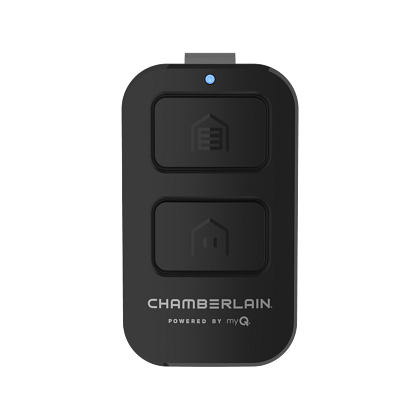
- Program the Chamberlain Remote: On your universal remote, press and hold the button you wish to assign. While holding, simultaneously press the corresponding frequency button (if your universal remote has selectable frequencies like 315MHz/390MHz). Release when the opener lights flash or you hear two clicks.
- Test the Connection: Press the programmed button once. The door should activate immediately.
Method B: For Older Craftsman Models with DIP Switches (Pre-1993)
If your Craftsman opener lacks a Learn button, it uses physical toggle switches.
- Match the Switches: Open the battery compartment of your Chamberlain universal remote. Locate the row of tiny DIP switches.
- Replicate the Pattern: Look at the DIP switch pattern on the back of your Craftsman motor unit. Slide the remote’s switches to match the exact up/down configuration of the motor.
- Set the Frequency: Some universal remotes require you to slide a frequency selector to match the opener (usually 390 MHz for older Craftsman).
- Sync via Button Press: Unlike Learn-button models, DIP switch units often sync automatically once switches match. Press the remote button firmly; the door should respond. If not, double-check every switch position.
Troubleshooting Common Programming Failures
Even with perfect instructions, things can go wrong. Use this table to diagnose issues quickly:
| Symptom | Likely Cause | Solution |
|---|---|---|
| LED blinks but door doesn’t move | Frequency mismatch | Verify Learn button color matches remote frequency setting |
| Remote programs but stops working after 24 hrs | Rolling code desync | Clear all codes and reprogram; check for RF interference |
| No response from opener | Dead battery or bad logic board | Replace remote battery; test wall console to verify power |
| Works intermittently | Signal obstruction | Reposition antenna wire; ensure it hangs vertically |
| Opener light flashes 5 times | Safety sensor misalignment | Check photo-eye alignment; clean lenses with soft cloth |
Expert Insight: “The most overlooked issue we see in field service is antenna positioning,” notes Mike Reynolds, a certified DASMA technician with 18 years of experience. “The antenna wire must hang straight down, uncoiled and away from metal conduits. A coiled antenna can reduce effective range by up to 60%, making programming appear to fail when it actually succeeded.”
Frequently Asked Questions (FAQ)
Can I program a Chamberlain universal remote to a Craftsman opener without a Learn button?
Yes, but only if your Chamberlain universal remote supports DIP switch programming. Not all universal models do. Check the packaging or manual for “DIP switch compatible” labeling. If your remote is rolling-code only and your opener is pre-1993 fixed-code, they are incompatible without an adapter kit.
Why does my Chamberlain remote work for a week then stop syncing with my Craftsman opener?
This typically indicates rolling code desynchronization. Security systems intentionally change codes after each use. If someone accidentally presses the remote out of range, or if there is RF interference from nearby devices, the codes drift apart. Perform a full factory reset on the opener’s Learn button and reprogram the remote to resync the sequence.
Does the color of the Learn button matter when programming?
Absolutely. The Learn button color corresponds to specific radio frequencies and encryption protocols:
- Red/Orange: Security+ 315 MHz
- Yellow: Security+ 2.0 310/315/390 MHz (most versatile)
- Purple: Security+ 390 MHz
- Green: Older 390 MHz non-Security+
Your Chamberlain universal remote must support the frequency indicated by your Craftsman opener’s Learn button color. Yellow-button openers generally offer the broadest universal remote compatibility.
Will programming a new remote erase my existing Craftsman keypads?
It depends on how you clear the system. If you perform a full Learn button reset (holding for 10+ seconds), yes—all remotes, keypads, and HomeLink integrations will be erased. If you simply press and release the Learn button to add a new remote without clearing, existing devices remain programmed. Only do a full reset if you suspect compromised security or persistent sync failures.
My Craftsman opener has no visible Learn button or DIP switches. What now?
Some commercial-grade or specialty Craftsman units use proprietary programming methods or require a dedicated receiver module. Locate the model number on the motor housing label and search the official Chamberlain/Craftsman support database. If the unit predates 1980, consider upgrading to a modern opener; parts and compatible remotes for pre-1980 units are increasingly scarce and pose safety risks due to lack of auto-reverse sensors.
Is it safe to buy a used Chamberlain universal remote for my Craftsman opener?
Technically yes, but with caveats. Used remotes may have worn buttons, degraded capacitors, or residual codes from previous owners. Always perform a factory reset on the used remote before programming. More importantly, verify the remote’s FCC ID matches current Chamberlain specifications—counterfeit remotes sold on third-party marketplaces often lack proper rolling-code encryption and can compromise home security.
Key Takeaways and Next Steps
Successfully completing how to program Chamberlain universal garage door opener to Craftsman comes down to three factors: identifying your opener’s generation, matching frequencies correctly, and following the precise timing of the Learn button sequence. Remember that Chamberlain and Craftsman share DNA, making compatibility far more achievable than with unrelated brands.
Quick Recap:
- ✅ Identify Learn button color or DIP switch configuration first
- ✅ Always use fresh batteries before programming
- ✅ Clear old codes if experiencing intermittent issues
- ✅ Ensure antenna wire hangs straight and unobstructed
- ✅ Consult model-specific documentation when uncertain
Your garage door is the largest moving object in your home and a primary entry point for daily life. Taking 15 minutes to properly program your remote ensures convenience, security, and peace of mind.
Found this guide helpful? Share it with a neighbor, friend, or family member who’s been battling their garage door remote! Tag us on social media with your success story—we love seeing DIY wins. And if you’re still stuck, drop a comment below; our community of garage door enthusiasts is always ready to help troubleshoot. 🏡🔧
Leave a Reply