Introduction
Is your new Chamberlain garage door remote refusing to sync? You’re not alone. Thousands of US homeowners struggle each year with programming their Chamberlain garage door opener model 953Ev EVC, often wasting hours on confusing manuals or outdated online guides. This frustration is completely understandable—your garage door is a critical entry point to your home, and you need it working reliably and securely.
The good news? Programming your Chamberlain 953Ev EVC is straightforward once you know the exact steps. Whether you’ve just installed a new opener, replaced a lost remote, or added an extra keypad for family members, this comprehensive guide will walk you through every detail. By the end, you’ll have your garage door responding instantly to your commands, giving you peace of mind and convenience.
Understanding Your Chamberlain 953Ev EVC System
Before diving into the programming process, it’s essential to understand what makes the Chamberlain 953Ev EVC unique. The “EVC” stands for Enhanced Versatility Control, a feature that improves security and compatibility with modern smart home systems. This model uses rolling code technology, which changes the access code every time you use the remote, preventing unauthorized entry.
According to Wikipedia’s entry on garage door openers, rolling code systems have become the industry standard since the mid-1990s due to their superior security compared to fixed-code systems. The Chamberlain 953Ev EVC builds on this foundation with additional features like battery backup compatibility and MyQ smart connectivity.
Key Components You’ll Need
- Chamberlain 953Ev EVC remote control (or wall-mounted keypad)
- Garage door opener motor unit with learn button
- Fresh batteries (typically 3V CR2032 for remotes)
- Stable ladder for safe access to the motor unit
Step-by-Step: How to Program Your Chamberlain 953Ev EVC Remote
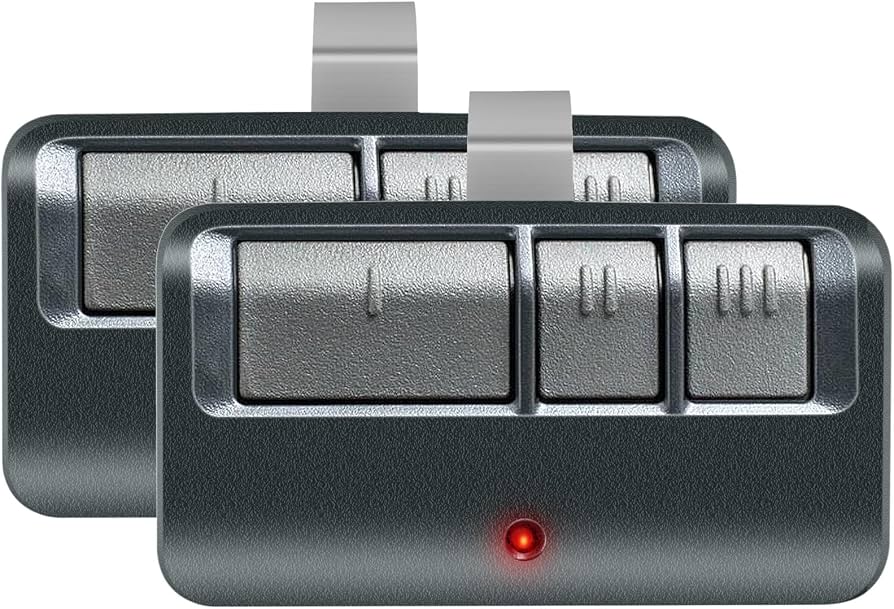
Programming your Chamberlain 953Ev EVC remote involves syncing it with the opener’s receiver. Follow these precise steps for successful pairing.
Step 1: Prepare the Remote Control
Insert fresh batteries into your 953Ev EVC remote. Ensure the battery compartment is closed securely. Test the remote by pressing any button—if the LED indicator lights up, the batteries are functioning correctly. If no light appears, replace the batteries before proceeding.
Step 2: Locate the Learn Button on the Opener
Climb safely to your garage door opener motor unit mounted on the ceiling. Look for the learn button, typically located on the back or side panel. On most Chamberlain models, including the 953Ev EVC, this button is colored yellow, purple, or red, depending on the manufacturing year. The learn button is usually near the antenna wire.
Step 3: Clear Existing Codes (If Necessary)
If you’re replacing an old remote or experiencing syncing issues, clear the opener’s memory first:
- Press and hold the learn button for 6–10 seconds until the LED indicator turns off.
- Release the button. All previously programmed remotes and keypads will be erased.
- You’ll need to reprogram all devices after this step.
Note: Only perform this step if you’re starting fresh or troubleshooting persistent problems.
Step 4: Initiate Programming Mode
Press the learn button once briefly (do not hold). The LED indicator next to the button will illuminate or blink, signaling that the opener is in programming mode. You have 30 seconds to complete the next step before the mode expires.
Step 5: Sync the Remote
Within 30 seconds of pressing the learn button:
- Point your 953Ev EVC remote toward the motor unit.
- Press and hold the desired button on the remote for 2–3 seconds.
- Release the button when you see the opener’s lights flash or hear a click sound.
This confirms successful programming. Test the remote by pressing the button again—the garage door should respond immediately.
Step 6: Program Additional Remotes or Keypads
Repeat Steps 4 and 5 for each additional remote or wireless keypad. The Chamberlain 953Ev EVC supports up to 8 different devices, allowing multiple family members to have their own access.
Troubleshooting Common Programming Issues
Even with careful following of instructions, problems can arise. Here are solutions to the most frequent issues:
| Problem | Possible Cause | Solution |
|---|---|---|
| Remote doesn’t sync | Weak batteries | Replace with fresh CR2032 batteries |
| LED doesn’t light on remote | Dead batteries or faulty unit | Test with multimeter or try another remote |
| Opener doesn’t enter programming mode | Learn button malfunction | Contact Chamberlain support |
| Door responds intermittently | Signal interference | Reposition antenna or remove obstructions |
| Multiple remotes fail simultaneously | Memory cleared accidentally | Reprogram all devices from scratch |
Expert Tip: Signal Interference
Radio frequency interference from nearby devices (Wi-Fi routers, baby monitors, or LED bulbs) can disrupt communication between your remote and opener. If you experience inconsistent performance, try relocating potential sources of interference at least 3 feet away from the motor unit.
Programming the Wall-Mounted Keypad
The Chamberlain 953Ev EVC system also supports wireless wall-mounted keypads for keyless entry. The process is similar but includes an additional PIN setup:
- Press the learn button on the motor unit once.
- Within 30 seconds, enter your desired 4-digit PIN on the keypad.
- Press the ENTER button.
- The opener’s lights will flash, confirming successful programming.
Choose a PIN that’s easy for family members to remember but difficult for outsiders to guess. Avoid obvious combinations like 1234 or your birth year.
Integrating with MyQ Smart Home System
One of the standout features of the Chamberlain 953Ev EVC is its compatibility with the MyQ smart home ecosystem. This allows you to control your garage door via smartphone app, receive notifications, and integrate with voice assistants like Amazon Alexa and Google Assistant.
To set up MyQ:
- Download the MyQ app from the App Store or Google Play.
- Create an account or log in.
- Follow the in-app instructions to connect your 953Ev EVC opener.
- Ensure your garage has reliable Wi-Fi coverage for optimal performance.
According to Chamberlain’s official documentation, MyQ integration provides real-time status updates and enhanced security monitoring, making it a valuable addition for tech-savvy homeowners.
FAQ Section
Q1: How long does the programming process take?
A: Programming a single Chamberlain 953Ev EVC remote takes approximately 2–5 minutes, including battery installation and testing. Programming multiple devices will add about 1–2 minutes per additional remote.
Q2: Can I program a universal remote to work with my 953Ev EVC?
A: Yes, many universal remotes are compatible with Chamberlain openers using rolling code technology. However, ensure the universal remote specifically lists compatibility with Chamberlain Security+ 2.0 systems. Follow the universal remote’s manual for dip switch or auto-search programming methods.
Q3: What should I do if my remote stops working after successful programming?
A: First, check the batteries. If they’re fresh, try reprogramming the remote following the steps above. If the issue persists, there may be signal interference or a hardware malfunction. Contact Chamberlain customer support at 1-800-528-9131 for assistance.
Q4: Is it safe to clear all codes from my opener?
A: Clearing codes is safe but will erase all previously programmed remotes and keypads. Only do this if you’ve lost a remote, suspect unauthorized access, or are setting up the system for the first time. Make sure you have all devices ready to reprogram immediately afterward.
Q5: How often should I replace the remote batteries?
A: Chamberlain recommends replacing remote batteries every 12–18 months under normal usage. If you notice decreased range or intermittent operation, replace the batteries sooner. Use high-quality lithium batteries for longer lifespan.
Q6: Can neighbors accidentally open my garage door?
A: No. The Chamberlain 953Ev EVC uses rolling code technology with billions of possible combinations, making accidental activation by neighbors virtually impossible. Each transmission generates a unique code, ensuring only your programmed devices can operate the door.
Conclusion
Programming your Chamberlain garage door opener model 953Ev EVC doesn’t have to be complicated. With the right steps, fresh batteries, and a bit of patience, you can have your remote synced and ready within minutes. Remember to keep your learn button accessible, maintain strong batteries, and consider integrating with MyQ for added convenience and security.
Now that your garage door is properly programmed, enjoy the convenience of effortless access every time you arrive home. If this guide helped you, please share it on social media to help other homeowners avoid the frustration of confusing manuals. Have questions or success stories? Drop them in the comments below—we’d love to hear from you!
Leave a Reply