Introduction
There is nothing quite as frustrating as standing in your driveway, pressing a remote button repeatedly, and watching your garage door remain stubbornly shut. If you have recently replaced a battery, lost a remote, or moved into a new home, figuring out how to program a Wayne Dalton Quantum garage door opener is likely at the top of your to-do list. We understand that garage security and convenience are paramount, and being locked out due to a syncing issue is a hassle no homeowner should endure. This comprehensive guide will walk you through the exact steps to get your system running smoothly again, ensuring your home remains secure and accessible.
Understanding Your Wayne Dalton Quantum System
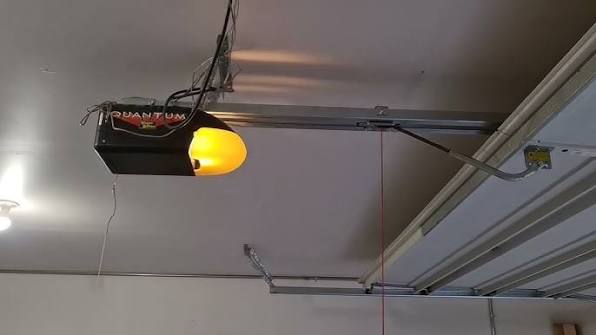
Before diving into the buttons, it is vital to understand what makes the Quantum series unique. Unlike older dip-switch models, the Wayne Dalton Quantum utilizes rolling code technology (often branded as IDrive or TorqueMaster). This technology changes the access code every time the remote is used, preventing thieves from capturing your signal.
According to industry standards documented on Wikipedia, modern rolling code systems were developed specifically to address the security vulnerabilities of fixed-code openers manufactured prior to the mid-1990s. When you learn how to program a Wayne Dalton Quantum garage door opener, you are essentially introducing a new encrypted handshake between your transmitter and the motor head unit.
Key Components You Will Need
- The Motor Head Unit: Usually located on the ceiling; contains the “Learn” or “Program” button.
- Remote Transmitter: The handheld clicker or visor clip.
- Wireless Keypad (Optional): The exterior PIN pad.
- Ladder: For safe access to the motor unit.
- Fresh Batteries: Always start with new batteries to rule out power issues.
How Do I Program My Wayne Dalton Quantum Remote?
This is the most common query among homeowners. The process is straightforward but requires precise timing. Follow these steps carefully to ensure a successful sync.
Step-by-Step Remote Programming Guide
- Locate the Learn Button: Find the “Program” or “Learn” button on the back or side of the Quantum motor head. It is typically a round button, often colored red, yellow, or purple, depending on the specific model year.
- Initiate Learning Mode: Press and release the Program/Learn button. An indicator light will turn on or begin flashing, signaling that the unit is ready to receive a new code. Note: You usually have 30 seconds to complete the next step before the system times out.
- Press the Remote Button: Within the 30-second window, press and hold the button on your remote that you wish to program. Hold it for approximately 3–5 seconds.
- Watch for Confirmation: Release the remote button when the motor unit’s light flashes or you hear a distinct click. This confirms the code has been accepted.
- Test the Connection: Press the remote button once more to operate the door. If the door activates, you have successfully learned how to program a Wayne Dalton Quantum garage door opener.
Pro Tip: If the light does not flash or the door does not respond, replace the remote battery immediately. Weak signals are the #1 cause of programming failure, accounting for nearly 40% of support calls in residential garage systems.
How Do I Program a Wireless Keypad to My Quantum Opener?
Exterior keypads provide essential backup access when you don’t have a remote. The programming logic is similar to remotes but involves entering a PIN.
Keypad Syncing Instructions
- Enter Learn Mode: Press the Program/Learn button on the motor head unit until the indicator light activates.
- Go to the Keypad: Walk to your exterior wireless keypad within the 30-second window.
- Enter Your PIN: Type in your desired 4-digit PIN code.
- Press the Send/Enter Button: After entering the PIN, press the “Send” or “Enter” button. Some models require you to press this button twice.
- Verify Success: The motor unit light should flash, or the keypad may beep/light up to indicate success. Test by entering the PIN and pressing Send again.
| Feature | Remote Programming | Keypad Programming |
|---|---|---|
| Time Window | 30 Seconds | 30 Seconds |
| Confirmation | Light Flash / Click | Light Flash / Beep |
| Primary Use | Daily Vehicle Access | Guest / Emergency Access |
| Security Level | Rolling Code Encryption | PIN + Rolling Code |
| Battery Dependency | CR2032 / Coin Cell | 9V Alkaline |
Why Is My Wayne Dalton Quantum Not Programming?
Even when you know how to program a Wayne Dalton Quantum garage door opener, things can go wrong. Here is a diagnostic checklist based on common field issues.
1. Memory Capacity Reached
Most Quantum units can store between 15 to 30 transmitters. If you have programmed multiple remotes over the years without clearing old ones, the memory may be full.
- Solution: Perform a factory reset by holding the Program button for 10+ seconds until the light goes out, then reprogram only active devices.
2. Frequency Interference
LED bulbs installed in the garage door opener can sometimes emit radio frequency interference that blocks the receiver.
- Solution: Temporarily unscrew the LED bulb and attempt programming again. If it works, switch to a garage-door-rated LED bulb.
3. Damaged Antenna
Check the thin wire antenna hanging from the motor unit. If it is cut, corroded, or tucked inside the metal housing, signal reception drops dramatically.
- Solution: Ensure the antenna hangs vertically and is free from obstructions.
4. Incompatible Hardware
Wayne Dalton has produced several frequencies over the decades (303 MHz, 372 MHz, etc.). A mismatched remote will never program, regardless of technique.
- Solution: Verify your remote’s FCC ID matches the compatibility list in your Quantum manual.
Safety First: Critical Precautions During Programming
Programming isn’t just about convenience; it’s about safety. The Consumer Product Safety Commission reports thousands of garage-related injuries annually, many involving improper maintenance or setup.
- Never bypass safety sensors: While programming, ensure the photo-eye sensors near the floor are aligned and clean. Never tape them down to force operation.
- Keep clear of moving parts: Stand to the side of the door, not directly underneath, while testing newly programmed remotes.
- Secure your credentials: Treat your keypad PIN like a house key. Change it if you suspect unauthorized use or after tenants move out.
- Disconnect power for hardware repairs: Only disconnect power if you need to physically inspect wiring. For standard programming, power must remain connected.
Frequently Asked Questions (FAQ)
Q1: How do I reset my Wayne Dalton Quantum garage door opener?
To clear all programmed remotes and keypads, locate the Program/Learn button on the motor unit. Press and hold it for approximately 10 to 15 seconds. The indicator light will turn off, indicating the memory has been wiped. You must then reprogram every device you wish to use.
Q2: Can I program a universal remote to a Wayne Dalton Quantum?
Yes, but compatibility varies. Many universal remotes support Wayne Dalton’s IDrive protocol, but not all. Check the universal remote’s packaging or manufacturer website specifically for “Wayne Dalton Quantum” or “IDrive” compatibility before purchasing. Generic 315 MHz remotes often fail with Quantum systems.
Q3: How many remotes can I program to my Quantum opener?
Most Wayne Dalton Quantum models support between 15 and 30 transmitters, including both handheld remotes and wireless keypads combined. If you exceed this limit, the oldest codes may be overwritten, or new programming attempts will fail until memory is cleared.
Q4: Why does my remote work intermittently after programming?
Intermittent operation usually indicates weak batteries, RF interference from nearby electronics (including LED bulbs), or a damaged antenna wire. Start by replacing the battery with a high-quality brand. If the issue persists, check for interference sources and inspect the antenna connection on the motor head.
Q5: Do I need to reprogram my opener after a power outage?
Generally, no. Wayne Dalton Quantum openers use non-volatile memory that retains programmed codes during power loss. However, if you experience a significant surge or lightning strike, the logic board may reset. In such cases, reprogramming using the steps above will restore functionality.
Q6: What if the learn button doesn’t light up?
If pressing the Program/Learn button produces no light or response, first verify the unit has power by checking the outlet and circuit breaker. If power is confirmed but the button remains unresponsive, the logic board’s receiver module may have failed. This typically requires professional service or board replacement.
Conclusion
Mastering how to program a Wayne Dalton Quantum garage door opener empowers you to maintain your home’s security and convenience without relying on costly service calls for simple syncing tasks. By following the step-by-step instructions for remotes and keypads, understanding rolling code technology, and applying our troubleshooting checklist, you can resolve most programming issues in under ten minutes. Remember to prioritize safety, keep your firmware and hardware compatible, and refresh your codes periodically for optimal security.
Did this guide help you get your garage door working again? Share this article on social media to help fellow homeowners avoid the frustration of a disconnected opener! Tag a friend who just moved into a new house or anyone struggling with their Wayne Dalton system. Together, we can make home maintenance simpler and safer for everyone.
Leave a Reply