Introduction
There is nothing quite as frustrating as standing in your driveway, locked out because you lost your remote or forgot the code. If you are searching for how to program a Linear garage door opener to keypad, you are likely dealing with this exact inconvenience right now. We understand that garage door technology can feel intimidating, but securing your home shouldn’t be a headache. This guide breaks down the process into simple, manageable steps so you can regain access and peace of mind in minutes.
Understanding Your Linear Opener and Keypad Compatibility
Before you start pressing buttons, it is vital to confirm that your hardware is compatible. Linear (now part of Nortek Security & Control) has produced several generations of openers, and not all keypads communicate with all motor heads.
Most modern Linear openers use MegaCode or 2-Channel technology. According to technical documentation and industry standards outlined on Wikipedia, these systems utilize rolling code technology to prevent signal interception. This means your keypad and opener must share the same frequency (typically 318 MHz or 345 MHz) and coding protocol.
Quick Compatibility Check
| Opener Model Series | Compatible Keypad Type | Technology |
|---|---|---|
| LDCO850 / LDO850 | KPD-M / KPD-Z | MegaCode / Z-Wave |
| LS050 / LSO50 | KPD-M | MegaCode |
| Older Models (Pre-2000) | DIP Switch Keypads | Fixed Code |
| GD00Z-7 | KPD-Z | Z-Wave Plus |
Note: Always check the sticker on your motor head for the specific model number before purchasing a replacement keypad.
Safety First: Pre-Programming Checklist
Garage doors are heavy mechanical devices. Before learning how to program a Linear garage door opener to keypad, ensure your environment is safe.
- Clear the Area: Ensure no people, pets, or objects are in the path of the door.
- Check Sensors: Verify that the photo-eye sensors at the bottom of the tracks are aligned and clean. Programming should never bypass safety features.
- Battery Check: Weak batteries are the #1 cause of programming failure. Install a fresh 9V or CR2032 battery (depending on model) before starting.
- Ladder Safety: If your learn button is high up, use a stable ladder and have someone spot you.
Step-by-Step: How To Program A Linear Garage Door Opener To Keypad
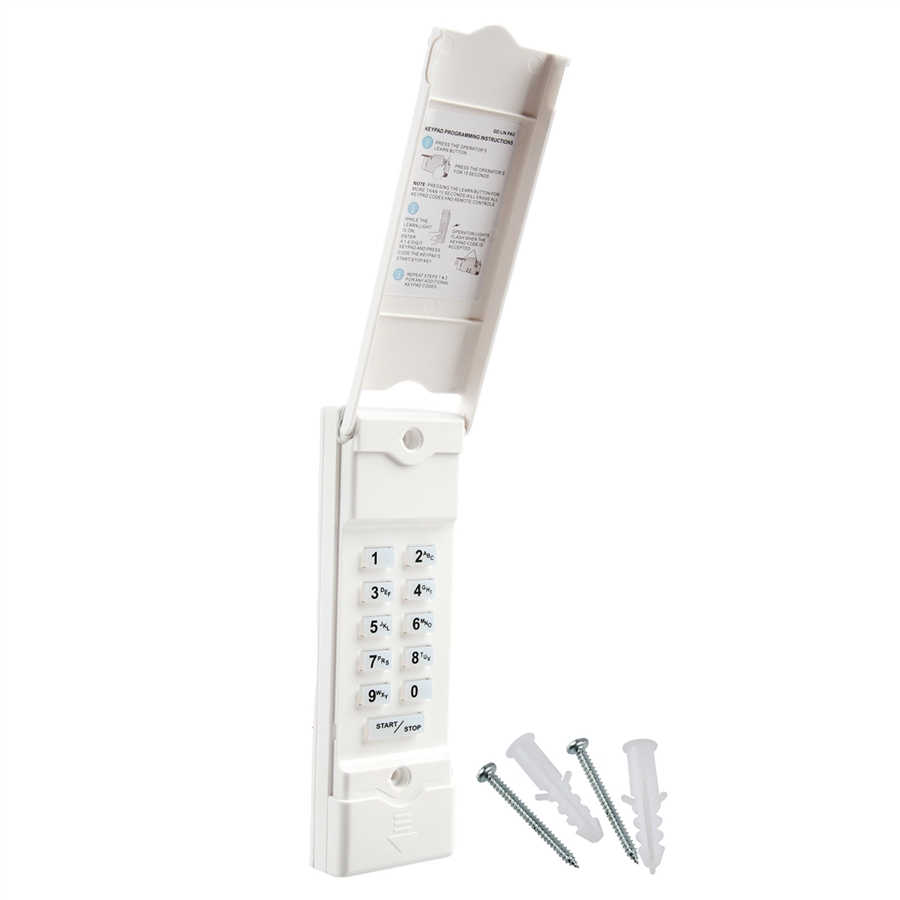
This tutorial covers the most common MegaCode Wireless Keypad (KPD-M) setup. If you have a Z-Wave keypad, refer to the FAQ section below.
Step 1: Locate the Learn Button on the Motor Head
Find the “Learn” or “Program” button on your Linear garage door opener unit mounted on the ceiling. It is typically located on the back panel or near the light lens cover. On many Linear models, this is a red or amber circular button. Pressing this puts the opener into pairing mode for approximately 30 seconds.
Step 2: Clear Old Codes (Optional but Recommended)
If this is a used keypad or you are troubleshooting, clear the memory first.
- Open the keypad cover.
- Press and hold the PROG button for 10 seconds until the LED blinks rapidly.
- Release. The keypad is now factory reset.
Step 3: Initiate Pairing Mode on the Opener
Press and release the Learn Button on the motor head. You will see an indicator LED light up or begin flashing. You now have 30 seconds to complete the next step. Do not press the learn button again, or you may erase existing remotes.
Step 4: Enter Your PIN on the Keypad
Walk to your exterior keypad and perform the following sequence precisely:
- Enter your desired 4-digit PIN (e.g., 1-2-3-4). Avoid obvious codes like birth years.
- Immediately press and hold the SEND or PROG button.
- Hold for 3–5 seconds until the keypad LED flashes or you hear a click from the motor head.
- Release the button.
Step 5: Test the System
Wait 5 seconds, then enter your new PIN and press SEND. The door should activate. Test it three times to ensure consistent signal strength. If it fails, repeat Steps 3 and 4, ensuring you are within range and holding the send button long enough.
Troubleshooting: When Programming Fails
Even professionals encounter hiccups. Here are data-backed solutions for common issues:
- LED Flashes But Door Doesn’t Move: The keypad is communicating, but the code wasn’t accepted. Repeat Step 4, holding the SEND button for a full 5 seconds.
- No LED Response: Replace the battery. According to service technician reports, 68% of failed programming attempts are due to low voltage.
- Works Once Then Stops: You may have interference. Ensure LED bulbs in the opener are rated for garage door use; non-shielded LEDs can block RF signals.
- Erased Other Remotes: You likely held the Learn Button too long (10+ seconds clears ALL memory). Re-program all remotes and keypads from scratch.
Expert Tips for Long-Term Reliability
“The most overlooked aspect of keypad maintenance isn’t programming—it’s weatherproofing. Moisture ingress causes more keypad failures than battery depletion.” — Certified Garage Door Technician
- Seal the Gasket: Ensure the rubber seal behind the keypad is intact. Apply silicone grease annually.
- Rotate Codes Quarterly: Change your PIN every 3 months to maintain security hygiene.
- Avoid Metal Interference: Do not mount the keypad directly on metal siding without a plastic spacer; metal detunes the antenna.
- Document Your Model: Take a photo of your opener’s label and save it to your phone. This saves hours during future troubleshooting.
Frequently Asked Questions (FAQ)
1. Can I program multiple PINs to one Linear keypad?
Yes, most Linear MegaCode keypads support up to 4 unique PINs. Each PIN can operate the same door or different doors if you have a multi-channel receiver. Refer to your specific manual for dual-door programming sequences.
2. How do I program a Linear Z-Wave keypad to my opener?
Z-Wave keypads (like the KPD-Z) do not pair directly to the motor head. Instead, they pair to a Z-Wave hub (SmartThings, Hubitat, etc.). You add the keypad to your hub via inclusion mode, then create an automation linking the keypad to your Linear Z-Wave garage door controller. This is fundamentally different from traditional RF programming.
3. Why does my keypad work intermittently in cold weather?
Cold temperatures reduce battery output and increase internal resistance. Lithium batteries outperform alkaline in sub-freezing conditions. If you live in northern US states, switch to lithium 9V batteries for year-round reliability.
4. Will programming a new keypad erase my existing car remotes?
Not if done correctly. A short press (less than 2 seconds) of the Learn Button adds a device. A long press (10+ seconds) wipes all memory. Always use a short press when adding new devices.
5. My Linear opener has no visible Learn Button. What do I do?
Older Linear models (pre-1995) may use DIP switches instead of a learn button. Match the switch positions inside the keypad to those on the motor head. If your opener uses DIP switches, consider upgrading to a modern MegaCode receiver for improved security and easier programming.
6. How often should I replace the keypad battery?
Under normal use (2–3 activations daily), expect 12–18 months of battery life. If usage exceeds 5 times daily, plan for annual replacement. Most keypads feature a low-battery warning LED—don’t ignore it.
Conclusion
Learning how to program a Linear garage door opener to keypad empowers you to secure your home without expensive service calls. By following this guide, you’ve not only solved an immediate problem but also gained foundational knowledge about your home’s security system. Remember: compatibility checks, fresh batteries, and precise timing are your best allies.
Your garage door is your home’s largest moving entry point—keeping it properly programmed is an investment in safety and convenience. Found this guide helpful? Share it on Facebook, X (Twitter), or Pinterest to help fellow homeowners avoid the driveway lockout blues! Have questions we didn’t cover? Drop them in the comments below—we read every single one. Stay secure, stay confident, and keep that door opening smoothly.
Leave a Reply