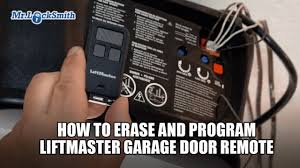
Struggling to connect your remote to your garage system? You’re not alone. Many homeowners search for how to program a LiftMaster garage door opener remote when setting up a new remote or troubleshooting access issues. The good news is—it’s a simple process you can complete in just a few minutes.
What You Need Before Programming Your LiftMaster Remote
Before starting, make sure you have everything ready.
Checklist:
- Your LiftMaster garage door opener unit
- A compatible LiftMaster remote control
- A ladder (to reach the opener motor)
- Fresh remote batteries (CR2032 or 9V)
💡 Most LiftMaster openers manufactured after 1993 use rolling code technology for better security.
For a general understanding of how garage door systems work, visit:
https://en.wikipedia.org/wiki/Garage_door
How To Program A LiftMaster Garage Door Opener Remote (Step-by-Step)
This is the most common and effective method using the “Learn” button.
Step 1: Locate the Learn Button
- Find the opener motor unit (usually on the ceiling)
- Look for a colored button labeled “Learn”
- Yellow, purple, red/orange, or green depending on the model
Step 2: Press the Learn Button
- Press and release the button
- A small LED light will turn on
- You now have 30 seconds to complete the next step
Read too: Tc1 Tricode Garage Door Opener Remote W/ Clip Chamberlain: Complete Guide
Step 3: Press the Remote Button
- Press and hold the button on your remote
- Hold for 2–3 seconds, then release
- Repeat once more if needed
Step 4: Test the Remote
- Press the remote again
- The garage door should open or close
✅ If it works, your remote is successfully programmed.
How To Program Multiple Remotes
Want to connect more than one remote? No problem.
Steps:
- Press the Learn button again
- Repeat the same pairing process for each remote
- Test each one individually
👉 Most systems support up to 5–10 remotes.
How To Program a LiftMaster Remote Without a Learn Button
Some older systems don’t have a visible Learn button.
Alternative Method:
- Use a wall-mounted control panel
- Enter programming mode via the settings/menu
- Follow on-screen instructions
💡 If your model is very old, consider upgrading to a newer opener for better compatibility.
Common Problems and How to Fix Them
Sometimes the programming doesn’t work on the first try.
1. Remote Not Responding
Possible causes:
- Dead battery
- Out of range
- Not compatible
Fix:
- Replace battery
- Stand within 1–2 meters
- Check model compatibility
2. Learn Button Not Working
Possible causes:
- Faulty opener
- Electrical issue
Fix:
- Reset the opener
- Unplug for 30 seconds, then retry
3. Remote Works Intermittently
Possible causes:
- Signal interference
- Weak battery
Fix:
- Replace battery
- Reprogram the remote
LiftMaster Learn Button Color Guide
The color of the Learn button indicates frequency and compatibility.
| Color | Frequency | Year Range | Compatibility |
|---|---|---|---|
| Yellow | 310 MHz | 2011–Present | High |
| Purple | 315 MHz | 2005–2011 | Medium |
| Red/Orange | 390 MHz | 1997–2005 | Limited |
| Green | 390 MHz | 1993–1996 | Low |
👉 Knowing this helps you choose the right remote.
How To Reset Your LiftMaster Garage Door Opener
If you’re experiencing issues, resetting can help.
Steps to Reset:
- Press and hold the Learn button
- Hold for 6–10 seconds
- Release when the LED turns off
⚠️ This will erase all programmed remotes.
Safety Tips When Programming Your Remote
- Always use a stable ladder
- Keep hands clear of moving parts
- Don’t attempt repairs while the opener is powered
- Test the system after programming
Benefits of Programming Your Own Remote
Advantages:
- Saves money on technician fees
- Quick and easy process
- Immediate access control
- Better understanding of your system
FAQ: How To Program A LiftMaster Garage Door Opener Remote
1. How long does it take to program a LiftMaster remote?
It usually takes less than 5 minutes if you follow the steps correctly.
2. Can I program a universal remote to LiftMaster?
Yes, but make sure it’s compatible with your opener’s frequency and technology.
3. Why does my remote need reprogramming?
Power outages, battery replacement, or system resets can erase stored codes.
4. How many remotes can I program?
Most LiftMaster systems allow 5–10 remotes, depending on the model.
5. Do I need a professional to program my remote?
No. Most homeowners can do it themselves with basic instructions.
6. What if my Learn button light doesn’t turn on?
This could indicate a power issue or faulty opener. Try resetting or checking the power source.
Conclusion
Learning how to program a LiftMaster garage door opener remote is a simple yet valuable skill. With just a few steps, you can connect your remote, improve convenience, and maintain control over your garage access.
Whether you’re setting up a new remote or troubleshooting an issue, following this guide ensures a smooth and safe process. Plus, doing it yourself saves both time and money.
If you found this guide helpful, share it with others who might need help programming their garage door remote!
Leave a Reply