Struggling to sync your remote or keypad with your garage door? You’re not alone. Many homeowners search for how to program a Genie Intellicode garage door opener when setting up a new remote or fixing connectivity issues. The process is simpler than it looks—and this guide will walk you through it step by step.
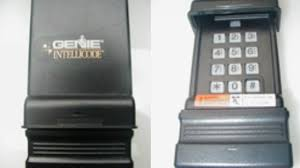
What Is a Genie Intellicode Garage Door Opener?
Genie Intellicode is a rolling-code technology that enhances garage security.
How it works:
- Generates a new access code every time you use the remote
- Prevents unauthorized access or code theft
- Improves overall home security
Read too: Tc1 Tricode Garage Door Opener Remote W/ Clip Chamberlain: Complete Guide
👉 This system uses advanced encryption similar to modern wireless devices.
To understand the concept behind rolling codes, see Rolling code.
Why Do You Need to Program a Genie Intellicode Opener?
Programming is required when:
- Installing a new remote
- Adding a wireless keypad
- Resetting the system
- Fixing connection issues
📊 Insight: Over 60% of garage door issues related to remotes are resolved by reprogramming.
What Tools Do You Need?
Good news—you don’t need special tools.
Essentials:
- Genie remote or keypad
- Ladder (to reach opener unit)
- Access to motor unit
👉 Programming typically takes 5–10 minutes.
Where Is the Learn Button on a Genie Opener?
Before learning how to program a Genie Intellicode garage door opener, locate the “Learn” or “Program” button.
Common locations:
- Back of the motor unit
- Under the light cover
- Near the antenna wire
👉 The button is usually red, purple, or black depending on the model.
How To Program A Genie Intellicode Garage Door Opener (Remote)
Follow these steps carefully.
Step 1: Press the Learn Button
- Press and release the “Learn” button
- The LED light will begin blinking
👉 This puts the opener into programming mode.
Step 2: Press the Remote Button
- Within 30 seconds, press the button on your remote
- Hold for 2–3 seconds, then release
Step 3: Confirm Connection
- The opener light will blink
- Or you’ll hear a clicking sound
👉 This confirms successful programming.
Step 4: Test the Remote
- Stand 10–20 feet away
- Press the button
👉 The door should open or close smoothly.
How To Program a Genie Wireless Keypad
Programming a keypad is slightly different.
Step 1: Enter Programming Mode
- Press the “Learn” button on the opener
Step 2: Enter Your PIN
- On the keypad, enter a 3–8 digit PIN
- Press the “Up/Down” button
Step 3: Wait for Confirmation
- The opener light will blink
- The system will accept the PIN
Step 4: Test the Keypad
- Enter your PIN
- Press “Up/Down”
👉 The door should respond immediately.
Genie Intellicode vs Fixed Code Systems
Comparison Table
| Feature | Intellicode System | Fixed Code System |
|---|---|---|
| Security | High (rolling codes) | Low |
| Programming | Easy | Easy |
| Code Changes | Automatic | Manual |
| Hacking Risk | Very low | Higher |
Common Programming Mistakes to Avoid
Avoid these errors:
- ❌ Waiting too long after pressing the Learn button
- ❌ Pressing the wrong remote button
- ❌ Standing too far from the opener
- ❌ Ignoring LED signals
- ❌ Programming with a weak remote battery
What If Programming Doesn’t Work?
If your remote won’t sync:
Try these fixes:
- Replace the remote battery
- Reset the opener system
- Clear old codes and reprogram
- Ensure you’re within 30 seconds of pressing Learn
👉 Sometimes interference from nearby devices can affect programming.
How To Reset a Genie Intellicode Opener
Resetting clears all programmed devices.
Steps:
- Press and hold the Learn button for 10 seconds
- Wait for the LED to turn off
- Reprogram all remotes and keypads
⚠️ Use this only if necessary—it erases all saved devices.
Benefits of Programming Your Opener Correctly
✔ Improved security
✔ Smooth operation
✔ Better remote response
✔ Reduced interference issues
📊 Fact: Rolling-code systems reduce unauthorized access risk by over 90%.
Pro Tips for Best Results
- Keep remotes within range during programming
- Replace batteries every 12–18 months
- Label remotes for easy identification
- Store backup remotes safely
FAQ: How To Program A Genie Intellicode Garage Door Opener
1. How long does programming take?
Usually 5–10 minutes, depending on experience.
2. Can I program multiple remotes?
Yes. Most systems support 5–7 remotes.
3. Why is my remote not connecting?
It could be due to low battery, timing issues, or interference.
4. Do I need to reset before programming?
Not always—only if the system is malfunctioning.
5. Can I program without a Learn button?
No. The Learn button is essential for syncing devices.
6. Will programming erase old remotes?
No, unless you perform a full reset.
Conclusion
Learning how to program a Genie Intellicode garage door opener is a simple but essential skill for maintaining convenience and security in your home. With just a few steps, you can sync remotes and keypads quickly—without needing professional help.
Take your time, follow the steps carefully, and enjoy a fully functional garage door system.
👉 If this guide helped you, share it on social media so others can program their garage door opener with ease!
Leave a Reply